Setting SQL Permissions
Only in DbVisualizer Pro
This feature is only available in the DbVisualizer Pro edition.
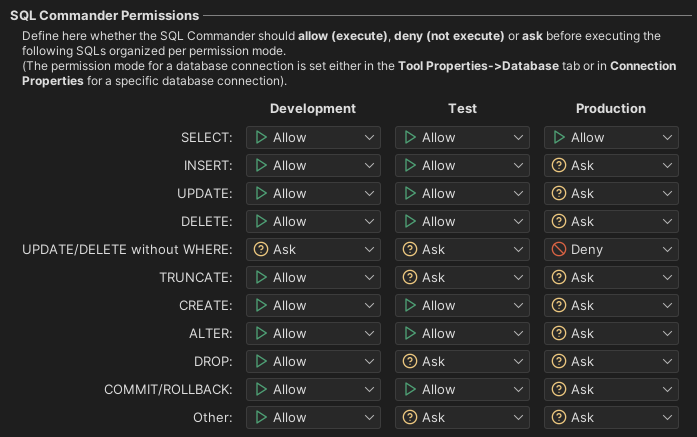
Permissions protect you from executing statements by mistake, for example a DELETE in a production database. For each kind of statement, you choose whether SQL Commander executes it, asks you first, or doesn't execute it at all. You choose this separately for each permission mode: Development, Test and Production.
Permissions are a safety net in DbVisualizer. They don't replace the permissions in the database itself.
- Set the Permission Mode of the connection in the Connection tab of its Object View tab. By default, it is Development.
- In Tools → Tool Properties, select the General / Permissions category.
For each kind of statement and each permission mode, select one of these:
Permission Effect Allow The statement is executed. Ask You are asked whether to execute the statement. Deny The statement isn't executed. Click Apply or OK.
The same category also has:
- Connection Permissions, for whether to confirm before connecting when a script needs a connection.
- Procedure Editor Permissions, for whether to confirm before you save, compile or execute a procedure, function or other code object in the procedure editor.
Queries that you run from the AI Assistant panel are also checked against the AI permissions in the AI Assistant / Permissions category, and the stricter setting applies. See Running generated queries.
For how to use the Production mode to protect a database from changes, see Preventing Accidental Changes.