Committing and Rolling Back Changes
When auto commit is on, each statement that changes data is committed as soon as it has been executed successfully. Auto commit is on by default. When you turn it off, your changes are kept in a transaction until you commit them, or roll them back to undo them. Some databases don't support transactions and always commit.
Turning auto commit on or off
To turn auto commit on or off for an SQL Commander tab, select SQL Commander → Transaction → Turn On/Off Auto Commit, or use the button in the SQL Commander toolbar. It is also in the Transaction submenu of the right-click menu.
In a script, use @set autocommit off; and @set autocommit on;, for example to run some statements in one transaction. Turning auto commit on again commits the changes:
@set autocommit off;
INSERT INTO SAKILA.FILM (FILM_ID, LANGUAGE_ID, TITLE) VALUES (1201, 1, 'First film');
INSERT INTO SAKILA.FILM (FILM_ID, LANGUAGE_ID, TITLE) VALUES (1202, 1, 'Second film');
@set autocommit on;
Changing the default
To change whether auto commit is on when you connect:
- For a connection: double-click the connection in the Databases tab, select the Properties tab, and clear Auto Commit in the Transaction category.
- For all connections to a database type: in Tools → Tool Properties, select the Database tab, expand the database type, such as Oracle, and clear Auto Commit in the Transaction category.
Committing and rolling back
When auto commit is off, commit or roll back your changes using Commit and Rollback in the SQL Commander toolbar or the SQL Commander menu, or press Ctrl+Alt+C or Ctrl+Alt+R (Cmd+Option+C or Cmd+Option+R on macOS). In a script, use:
@commit;
@rollback;
Uncommitted changes
The status bar of the editor shows whether auto commit is on. When it is off, it also shows two numbers: the rows changed, and the statements other than SELECT executed since the last commit or rollback.

After you execute statements that leave uncommitted changes, DbVisualizer asks whether to Commit or Rollback them, or to Continue with Uncommitted:
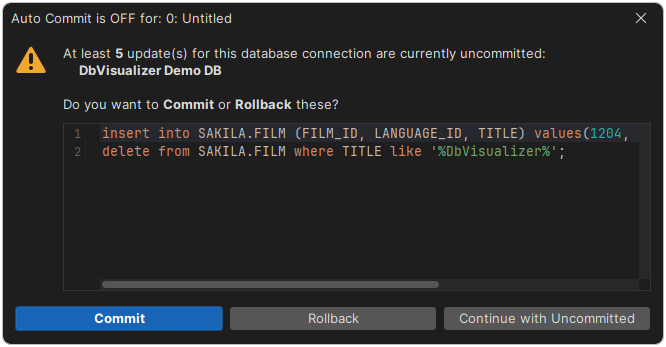
An open transaction may lock parts of the database, depending on the database. Don't leave changes uncommitted longer than needed.
When you are asked is set in Ask when Auto Commit is OFF, in the Transaction category of the connection properties:
- When Uncommitted Updates, the default, asks when the database reports at least one changed row.
- Always asks when at least one statement other than
SELECThas been executed. Use it for databases that don't report the changed rows correctly.
If you close the tab or disconnect while there are uncommitted changes, you are asked whether to Commit or Rollback them, or to Cancel.
To choose what happens to uncommitted changes when you disconnect, set Pending Transactions at Disconnect in the General / Transaction category in Tools → Tool Properties: Commit, Rollback or Ask.