Academic and research verification
If your organization is an academic institution, a start-up in its first five years, or a non-profit, you may qualify for a discount of up to 50%. To unlock this pricing, your organization must be reviewed and approved by our sales team.
Selecting a type that requires verification
When setting your organization type (see Setting up your organization), choose Academic, Start-up, or Non-profit instead of Business. You can do this during the onboarding or later from Account → Organization.
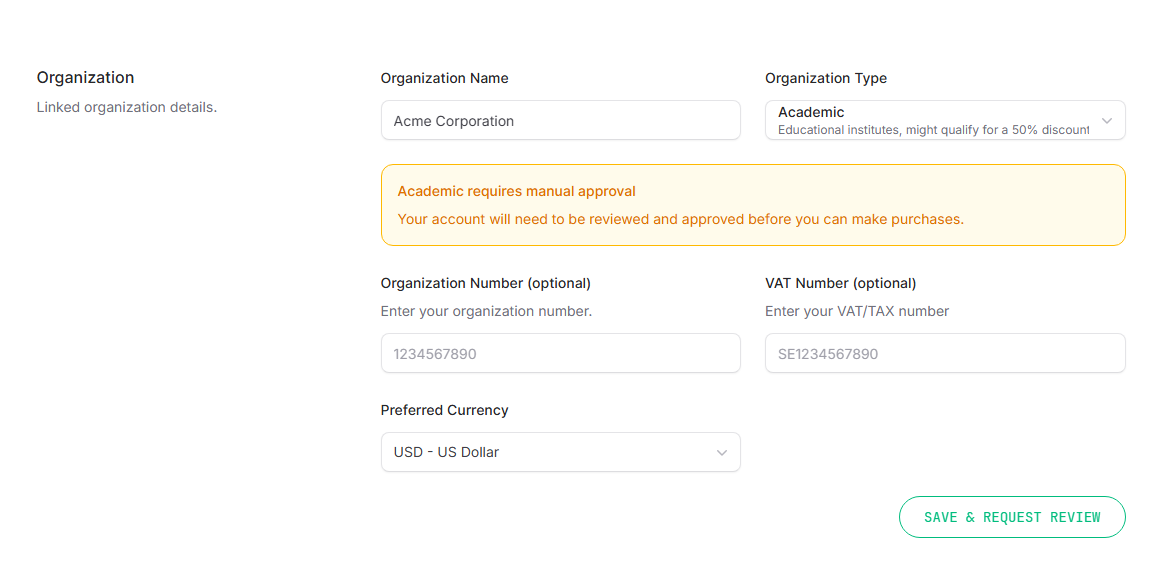
As soon as you select one of these types, an amber notice appears:
Approval required
Your account will need to be reviewed and approved before you can make purchases.
The save button also changes to Save & Request Review to indicate that saving will trigger a review.
What happens next
After you save, your organization enters a Pending state. The Account page shows a "Pending verification" badge and the message "Your organization is currently under review." Our sales team reviews the request manually, which typically takes a few business days.
After approval
Once approved, you receive a confirmation email and the pending badge is removed from your account. When you make a new purchase, you will automatically see the new discounted prices. See Buying a subscription for the next step.