Finding Tabs and Scripts by Name
Finding a tab by name
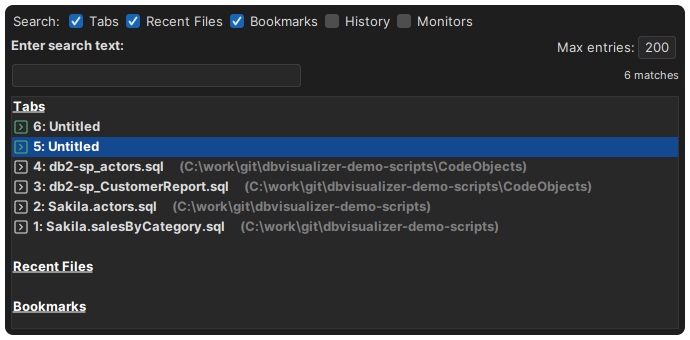
When you have many tabs open, finding one by looking through the tab row is slow, and you need to remember where it is. With Quick File Open, you find it by name instead:
- Press
Ctrl+Alt+O(Cmd+Option+Oon macOS), or select Quick File Open in the main toolbar or the File menu. - Type a part of the name. Upper and lower case don't matter, and you can use
*as a wildcard. - Select the tab in the list and press
Enter, or click it.
The open tabs are listed with the most recently used first, so the tab you just left is selected when the list opens.
Switching to scripts that aren't open
Quick File Open also lists scripts that you have used, but that aren't open in a tab. When you select one, it opens in a new SQL Commander tab. So you can close tabs that you don't need right now, and still switch to them as easily as to an open tab.
Select which kinds of entries to list at the top of the window:
- Tabs: the open tabs.
- Recent Files: scripts that you have opened recently.
- Bookmarks: your bookmarks.
- History: statements in the SQL history.
- Monitors: your monitors.
By default, Tabs, Recent Files and Bookmarks are listed. Max entries sets how many entries of each kind are listed.