Copying a Table
Only in DbVisualizer Pro
This feature is only available in the DbVisualizer Pro edition.
You can copy a table, including its data, to another database connection or within the same connection. The source and target can be different types of databases. In that case, the data types are converted to the closest data types in the target database.
Copying tables is supported for PostgreSQL, MySQL, Oracle, SQL Server, Db2 and H2.
Copying a table
To copy a table:
- Select a table node in the Databases tab tree,
- Choose Copy Table from the right-click menu,
- Under Target, select the Connection to copy the table to. If you're not connected to it, click Connect,
- Select the Database and Schema for the new table, and enter its name in Table,
- Optionally, under Options, clear the columns you don't want to copy in Columns to copy, and change the Batch Size, the number of rows inserted at a time,
- Click Copy.
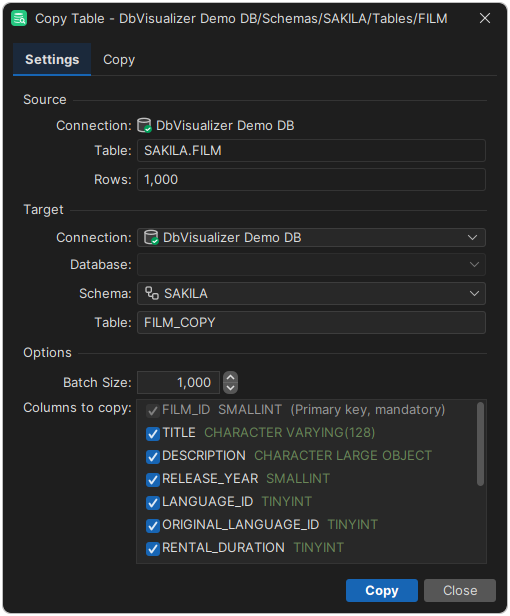
The Copy tab shows the progress of the copy. Within the same connection, the table is created and filled in a single transaction. When you copy to another connection, the table is created first, and the data is committed after each batch.
What is copied
DbVisualizer creates a new table in the target database with the columns and the primary key of the source table, and then copies the data. The target table must not already exist.
These parts of the source table are not copied:
- indexes, foreign keys and other constraints,
- triggers,
- computed columns.
Some data types have no equivalent in the target database, or can't be copied between different types of databases. These columns are cleared in Columns to copy, and can't be selected. Primary key columns are always copied.
Using the @copy table command
You can also copy a table using the @copy table client-side command, for example in a script:
@copy table SourceSchema="public" SourceTable="film"
            TargetConnection="MySQL Production" TargetCatalog="sakila" TargetTable="film_copy"
            ExcludeColumns="description";
The table is copied from the connection of the SQL Commander tab to the target connection. The command takes these parameters:
| Parameter | Default | Description |
|---|---|---|
TargetConnection | Required. The name of the target connection. | |
SourceCatalog | The database selected for the SQL Commander tab | The database of the source table. |
SourceSchema | The schema selected for the SQL Commander tab | The schema of the source table. |
SourceTable | The name of the source table. | |
TargetCatalog | The current database of the target connection | The database for the new table. |
TargetSchema | The current schema of the target connection | The schema for the new table. |
TargetTable | The name of the source table | The name of the new table. |
BatchSize | 1000 | The number of rows inserted at a time. |
ExcludeColumns | A comma-separated list of columns that aren't copied. |
To run a copy within the same connection in a single transaction, put @set autocommit off before the command and @commit after it. For more about client-side commands, see Using Client-Side Commands.