Unassigning and reassigning licenses
If you assigned a seat to the wrong person, or a team member has left, you can make that seat available for another user. What happens next depends on whether the user has activated their license yet.
Two ways to recover a seat
On the Users page there are two actions you can take on an assigned seat:
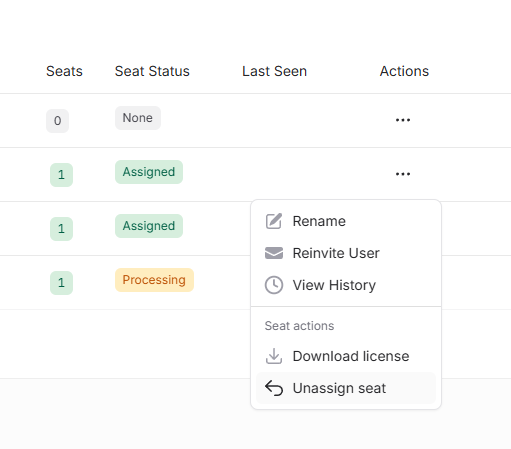
- Unassign seat appears when the user has not yet activated or downloaded their license. The seat returns to your available pool immediately and can be assigned to someone else.
- Leave subscription appears when the user has already activated or downloaded the license. The user keeps their working license for the rest of the current subscription period (DbVisualizer keeps working for them), but the seat is excluded from auto-renewal. At the next subscription renewal the seat is freed up and can be assigned to someone else.
Leave subscription cannot be reversed within the current period
Use Leave subscription when you want a user to wind down their access at the next renewal cycle, not as an immediate-takeback action.
There is also a separate Revoke license action that permanently invalidates the license: the user can no longer use DbVisualizer with it. Revoke is a destructive action; the confirmation dialog warns that it cannot be undone.
How to unassign or leave
- Go to Users in the left sidebar.
- Find the user in the table.
- Click the
···actions menu and pick Unassign seat or Leave subscription (the menu shows whichever one applies based on the user's seat status).
The change takes effect immediately. There is no confirmation step for unassign or leave: only Revoke prompts for confirmation.
Reassigning a seat
- Unassigned (not activated): The seat is back in your pool right away. Assign it to a new user from the same Users page. See Managing licenses → Assigning a seat.
- Left subscription (activated): The seat is reserved for the original user for the rest of the current period. It becomes assignable to a new user only after the next renewal.