Renewing a subscription
A subscription runs for its term: 1, 2 or 3 years. How it renews depends on how it is paid: automatically by card, by an invoice, or through your reseller. When you renew, you can change the number of seats, the support level and the term.
Quick guide
| If you want to… | Go to |
|---|---|
| See how your subscription renews | How a subscription renews |
| Turn automatic renewal on or off | Automatic renewal |
| Know what happens before the end date | As the end date comes closer |
| Renew and change seats, support level or term | Renewing yourself |
| Renew after the end date | The grace period |
| Stop a subscription from renewing | Stopping a subscription |
How a subscription renews
The Payment method and Automatic renewal rows on the subscription show how it renews:
| Payment method | How it renews |
|---|---|
| Card, paid through Paddle | With Automatic renewal on, it renews by itself at the end of the period, for the same term, and Paddle charges the card. With it off, you renew it yourself. |
| Invoice, paid by invoice from DbVis | DbVis sets automatic renewal: to change it, click contact DbVis in the row. Renew it yourself with Renew now, or answer the renewal offer DbVis sends you. |
| Through your reseller | Ask your reseller to renew it. They send you an activation code, or update the subscription for you. See Buying through a reseller. |
| Free of charge | DbVis sales renew it. Click Contact sales. |
Automatic renewal
The Automatic renewal row shows On or Off, and what that means for this subscription:
- On: "Renews on" the end date "for 1 more year" (or the subscription's term), with about what it costs, excluding VAT.
- Off: the subscription ends on the end date. Where you can change it, the row says what turning it on would renew it for, and about what it costs.
For a subscription paid through Paddle, owners and administrators turn automatic renewal on or off with the switch in the row. Auto-renewal enabled confirms that the subscription now renews at the end of each period. Auto-renewal disabled confirms that it does not, and that you get an email when it is about to end.
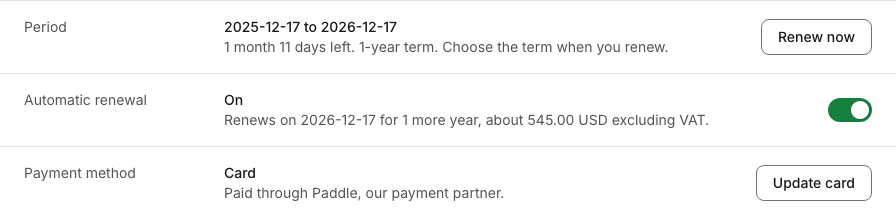
The cost shown is an estimate from today's renewal price, excluding VAT. The checkout shows the exact price when you renew yourself.
As the end date comes closer
- Renew now shows in the last three months of the period, also for a subscription that renews automatically: in the Period row, or on a notice about the end date.
- From 60 days before the end, a subscription that does not renew automatically says This subscription ends in so many days, with the date to renew by and about what renewing costs. It has Renew now, and Turn on automatic renewal where you can turn it on. Link a reseller lets a reseller order the renewal for you.
- About 30 days before the end, DbVis emails the organization a reminder: with the renewal price when the subscription renews automatically, or a reminder that it is about to end when it does not. Another email comes when the period ends. See Email notifications.
- With more than one subscription, Needs your attention on Subscriptions lists those that end soon, and the Due within 30 days view shows those that end within 30 days.

DbVis may also send you a renewal offer, or start the renewal for a subscription it invoices. It then shows as An offer from DbVis is waiting for you (see Offers and quotes from DbVis), or as The renewal is on its way while DbVis prepares the invoice or the quote.
Renewing yourself
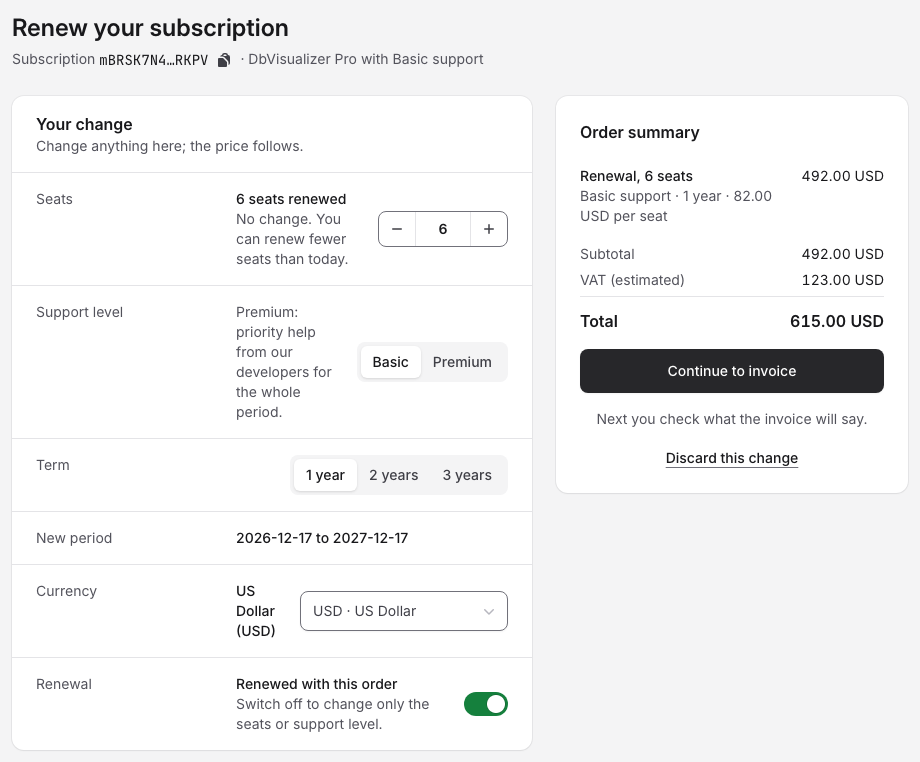
- Open the subscription and click Renew now. The checkout Renew your subscription opens.
- Under Your change, choose:
- Seats: the number of seats to renew. You can renew fewer seats than today, but at least as many as people hold. To renew fewer, take seats back on Users first (see Unassigning and reassigning licenses). You can also add seats.
- Support level: Basic or Premium. Only DbVis sales can change Premium to Basic.
- Term: 1 year, 2 years or 3 years. A 2-year term gives 10% off in year 2, a 3-year term 20% off in years 2 and 3.
- Currency: the currency you pay in.
- New period shows the dates the renewal covers. It starts where the current period ends, so renewing early does not shorten the subscription.
- Check the Order summary, choose how to pay and click the button. See Payment methods.
The Renewal switch says Renewed with this order. Switch it off to change only the seats or the support level, without renewing. To leave without ordering, click Discard this change.
A subscription invoiced by DbVis is renewed by invoice or with a price quote. Once you ask for the invoice, the subscription says The renewal is on its way while DbVis prepares it, and Invoice to pay by a date when it is sent. A price quote for a renewal holds as long as the subscription is still due for this renewal and no other order has changed it.
The grace period
A subscription that reaches its end date without being renewed gets the status Overdue. For 63 days after the end date it is in its grace period: you can still renew it at the renewal price. The subscription says This subscription ended on the end date and was not renewed, with the date to renew by. Click Renew to renew it as described in Renewing yourself. The new period starts on the date the old one ended.
During the grace period you can't add seats or upgrade the support level until you have renewed. DbVis emails a reminder one week and one day before the grace period ends.
If a card payment for the renewal failed, the subscription says Your payment failed, with the date to pay by to keep the renewal price. Click Pay now to pay again with the same or another card, or by invoice. See If a payment fails.

After the end date, licenses no longer get newer DbVisualizer versions. Each user's License page says how their license stands. Renew the subscription to get newer versions.
After the grace period
When the grace period is over, the status is Expired. The subscription says This subscription ended on the end date, and Renew lets you renew it to use its seats again. Only a renewal within the grace period keeps the renewal price.
A subscription that was free of charge is renewed by DbVis sales: click Contact sales.
Stopping a subscription
To let a subscription paid through Paddle end, turn off automatic renewal. It keeps running, and its licenses stay valid, until the end date. For a subscription DbVis invoices, contact DbVis; for one your reseller handles, ask your reseller.
A subscription DbVis has cancelled has the status Cancelled and says This subscription is cancelled: it does not renew, and its licenses stay valid until the end date.