



intro
DbVisualizer 26.1 brings an integrated AI assistant, faster access to recently used database connections, significant performance optimizations, a native file chooser, new database support, database-specific improvements, and more. Let’s take a closer look.
AI
Integrated AI assistant
This release introduces an AI assistant in DbVisualizer that helps you work faster and more confidently with your databases and scripts. It supports everyday tasks like writing and improving SQL, understanding and developing schemas, and troubleshooting errors, with explanations and suggestions tailored to what you are working on.
Ask questions
To access the AI assistant, use the button in the top-right corner of the main window. The assistant can help you reason about most aspects of your database or query, from explaining database features to modelling, writing queries and much more. When connected to a database, you can optionally allow DbVisualizer to include relevant context such as database type and schema, with your prompt. This helps the assistant provide more accurate, environment-specific responses.
Explain errors
If you have run into an error when executing your query, you can ask the AI assistant to explain it and suggest a fix.
Analyze code
When working on a script, you can ask the AI assistant questions about the current query directly from the editor, based on the current position or the current selection. Any changes that the assistant suggests can then be applied to your original code.
You need to opt in
The AI features in DbVisualizer are strictly opt-in. If you want everything to stay local and avoid any server-side AI processing, simply do not enable the assistant. To use AI, you will be asked to log in or create an account. This helps ensure a secure and reliable service.
PERFORMANCE
Performance optimizations
Improved startup time
Like many of our users, we don’t like waiting. That’s why we optimized DbVisualizer’s startup in this release, so you can start being productive faster. We have measured decreased startup times on all configurations we have tested, with the most apparent effect in Windows environments.
Large workspaces
Additionally, we have looked specifically at workspaces where many editor tabs are open simultaneously. Overall application responsiveness has improved is such scenarios, including starting a new session, connecting to a database, updating application settings and more.
CODE EDITOR
Recently used connections
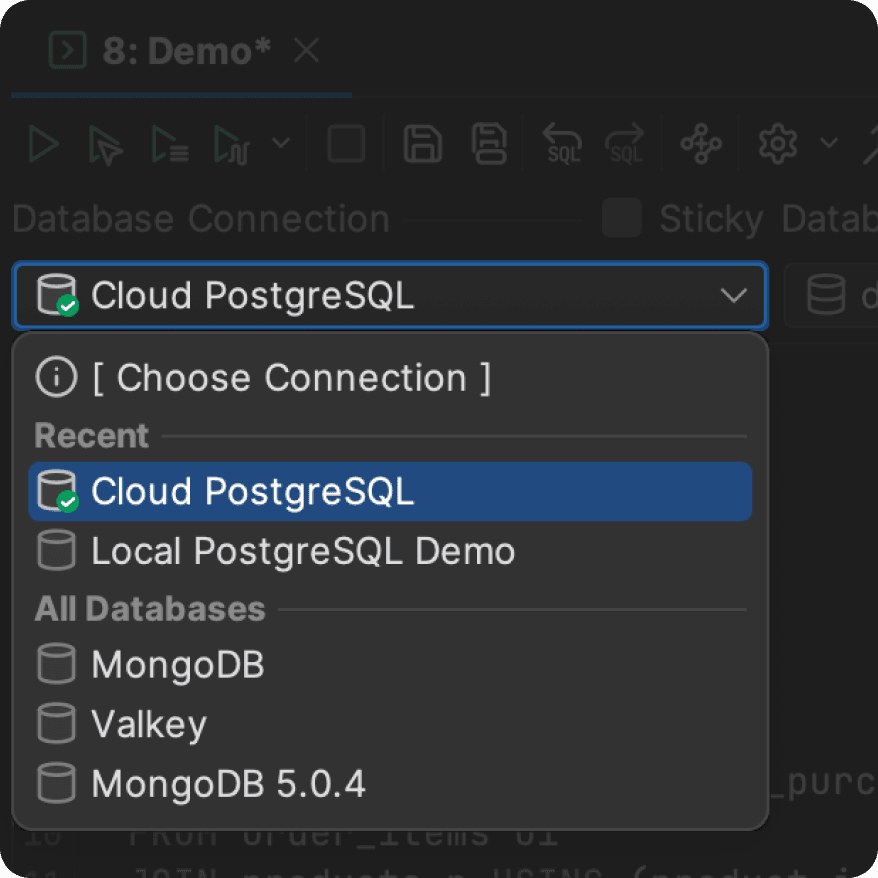
Particularly useful for users who work with many data sources, DbVisualizer now keeps track of recently used database connections and displays them at the top of the connections list in SQL Commander. This helps you save time, adding to the existing behaviour where the current connection is used when creating new editor tabs.
Database-specific improvements
Improved database support
Support for Neo4j and Impala
This release adds basic database support for Neo4j and Apache Impala. You will find pre-defined entries for both databases in the driver manager, making it easy to get started.
Avoid multiple authentication prompts when working with Azure
DbVisualizer can now cache the access token used in the interactive authentication flow in Azure. This way, it is no longer necessary to log in for each physical connection established behind the scenes.
Simplified connection setup for Databricks
It is now easier to set up your connection for the common authentication flows used in Databricks. Choose between personal access token, token pass-through, browser-based authentication, machine-to-machine and Azure managed identity.
In addition, Databricks streaming tables are now supported.
Import data into temporary tables in Informix
It is now possible to import data into a temporary table using the @import command when working with Informix, which simplifies real-life ETL scenarios.
AND MORE
And more improvements across the board
Native file chooser
Starting with this release, when you open or save a file, DbVisualizer will bring up a file chooser native to your operating system. This means that you will be able to use the native features that you are accustomed to in a file chooser such as favourite locations, native-style navigation, familiar context actions and so on. On Windows, this also results in better performance when working in an environment with mounted network drives.
To mount a shared connection folder, you can now simply drag and drop it on the Databases tab. In addition, any missing SSH configurations used by the shared connections will be created automatically.
Copy grid as a Markdown table
To further improve interoperability between DbVisualizer and other tools, it is now possible to copy a result grid as a Markdown-formatted table.
Current clipboard contents as a SQL Commander variable
It is now possible to use the current clipboard contents directly in a SQL Commander script using the ${system.clipboard}$ syntax, simplifying half-automated tasks.
Security and platform updates
This release ships with Java 25 and includes the latest security upgrades for third-party dependencies and template drivers.
And that’s not all…
There are a total of 31 improvements and fixes that you can read about in the release notes.
OTHER RELEASES