Versioning Your Queries: Git Workflows for Analysts and Engineers

intro

In this ever-changing world, collaboration between developers is key. Version control is something many have heard about, but only some fully understand. Here’s what versioning is, how it works, and what your database has to do with it all.

Tools used in the tutorial
Tool Description Link
Dbvisualizer DBVISUALIZER
TOP RATED DATABASE MANAGEMENT TOOL AND SQL CLIENT

If you’re a developer, you’ve most likely heard about git, even used it quite extensively. The majority of us did and do so to this day and with Git being an indispensable helper for all kinds of developers, we often get accustomed to what it does so much that we don’t even think about it. Here’s how Git plays in tandem with your database.

What is Git and What It’s Used For?

At its core, Git is a versioning control system that helps everyone track changes in code and collaborate with other developers in the team. Developers use Git to version their code, queries, and things related to them meaning that Git, and version control in extension, is quite essential for collaboration, tracking changes, and maintaining an organized workflow.

Think about it: when working on a complex project, multiple team members might be writing and contributing code to the same project, tweaking, fixing something, and committing something to Git makes the commit visible to all of the team members. Without a version control system, keeping track of all changes could quickly become overwhelming. Git helps with:

  1. Traceability: since Git shows you who made changes, to what, and when, it’s crucial for traceability and collaboration.
  2. Collaboration and Ability to Revert: since Git keeps a record of all changes made to files over time, if anyone makes a mistake, going back or reverting to a previous version of the file is possible. Git also allows many developers to work on the same project without overwriting changes and also lets you create separate branches to work on different features of the project without affecting the main part of it.
  3. Backup: Git is also sometimes used as a fall-back option as if your files locally get damaged or in any way impacted. In that way, it can also act as a backup of sorts.

What Does My Database Have to Do with This?

Git does not directly work with your database unless you’re versioning your database schema, queries, CTEs, or stored procedures. At the same time, the way queries and procedures are managed can be improved by using version control practices. Version control matters for your database because:

  1. Version control helps track schema changes: developers working with databases may add, modify, or remove tables, modify the contents inside of them by moving, removing, or adding columns or data, and relationships between tables might change. Versioning your queries helps you keep track of what works across multiple environments (e.g. what works locally, what works in the staging environment, and in production.)

Provided that each SQL file represents a change or some action (e.g. creating a table, adding or modifying data, or the like), you can put files inside of Git and provide a meaningful message depicting the change like depicted below. That should get you started in terms of tracking what happened to schemas and the tables within:

Copy
        
1 # initialize a new Git repo inside a directory db-project 2 git init db-project 3 # stage the messages-table.sql file for a commit (before committing) 4 git add messages-table.sql 5 # commit or save changes with a comment 6 git commit -m "Added a modified messages table pertaining to the users in the CMS"
  1. Reproducibility and auditing: look at the piece of code above: in that example, we can imply that version control provides a visible audit trail. Since Git allows us to see who made changes to what and using what comments, it can be crucial for troubleshooting or compliance processes.
  2. Deployment of changes to your database: the deployment of SQL files having code inside of them may be crucial for those running search engines, too. Think about it - if you’re contributing to a data breach search engine, data breaches need to be added to the database quite often and there’s a good chance that they are added by running SQL queries that reside in files. By having those SQL queries and files readily accessible to everyone working on the search engine, the deployment of changes becomes quicker.
  3. We can use different Git branches to mark different parts of the project or different features: Git can be very useful if we’re working simultaneously on multiple features or changes to our database. Git branches can help keep everything organized since each branch will represent a different set of changes to your application and/or your database (i.e. adding tables, modifying them, modifying or adding CTEs, etc.)

While Git may not be the most popular choice for those tracking database operations, it’s quite surprising what can be done with it from a database point of view.

If you find yourself using Git to track changes to your database schemas, tables, and the procedures within, you’re likely going to need an SQL client to help you understand what’s happening with your database on a deeper level. Database clients like DbVisualizer will help you with:

  • Visualizing and navigating through the structure of your database and tables within: tools like DbVisualizer allow you to obtain a visual representation of your database and the tables and columns within, including relationships and views. Tools like DbVIsualizer will help you you see which tables reference each other, see interactions between indexes like foreign keys and primary keys, help you check for database constraints, and perform a variety of other things.
  • Entity-Relationship Diagrams: some SQL clients, including DbVisualizer, are able to mock up Entity Relationship Diagrams (ERDs) that allow you to visually see how tables are interacting with one another enabling you to more easily see how and what data does flow through your application and database.
  • Writing and modifying SQL code: database clients often come with SQL editing capabilities and those capabilities allow you to write nicely formatted SQL code. Features like intelligent auto-complete will give you relevant suggestions that will make you craft efficient SQL queries no matter what your use case may be.

Besides that, DbVisualizer also comes with a set of permissions and other features that can be set within the tool to ensure that certain types of queries are allowed to execute only in certain environments.
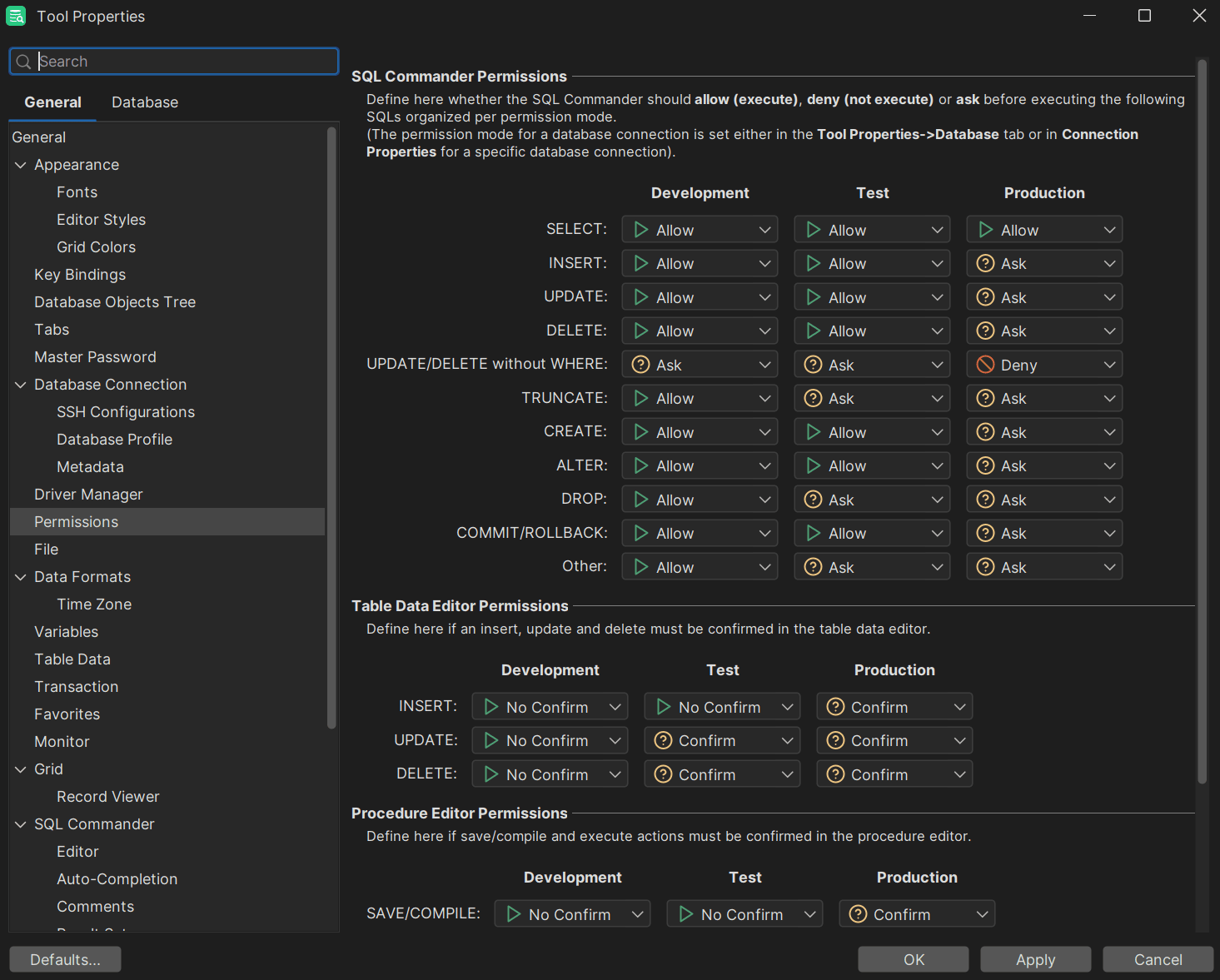
SQL Editor of DbVisualizer

In this regard, DbVisualizer isn’t alone: there are lots of SQL clients that you may be familiar with, but what sets DbVisualizer apart are its unique features, ability to suggest SQL code upon writing it, versatility, and of course, user-friendly design that makes it an excellent choice for database professionals and developers looking to streamline their workflow alike. Start versioning your SQL queries and give DbVisualizer a try today: you won’t be disappointed.

Conclusion

Git is a key tool in the life of many developers and while many know what it is, what it does, and what it’s used for, not many developers think of it as a database versioning tool. In terms of databases, Git can help us track schema changes as well as mark or track different parts of a project or specific features related to it.

Git isn’t your primary tool for completing database operations - at the same time, it can be used in ways that previously were unimaginable.

FAQ

What Relevance Does Git Have for Database Operations?

Git fits into the world of database operations by helping developers version their queries, CTEs, tables or relationships within them, or entire database schemas, thus facilitating collaboration and effective future use. Git also plays a key role in managing database migrations and changes.

How Best to Track Changes in a Database?

To track changes in a database, consider:

  1. Crafting SQL files for operations (inserting, modifying, or deleting data), then making use of Git.
  2. Tracking stored procedures, files, and actions in Git.
  3. Making use of automated database backup and restore procedures together with versioned database backups.

Besides Tracking Changes, Is There Something Else To Take Care Of?

Yes. Besides tracking the changes made to your database and data within, you should also consider educating yourself on the internals of the database management system you find yourself using by scrolling through blogs, reading books, or educating yourself by going to seminars, conferences, or workshops to further learn about databases and their internals.


Dbvis download link img
About the author
LukasVileikisPhoto
Lukas Vileikis
Lukas Vileikis is an ethical hacker and a frequent conference speaker. He runs one of the biggest & fastest data breach search engines in the world - BreachDirectory.com, frequently speaks at conferences and blogs in multiple places including his blog over at lukasvileikis.com.
The Table Icon
Sign up to receive The Table's roundup
More from the table
Title Author Tags Length Published
title

The Best MySQL GUI for macOS: Top 4 Alternatives to Workbench

author Leslie S. Gyamfi tags SQL SQL clients 7 min 2026-04-20
title

Choosing the Right SQL Client for Cassandra Clusters

author Lukas Vileikis tags Cassandra 5 min 2026-04-16
title

Best Cross-Platform Database IDEs in 2026

author Lukas Vileikis tags SQL clients 6 min 2026-04-13
title

Database Clients: A Security Comparison of the Most Popular Tools

author Lukas Vileikis tags SQL 5 min 2026-04-09
title

SQL Interview Questions and Answers: Part 2 — Problems & Solutions

author Lukas Vileikis tags MARIADB MySQL SQL 7 min 2026-04-06
title

Comparing Git Support in Popular SQL Clients

author Leslie S. Gyamfi tags SQL SQL clients 7 min 2026-04-02
title

SQL Interview Questions and Answers: Part 1 — The Basics

author Lukas Vileikis tags DBMS MARIADB MySQL POSTGRESQL SQL SQL SERVER 10 min 2026-03-30
title

The Best SQL Clients for Explain/Query Plan Visualization (2026)

author Lukas Vileikis tags 5 min 2026-03-23
title

Best SQL Clients for Cloud IAM/SSO Authentication (2026)

author Leslie S. Gyamfi tags 10 min 2026-03-16
title

Best SQL Clients for Data Import/Export & CSV Handling (2026)

author Leslie S. Gyamfi tags 13 min 2026-03-09

The content provided on dbvis.com/thetable, including but not limited to code and examples, is intended for educational and informational purposes only. We do not make any warranties or representations of any kind. Read more here.
