Extending a Database Profile
The included database profiles all extend the generic profile, directly or through another profile. The generic profile handles the basic object types in a relational database, such as tables, columns, indexes and procedures. It is based entirely on the database metadata that the JDBC driver provides, so it works with almost any database that has a JDBC driver. A new database profile should also extend the generic profile.
DbVisualizer selects the database profile based on the Database Type setting of the database connection. Some database types have a dedicated profile, others don't. For databases without a profile, DbVisualizer uses the generic profile. You can also select the generic profile manually in the Database Profile category in the connection properties.
The most important part of the profile is the definition of the database objects tree. The tree also connects the object types to their actions and to the views (not database views) that show detailed information.
This page is mainly about extending an existing profile (other than the generic one). Extending a profile means adding, changing and removing definitions in the profiles that it extends.
Extending commands
Each command is identified by its id attribute, which makes it simple to extend the Commands and InitCommands elements. To add a command, add the new Command element:
<Commands extends="true">
   <Command id="sample.getLoginSchema">
      <SQL>
         <![CDATA[
select '${schema}' as schema from dual
         ]]>
      </SQL>
   </Command>
</Commands>
To replace a command in the parent profile, give the new command the same id as the command in the parent profile.
Extending database objects tree
To extend or change the database objects tree (ObjectsTreeDef), the changes must match the exact object paths in the parent profile. The object path is made up of the GroupNode and DataNode elements and their type attributes. This is the object path to the Columns node of a table:
GroupNode[@type='Schemas']/DataNode[@type='Schema']/GroupNode[@type='Tables']/DataNode[@type='Table']/GroupNode[@type='Columns']
The Analyze Database Profile utility reports object paths in this XPath format.
The extended profile must use the same hierarchy of GroupNode and DataNode elements as the parent profile. This includes conditional elements, such as If, ElseIf and Else, in the parent profile.
The following objects tree for Oracle shows the Schemas node expanded, with all schemas in the database:
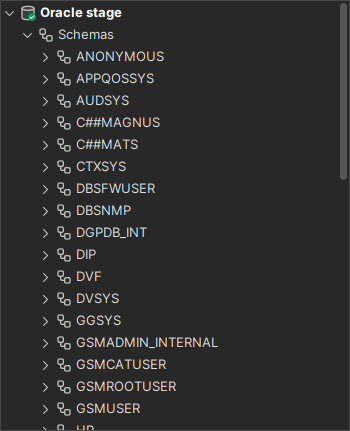
In this example, the extended profile shows the default schema at the top level, below the database connection node. The default schema node shows only tables, instead of all the object types in the Oracle profile.
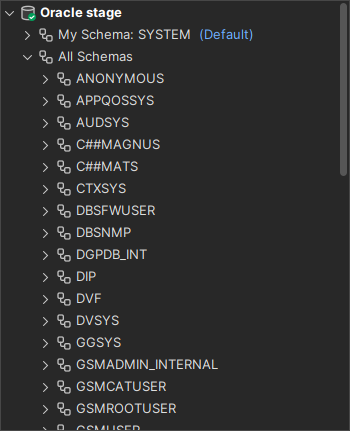
The screenshot shows the new My Schema: SYSTEM node at the top, and the Schemas node renamed to All Schemas. To do this, the custom profile ${dbvis.prefsdir}/ext/profiles/sample-oracle.xml has the following ObjectsTreeDef definition and the command it uses:
<!--Commands used in this profile-->
<Commands extends="true">
   <Command id="sample.getLoginSchema">
      <SQL>
         <![CDATA[
select '${schema}' as schema from dual
         ]]>
      </SQL>
   </Command>
</Commands>

<ObjectsTreeDef extends="true">
   <!--The following "Schema" definition shows the login schema directly below-->
   <!--the Database Connection for faster access. It is limited to only show-->
   <!--tables (by setting the "Table" DataNode to isLeaf="true")-->
   <DataNode type="Schema" label="My Schema: ${sample.getLoginSchema.SCHEMA}" order-before="0">
      <SetVar name="schema" value="${sample.getLoginSchema.SCHEMA}"/>
      <Command idref="sample.getLoginSchema">
         <Input name="schema" value="${#db.loginSchema}"/>
      </Command>

      <DataNode type="Table" label="${oracle.getTables.TABLE_NAME}" isLeaf="true">
         <SetVar name="objectname" value="${oracle.getTables.TABLE_NAME}"/>
         <SetVar name="rowcount" value="true"/>
         <SetVar name="acceptInQB" value="true"/>
         <Command idref="oracle.getTables">
            <Input name="owner" value="${schema}"/>
            <Input name="temporary" value="N"/>
            <ProcessDataSet action="sortcolumn" index="TABLE_NAME"/>
            <Filter index="TABLE_NAME" label="Table"/>
         </Command>

         <!--These are needed for the viewers defined in the parent profile-->
         <!--associated with the "Table" type-->
         <SetVar name="theTableName" value="${objectname}"/>
         <SetVar name="theParentName" value="${objectname}"/>
         <SetVar name="triggersCondition" value="and table_name = '${theTableName}'"/>

      </DataNode>
   </DataNode>

   <!--Renaming the standard Schemas node to "All Schemas"-->
   <GroupNode type="Schemas" label="All Schemas"/>
</ObjectsTreeDef>
The new command sample.getLoginSchema runs a dummy SELECT that returns a single row and column with the value of the ${schema} variable. The Command element in DataNode type="Schema" sets ${schema} to the value of the ${#db.loginSchema} variable. DbVisualizer sets this variable to the login schema from the connection setup. For Oracle, this is the user ID.
<Command idref="sample.getLoginSchema">
   <Input name="schema" value="${#db.loginSchema}"/>
</Command>
The following DataNode uses the command to show the default schema:
<DataNode type="Schema" label="My Schema: ${sample.getLoginSchema.SCHEMA}" order-before="0">
   <SetVar name="schema" value="${sample.getLoginSchema.SCHEMA}"/>
   <Command idref="sample.getLoginSchema">
      <Input name="schema" value="${#db.loginSchema}"/>
   </Command>

   <DataNode type="Table">
      ...
   </DataNode>
</DataNode>
The label of the node is My Schema: ${sample.getLoginSchema.SCHEMA}. The variable ${sample.getLoginSchema.SCHEMA} has two parts: the name of the command, sample.getLoginSchema, and the name of the column in its result set, SCHEMA.
Below the My Schema node is the DataNode type="Table" definition for tables. It is copied from the parent profile:
<DataNode type="Table" label="${oracle.getTables.TABLE_NAME}" isLeaf="true">
   <SetVar name="objectname" value="${oracle.getTables.TABLE_NAME}"/>
   <SetVar name="rowcount" value="true"/>
   <SetVar name="acceptInQB" value="true"/>
   <Command idref="oracle.getTables">
      <Input name="owner" value="${schema}"/>
      <Input name="temporary" value="N"/>
      <ProcessDataSet action="sortcolumn" index="TABLE_NAME"/>
      <Filter index="TABLE_NAME" label="Table"/>
   </Command>

   <!--These are needed for the viewers defined in the parent profile-->
   <!--associated with the "Table" type-->
   <SetVar name="theTableName" value="${objectname}"/>
   <SetVar name="theParentName" value="${objectname}"/>
   <SetVar name="triggersCondition" value="and table_name = '${theTableName}'"/>
</DataNode>
The tables in the extended profile should not have child nodes, such as columns or triggers, so these definitions are removed from the copy. The isLeaf="true" attribute specifies that the node has no child nodes.
The All Schemas node has the same content as the Schemas node in the parent profile. The following definition only changes the label of the existing node:
<GroupNode type="Schemas" label="All Schemas"/>
The next example adds a Role node below each user in DBA Views → Users.
In the parent Oracle profile, User nodes have no child nodes. To add one, the extended profile specifies all nodes from DBA down to User (the object type path). Each node only needs the type attribute, matching the type in the parent profile. The example also sets the label attribute for the DBA node, to show that an attribute in the extended profile replaces the same attribute in the parent profile.
Attributes that you set on an element replace the attributes of the matching element in the parent profile. Child elements that are not nodes, such as SetVar and Command, work differently: if you specify any of them, they replace all such child elements of the parent element. To change one SetVar in a DataNode, you must therefore specify all its SetVar and Command elements.
<GroupNode type="DBA" label="Database Administration">
   <GroupNode type="Users">
      <!--The "User" type don't allow child nodes in the parent profile.-->
      <!--Setting isLeaf="false" is needed to override this and allow the-->
      <!--new "Role" child node-->
      <DataNode type="User" isLeaf="false">
         <!--Here comes the new child "Role" DataNode-->
         <DataNode type="Role" isLeaf="true" label="${oracle.getGranteeRoles.GRANTED_ROLE} - ext">
            <SetVar name="objectname" value="${oracle.getGranteeRoles.GRANTED_ROLE}"/>
            <Command idref="oracle.getGranteeRoles">
               <Input name="grantee" value="${objectname}"/>
            </Command>
         </DataNode>
      </DataNode>
   </GroupNode>
</GroupNode>
The next definitions only change the position of the Locks and Roles nodes. The order-before and order-after attributes position the node before or after the node with the given type (or id), or at a given index. Index 0 means first, and a high number means last. Specify these definitions inside <GroupNode type="DBA">:
<!--Move the "Locks" node first among the "DBA" child nodes-->
<GroupNode type="Locks" order-before="0"/>
<!--Move the "Roles" node before "Locks"-->
<GroupNode type="Roles" order-before="Locks"/>
Extending actions
ActionGroup and Action elements are extended in the same way as the database objects tree. An ActionGroup is identified by its type attribute, and an Action by its id attribute. The following example removes the oracle-schema-stringsearch action for the Schema object type in the parent profile. It also adds an Extended Schema Actions submenu with a single new action, sample-schema-sample-action.
<ObjectsActionDef extends="true">
   <ActionGroup type="Schema">
      <!--Remove action from parent profile for "Schema"-->
      <Action id="oracle-schema-stringsearch" drop-on-condition="always"/>
      <!--Adds an "Extended Schema Actions" sub menu in the "Schema" actions menu-->
      <ActionGroup type="sample-schema-test" label="Extended Schema Actions">
         <!--Sample action that does nothing-->
         <Action id="sample-schema-sample-action" label="Sample Action"
                 reload="true" resetcatalogs="true" icon="remove">
            <Input label="Text Field" name="textField" style="text" editable="true"/>
            <Command>
               <SQL><![CDATA[Sample Action "${textField}"]]></SQL>
            </Command>
            <Confirm>
               Really run Sample Action "${textField}"?
            </Confirm>
            <Result>
               Sample Action "${textField}" processed!
            </Result>
         </Action>
      </ActionGroup>
   </ActionGroup>
</ObjectsActionDef>
Extending object views
ObjectView and DataView elements are extended in the same way. An ObjectView is identified by its type attribute, and a DataView by its id attribute.
The Oracle profile drops the Schema object view using drop-on-condition="always". A DataView that you add to it in an extended profile is dropped with it, unless you also remove the drop-on-condition attribute. To remove an attribute of the matching element in the parent profile, set it to <remove>, written as <remove> in XML. The Schema object view then also shows the data views from the generic profile.
<ObjectsViewDef extends="true">
<!--Schema is dropped in the Oracle profile. Remove the drop and add a-->
<!--view with the dictionary views. That data is not associated with the-->
<!--single schema defined in this profile, but is a way to have it quickly-->
<!--accessed from a single node.-->
<ObjectView type="Schema" drop-on-condition="<remove>">
<DataView id="sample-schema-dict" label="Dictionary"
icon="sample-schema-dict" viewer="grid">
<Command idref="sample.getDict"/>
<Message>
<![CDATA[
<html>
Simple viewer showing all dictionary tables with description.
</html>
]]>
</Message>
</DataView>
</ObjectView>
</ObjectsViewDef>
Remove an element
To remove an element in the parent profile, add the drop-on-condition="always" attribute to the GroupNode, DataNode, ObjectView, DataView, ActionGroup or Action element. Its child elements are also removed. For more about this attribute, see Conditional Processing.
Older profiles use the action attribute with the value drop. It still works, but it is deprecated. Use drop-on-condition with the value always instead.
Complete sample database profile
This is the complete sample profile that extends the Oracle profile. To test it with your Oracle database:
- Save it as
sample-oracle.xmlin the${dbvis.prefsdir}/ext/profilesfolder.${dbvis.prefsdir}is the folder of the current workspace, by default the.dbvisfolder in your home folder. - In the connection properties for your Oracle connection, open the Database Profile category.
- Right-click the list of profiles and select Reload Database Profiles List.
- With Auto Detect selected, DbVisualizer uses sample-oracle, since it extends the Oracle profile. You can also select Manually Choose and then sample-oracle.
- Click Apply and connect.
<?xml version="1.0" encoding="UTF-8" ?>
<!--
Copyright (c) DbVis Software AB. All Rights Reserved.
-->
<DatabaseProfile
desc="Sample profile extending the Oracle profile"
extends="oracle"
minver="9.5">
<!--Commands used in this profile-->
<Commands extends="true">
<Command id="sample.getLoginSchema">
<SQL>
<![CDATA[
select '${schema}' as schema from dual
]]>
</SQL>
</Command>
<Command id="sample.getDict">
<SQL>
<![CDATA[
select * from dict order by table_name
]]>
</SQL>
</Command>
</Commands>
<ObjectsActionDef extends="true">
<ActionGroup type="Schema">
<!--Remove action from parent profile for "Schema"-->
<Action id="oracle-schema-stringsearch" drop-on-condition="always"/>
<!--Adds an "Extended Schema Actions" sub menu in the "Schema" actions menu-->
<ActionGroup type="sample-schema-test" label="Extended Schema Actions">
<!--Sample action that does nothing-->
<Action id="sample-schema-sample-action" label="Sample Action" reload="true"
resetcatalogs="true" icon="remove">
<Input label="Text Field" name="textField" style="text" editable="true"/>
<Command>
<SQL><![CDATA[Sample Action "${textField}"]]></SQL>
</Command>
<Confirm>
Really run Sample Action "${textField}"?
</Confirm>
<Result>
Sample Action "${textField}" processed!
</Result>
</Action>
</ActionGroup>
</ActionGroup>
</ObjectsActionDef>
<ObjectsTreeDef extends="true">
<!--The following "Schema" definition shows the login schema directly below-->
<!--the Database Connection for faster access. It is limited to only show-->
<!--tables (by setting the "Table" DataNode to isLeaf="true")-->
<DataNode type="Schema" label="My Schema: ${sample.getLoginSchema.SCHEMA}" order-before="0">
<SetVar name="schema" value="${sample.getLoginSchema.SCHEMA}"/>
<Command idref="sample.getLoginSchema">
<Input name="schema" value="${#db.loginSchema}"/>
</Command>
<DataNode type="Table" label="${oracle.getTables.TABLE_NAME}" isLeaf="true">
<SetVar name="objectname" value="${oracle.getTables.TABLE_NAME}"/>
<SetVar name="rowcount" value="true"/>
<SetVar name="acceptInQB" value="true"/>
<Command idref="oracle.getTables">
<Input name="owner" value="${schema}"/>
<Input name="temporary" value="N"/>
<ProcessDataSet action="sortcolumn" index="TABLE_NAME"/>
<Filter index="TABLE_NAME" label="Table"/>
</Command>
<!--These are needed for the viewers defined in the parent profile-->
<!--associated with the "Table" type-->
<SetVar name="theTableName" value="${objectname}"/>
<SetVar name="theParentName" value="${objectname}"/>
<SetVar name="triggersCondition" value="and table_name = '${theTableName}'"/>
</DataNode>
</DataNode>
<!--Renaming the standard Schemas node to "All Schemas"-->
<GroupNode type="Schemas" label="All Schemas"/>
<!--The main purpose with the following is to add a "Role" child DataNode -->
<!--for each "User". In the parent Oracle profile there are no child-->
<!--nodes below "User". To handle this all nodes from "DBA" down to "User"-->
<!--must be specified. The only requirement is that the type attribute is-->
<!--specified and that it match the type in the parent profile.-->
<!--In addition, this example specifies the label attribute for the DBA-->
<!--node to show that overridden attributes replace the attributes of the-->
<!--matching parent node.-->
<GroupNode type="DBA" label="Database Administration">
<GroupNode type="Users">
<!--The "User" type don't allow child nodes in the parent profile.-->
<!--Setting isLeaf="false" is needed to override this and allow the-->
<!--new "Role" child node-->
<DataNode type="User" isLeaf="false">
<!--Here comes the new child "Role" DataNode-->
<DataNode type="Role" label="${oracle.getGranteeRoles.GRANTED_ROLE} - ext" isLeaf="true">
<SetVar name="objectname" value="${oracle.getGranteeRoles.GRANTED_ROLE}"/>
<Command idref="oracle.getGranteeRoles">
<Input name="grantee" value="${objectname}"/>
</Command>
</DataNode>
</DataNode>
</GroupNode>
<!--The following only re-define the position of the "Locks" and "Roles"-->
<!--nodes. The "order-before" and "order-after" attributes identify a type-->
<!--that the node is positioned before or after, or an index. Index 0-->
<!--means first and a high number means last.-->
<!--Move the "Locks" node first among the "DBA" child nodes-->
<GroupNode type="Locks" order-before="0"/>
<!--Move the "Roles" node before "Locks"-->
<GroupNode type="Roles" order-before="Locks"/>
</GroupNode>
</ObjectsTreeDef>
<ObjectsViewDef extends="true">
<!--Schema is dropped in the Oracle profile. Remove the drop and add a-->
<!--view with the dictionary views. That data is not associated with the-->
<!--single schema defined in this profile, but is a way to have it quickly-->
<!--accessed from a single node.-->
<ObjectView type="Schema" drop-on-condition="<remove>">
<DataView id="sample-schema-dict" label="Dictionary" icon="sample-schema-dict" viewer="grid">
<Command idref="sample.getDict"/>
<Message>
<![CDATA[
<html>
Simple viewer showing all dictionary tables with description.
</html>
]]>
</Message>
</DataView>
</ObjectView>
</ObjectsViewDef>
</DatabaseProfile>