Understanding Database Profiles
A database profile defines the information that DbVisualizer shows in the database objects tree and in the object views for a specific database. It also defines the actions for the object types in the profile. DbVisualizer loads the matching database profile when you connect to a database. If there is no matching profile, DbVisualizer uses the Generic profile, which shows general database information and actions.
To see which parts of DbVisualizer a profile controls, see Affected DbVisualizer Features. To see how DbVisualizer chooses the profile for a connection, and how to choose one yourself, see How a Database Profile Is Loaded.
DbVisualizer includes database profiles for many databases. To see which databases are supported, and what is supported for each, see Supported Databases.
The database profiles define different object types, so the database objects tree looks different depending on the database you are connected to. Most of the included profiles have two kinds of top-level nodes:
- A node for the schema objects, for example Schemas or Databases
- A DBA Views node
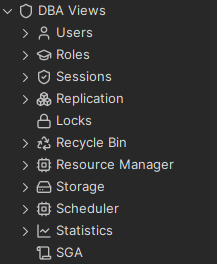
Schema objects are, for example, tables, views, triggers and functions. The objects under DBA Views most often require administration privileges in the database. If you connect using an account without these privileges, you may get error messages when you select nodes under DBA Views. The following is an example of the DBA subtree for Oracle:
For databases that have no specific profile, DbVisualizer uses the Generic profile. The generic profile shows the objects that the JDBC driver reports in its database metadata. DbVisualizer asks the driver for all schemas, databases, tables and procedures, and builds the tree from what the driver returns.
JDBC metadata is a standard way to get this information for any database. The drawback is that JDBC doesn't give access to all metadata a database holds. The generic profile is enough for many tasks, but a database-specific profile shows more details and has more features.
This is how the generic profile looks for an Oracle connection:
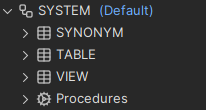
The generic profile shows schema and catalog objects, depending on what the database supports. The Procedures node is always shown, also when the database doesn't support procedures. The generic profile has no DBA Views node.