Affected DbVisualizer Features
Two central features in DbVisualizer are the database objects tree, which you use to navigate databases, and the object view, which shows details about an object. Databases differ in how they describe their content (the system tables or database metadata), and they support different object types beyond common ones such as tables, views and indexes. Each database therefore needs specific handling.
A database profile defines what DbVisualizer shows and operates on for a specific database. It is an XML file that maps the logic, structure and actions to the components in DbVisualizer. Because the database-specific logic is kept separate from DbVisualizer, anyone with knowledge of a database can create a database profile using a text editor.
The database profiles included with DbVisualizer are good examples to start from. They are stored in the resources/profiles folder in the DbVisualizer installation folder.
The following figure shows the features in DbVisualizer that the database profile controls.
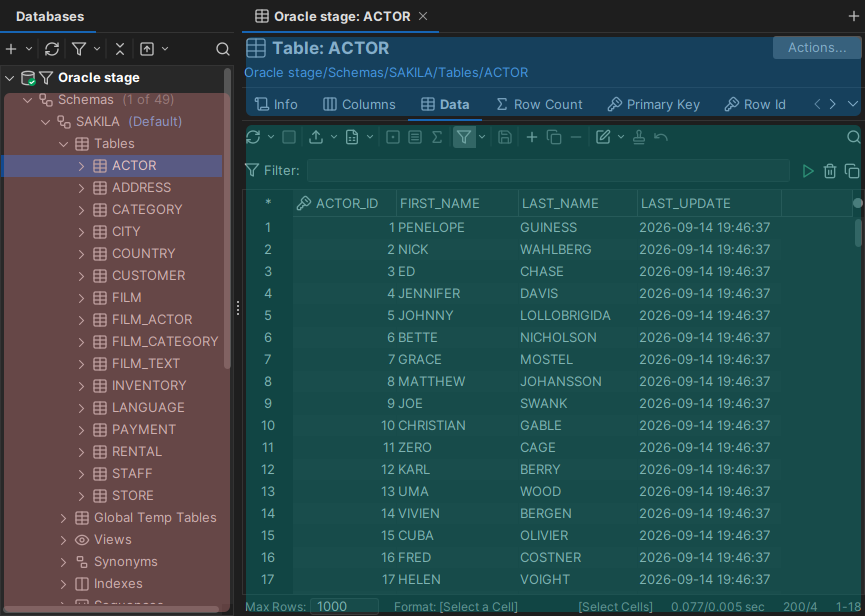
The red box on the left shows the database objects tree, which you use to navigate the objects in the database. When you select an object in the tree, the object view (blue box) for the object type is shown. An object view may have several data views (green box) that show object information, as tabs. In the screenshot, the green box shows the data view labeled Columns, using the grid viewer. For all viewers, see ObjectsViewDef.
The database objects tree and the object views both use SQL commands to get the information from the database. DbVisualizer runs the SQL when you expand a node in the tree (to show its child objects) and when you select a node (to fill the data views).
When you right-click an object in the tree, or click Actions in the object view, a menu shows the actions for the object. Actions are also defined per database profile and object type. For more about actions, see ObjectsActionDef.
The components map to the elements in the XML file as follows:
- The database objects tree (red box) is defined by the ObjectsTreeDef element.
- The object views (blue and green boxes) are defined by the ObjectsViewDef element.
- The SQL commands used by
ObjectsTreeDef,ObjectsViewDefandObjectsActionDefare defined by the Commands element. - The actions for an object are defined by the ObjectsActionDef element.