ObjectsTreeDef
The ObjectsTreeDef element defines the structure of the objects tree and the commands that create its nodes.
<ObjectsTreeDef extends="false">
   <GroupNode type="xxx" label="xxx">
      <DataNode type="yyy" label="yyy">
         ...
      </DataNode>
   </GroupNode>
</ObjectsTreeDef>
With extends="true", the ObjectsTreeDef extends the one in the profile being extended. With extends="false", it replaces it.
The objects tree maps directly to the XML. This is the tree in DbVisualizer:
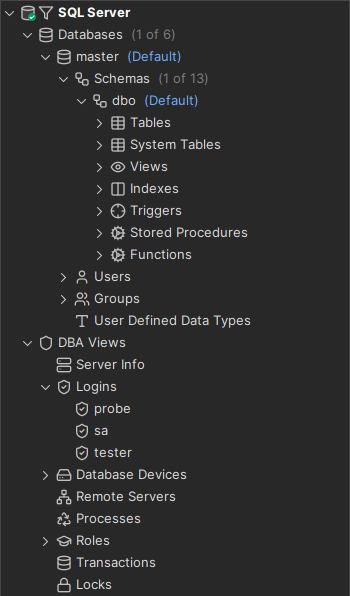
And this is the XML for it:
<ObjectsTreeDef extends="false">
    <GroupNode type="Databases">
        <DataNode type="Catalog">
            <GroupNode type="Schemas">
                <DataNode type="Schema">
                    <GroupNode type="Tables">
                        <DataNode type="Table"/>
                    </GroupNode>
                    <GroupNode type="SystemTables">
                        <DataNode type="SystemTable"/>
                    </GroupNode>
                    <GroupNode type="Views">
                        <DataNode type="View"/>
                    </GroupNode>
                    <GroupNode type="Indexes">
                        <DataNode type="Index"/>
                    </GroupNode>
                    <GroupNode type="Triggers">
                        <DataNode type="Trigger"/>
                    </GroupNode>
                    <GroupNode type="Procedures">
                        <DataNode type="Procedure"/>
                    </GroupNode>
                    <GroupNode type="Functions">
                        <DataNode type="Function"/>
                    </GroupNode>
                </DataNode>
            </GroupNode>
            <GroupNode type="Users">
                <DataNode type="User"/>
            </GroupNode>
            <GroupNode type="Groups">
                <DataNode type="Group"/>
            </GroupNode>
            <GroupNode type="Types"/>
        </DataNode>
    </GroupNode>
    <GroupNode type="DBA">
        <GroupNode type="ServerInfo"/>
        <GroupNode type="Logins">
            <DataNode type="Login"/>
        </GroupNode>
        <GroupNode type="Devices">
            <DataNode type="Device"/>
        </GroupNode>
        <GroupNode type="RemoteServers"/>
        <GroupNode type="Processes"/>
        <GroupNode type="ServerRoles">
            <DataNode type="ServerRole"/>
        </GroupNode>
        <GroupNode type="Transactions"/>
        <GroupNode type="Locks"/>
    </GroupNode>
</ObjectsTreeDef>
The screenshot shows the nodes for the GroupNode elements. The Logins node is expanded to show the probe, sa and tester nodes, which are DataNode nodes. To keep the example short, the XML shows only the type attribute, not the labels.
A GroupNode is a static node. A DataNode is created from the result set of an SQL statement. A GroupNode is a container for other GroupNode and DataNode elements.
In the objects tree, you open object views and run actions. The type attribute connects a node with its object actions and object views. Use a descriptive word for the type, such as Table, Schemas or MaterializedQueryTable. The type also maps to an icon. See database profile utilities for how to show all bundled icons and their type mappings.
You can nest GroupNode and DataNode elements to any number of levels. Keep the tree simple.
XML element - GroupNode
A GroupNode element is a static node in the tree. It has no SQL and appears once, where it is defined. Use it to group other nodes.
<GroupNode type="SystemTables" label="System Tables" isLeaf="false">
  ...
</GroupNode>
The isLeaf attribute sets whether the node can have child nodes. If isLeaf is false, the node shows an expand handle even if it has no child nodes.
If isLeaf is true, child GroupNode and DataNode elements are not shown.
The attributes for the GroupNode element:
| Attribute | Default | Description |
|---|---|---|
type | The type of node. | |
label | The label of the node. It must be unique among the nodes with the same parent. It is part of the object identifier when you open an object view. | |
label1 | Additional information about the object, shown after the label. | |
isLeaf | false | Set to true if the node can't have child nodes. |
icon | An icon name that replaces the icon for the type. Icons are normally mapped to types in the icons.prefs files. | |
drop-label-not-equal | Don't add the node if the label isn't equal to this value or variable. | |
drop-on-condition | See drop-on-condition attribute. | |
order-before | The position of the node among the nodes with the same parent: an index starting at 0, or a node type. For example, order-before="Views" puts the node before the nodes with type="Views". | |
order-after | The position of the node among the nodes with the same parent: an index starting at 0, or a node type. For example, order-after="0" puts the node after the first node. |
XML element - DataNode
A DataNode element adds nodes from the result of a Command. The example in Command, which gets all logins in SQL Server, looks like this in ObjectsTreeDef:
<GroupNode type="Logins" label="Logins">
  <DataNode type="Login" label="${sqlserver.getLogins.Name}" isLeaf="true">
    <Command idref="sqlserver.getLogins"/>
  </DataNode>
</GroupNode>
The GroupNode groups the logins in a Logins node. The DataNode has the type Login in singular, while the GroupNode has Logins in plural. The difference matters because the object view shows the views for the object type: for Logins, a list of all logins, and for a Login, the details of that login.
The DataNode works as a template. The command gets rows from the database, and DbVisualizer creates one node per row.
The label attribute uses a variable. Its value is the Name column from the sqlserver.getLogins command. Variable names are prefixed with the ID of the command that produced them.
The Command element refers to the command with the idref attribute. The command returns a result set with three rows and eight columns, so there are three nodes, labeled with the Name column.
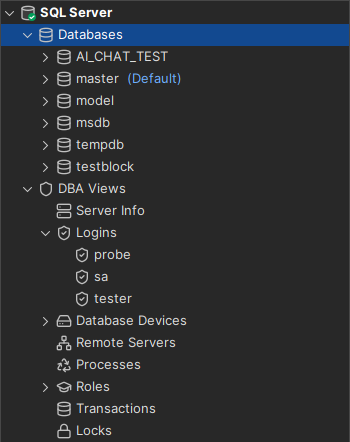
The label1 attribute can be any variable, several variables, or static text:
label1="${sqlserver.getLogins.Default Database}"
This results in these labels:
probe  master
sa  master
tester  master
The attributes for the DataNode element:
| Attribute | Default | Description |
|---|---|---|
type | The type of node. | |
label | The label of the node. It must be unique among the nodes with the same parent. It is part of the object identifier when you open an object view. | |
label1 | Additional information about the object, shown after the label. For columns, typically the data type. For indexes, typically the table name. | |
icon | An icon name, or an expression that returns one, that replaces the icon for the type. See Icons and tooltips. | |
tip | A tooltip for the node. It can be an expression. Use it, for example, to explain why the node has a different icon. | |
actiontype | The object type to use for object actions. | |
isLeaf | false | Set to true if the node can't have child nodes. It can also be an expression. |
drop-label-not-equal | Don't add the node if the label isn't equal to this value or variable. | |
stop-label-not-equal | Make the node a leaf if the label isn't equal to this value or variable. | |
warnstate | An expression. If it returns true, the node shows a warning overlay icon. See Warning and error states. | |
errorstate | An expression. If it returns true, the node shows an error overlay icon. | |
is-empty-output | stop | Set to continue to add the child GroupNode and DataNode elements also when the result set is empty. |
drop-on-condition | See drop-on-condition attribute. | |
order-before | The position of the node among the nodes with the same parent: an index starting at 0, or a node type. For example, order-before="View" puts the node before the nodes with type="View". | |
order-after | The position of the node among the nodes with the same parent: an index starting at 0, or a node type. For example, order-after="0" puts the node after the first node. |
Icons and tooltips
This icon attribute shows a primary key icon for primary key columns, and the tip attribute explains it:
icon="#dataMap.get('getColumnDefinitions.IS_PRIMARY_KEY') eq true ? 'PrimaryKey' : 'Column'"
tip="#dataMap.get('getColumnDefinitions.IS_PRIMARY_KEY') eq true ? 'This is a primary key column' : ''"
Warning and error states
These attributes show a warning icon for disabled triggers and an error icon for invalid objects:
warnstate="! #dataMap.get('oracle.getTriggers.STATUS').equals('ENABLED')"
errorstate="! #dataMap.get('oracle.getObjectsByType.STATUS').equals('VALID')"
XML element - Command
The Command element sets the SQL that creates the nodes for a DataNode.
The idref attribute refers to a command id in the Commands section of the profile. Most DataNode definitions pass input to the command with Input child elements:
<DataNode type="Login" label="${sqlserver.getLogins.Name}" isLeaf="true">
  <Command idref="sqlserver.getLogins">
    <Input name="name" value="sa"/>
    <Input name="suid" value="${sqlserver.getProcesses.SUID}"/>
  </Command>
</DataNode>
The value of an Input element is evaluated as described in Input.
For more about the Command element, see Command.
XML element - Filter
A Filter element in the Command of a DataNode sets which data you can filter on in the objects tree filter. The filter settings are below the objects tree. In this example, you can filter these object types:
- Catalog
- Table
- System Table
- View
- User
- Group
- Trigger
- Procedure
For each object type, you can filter on one or more columns.
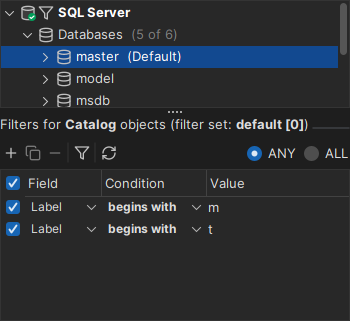
<DataNode type="View" label="${sqlserver.getViews.Name}" isLeaf="true">
  <Command idref="sqlserver.getViews">
    <Filter index="TABLE_NAME" label="View Table"/>
  </Command>
</DataNode>
This filter is for the View object type. The index attribute is a column name or number in the result set. The label attribute is the name of the filter column in the filter settings.
Show only default database/schema
The Show Only Default Database/Schema filter is available for all profiles. It requires a Filter with label="Name" for the catalog and schema nodes. The index attribute identifies the column in the result set.
For catalog nodes:
<Filter index="TABLE_CAT" label="Name"/>
For schema nodes:
<Filter index="TABLE_SCHEM" label="Name"/>
XML element - SetVar
The SetVar element sets a variable for a GroupNode or DataNode. Some object types have a special meaning in DbVisualizer, such as Catalog and Schema. For these data nodes, set a variable named catalog or schema.
For a catalog:
<DataNode type="Catalog" label="${getCatalogs.TABLE_CAT}">
  <SetVar name="catalog" value="${getCatalogs.TABLE_CAT}"/>
</DataNode>
For a schema:
<DataNode type="Schema" label="${getSchemas.TABLE_SCHEM}">
  <SetVar name="schema" value="${getSchemas.TABLE_SCHEM}"/>
</DataNode>
All other data nodes must set the objectname variable:
<DataNode type="View" label="${sqlserver.getViews.Name}" isLeaf="true">
  <SetVar name="objectname" value="${sqlserver.getViews.Name}"/>
  <SetVar name="rowcount" value="true"/>
</DataNode>
The objectname variable identifies the object of the node, so that object views and object actions can refer to it. Set it to the name of the object in the database, such as a table or view name.
The optional rowcount variable (default false) sets whether the object type shows the row count when Show/Hide Table Row Count is on for the connection.
The optional acceptInQB variable (default false) sets whether you can use nodes of this type in the Query Builder. Set it to true only for object types with data that you can query with SELECT, such as tables, views and materialized views.
Variables set with SetVar are hidden by default, for example in the node form viewer. To show a variable, set the action attribute to show. To remove a variable from the node, set action to drop.
In a GroupNode, which runs no command, use SetVar to set static values, for example to use later in an action or data view. See vertica.xml for an example.