Commands
The Commands element groups Command elements.
<Commands extends="true">
  <Command id="profileName.xxx">
    ...
  </Command>
</Commands>
With extends="true", the commands are added to the commands in the profile being extended.
XML element - Command
A Command element runs one SQL statement or a script of SQL statements. In most cases, the command returns a result set with zero or more rows. Commands for actions, such as a drop action, don't need to return a result set. The following shows the Command element with its attributes and the child elements it can have.
<Command     id="sqlserver.getLogins"
         method="dynamic"
       exectype="script"
 processmarkers="true"
     autocommit="false"
    whensuccess="commit"
      whenerror="rollback">

   <SQL>
      ...
   </SQL>

   <Input>
      ...
   </Input>

   <Output>
      ...
   </Output>

   <Filter>
      ...
   </Filter>

   <ProcessDataSet>
      ...
   </ProcessDataSet>

</Command>
| Attribute | Default | Description |
|---|---|---|
id | A unique ID. ObjectsTreeDef, ObjectsViewDef and ObjectsActionDef refer to the command with the idref attribute. By convention, the ID starts with the profile name and a dot, for example oracle.xxx. | |
method | dynamic | dynamic: the SQL is an SQL statement. jdbc: the SQL is a JDBC metadata call. runBeforeConditionsEval: used only in InitCommands. |
exectype | script | For actions. script: the SQL can contain several statements separated by the statement delimiter. asis: the SQL is run as one statement. explain: the SQL is run as an explain plan. |
processmarkers | For actions. true: variables in the SQL are processed. withdriver: parameter markers are also passed to the driver. | |
autocommit | true | For actions. Set to false to run the action with auto-commit off. |
whensuccess | ask | For actions with auto-commit off: commit, rollback or ask. |
whenerror | ask | For actions with auto-commit off: commit, rollback or ask. ignore: only in InitCommands, ignores the error. |
The following command, from an example profile for SQL Server, gets information about logins:
<Command id="sqlserver.getLogins">
   <SQL>
      <![CDATA[
SELECT l.name "Name", suser_id(l.name) "SUID", l.dbname "Default Database",
cast(null as nvarchar(128)) "Full Name", l.language "Default Language",
l.totcpu "CPU Time", l.totio "I/O Time",
cast(loginproperty(l.name, 'PasswordLastSetTime') as datetime) "Password Set"
FROM master.dbo.syslogins l WHERE l.isntname = 0 ORDER BY 1
      ]]>
   </SQL>
</Command>
The ID is prefixed with the profile name because profiles can be extended, and IDs must be unique.
This command uses column aliases. Without aliases, refer to the data by the column names.
Result set
This is the result set for the command:
| Name | SUID | Default Database | Full Name | Default Language | CPU Time | I/O Time | Password Set |
|---|---|---|---|---|---|---|---|
| probe | 262 | master | (null) | us_english | 0 | 0 | 2026-09-14 21:38:22 |
| sa | 1 | master | (null) | us_english | 0 | 0 | 2025-11-10 11:59:35 |
| tester | 263 | master | (null) | us_english | 0 | 0 | 2026-09-14 21:38:22 |
How DbVisualizer uses the result set depends on where the command runs. In the objects tree (ObjectsTreeDef), each row becomes a node. In an object view (ObjectsViewDef), the viewer decides how to show the result.
Each node in the objects tree keeps all data from its row. You can use the data in labels, variables and conditions. Object views don't keep the data in this way.
In the objects tree, the result set above shows as three nodes. The label of each node is the value in the Name column:
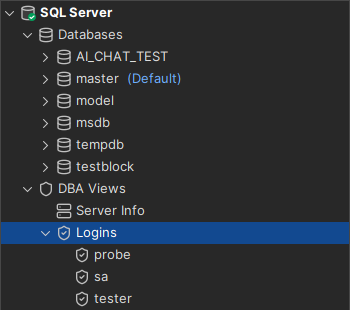
You refer to the data for a node as commandId.columnName, for example sqlserver.getLogins.Name or sqlserver.getLogins.Default Database. This is the data for the sa node:
sqlserver.getLogins.Name = sa
sqlserver.getLogins.SUID = 1
sqlserver.getLogins.Default Database = master
sqlserver.getLogins.Full Name = (null)
sqlserver.getLogins.Default Language = us_english
sqlserver.getLogins.CPU Time = 0
sqlserver.getLogins.I/O Time = 0
sqlserver.getLogins.Password Set = 2025-11-10 11:59:35.550
The DataNode element for these nodes uses the data for the label:
<DataNode type="Login" label="${sqlserver.getLogins.Name}" isLeaf="true">
   <SetVar name="objectname" value="${sqlserver.getLogins.Name}"/>
   <Command idref="sqlserver.getLogins">
      <Output name="sqlserver.getLogins.Name" index="1"/>
      <Output name="sqlserver.getLogins.SUID" index="2"/>
   </Command>
</DataNode>
When a Command element refers to a command with idref, the Input elements in it replace the ones in the command definition. Output, Filter and ProcessDataSet elements are added to the ones in the command definition.
XML element - Input
A command can take input, typically to build the WHERE clause of a SELECT statement. The previous example has no input.
To accept input, put variables anywhere in the SQL where values should be inserted. This version of the previous example has input:
<Command id="sqlserver.getLogins">
   <SQL>
      <![CDATA[
SELECT l.name "Name", suser_id(l.name) "SUID", l.dbname "Default Database",
cast(null as nvarchar(128)) "Full Name", l.language "Default Language",
l.totcpu "CPU Time", l.totio "I/O Time",
cast(loginproperty(l.name, 'PasswordLastSetTime') as datetime) "Password Set"
FROM master.dbo.syslogins l WHERE l.name = '${name}' and suser_id(l.name) = ${suid} ORDER BY 1
      ]]>
   </SQL>
</Command>
The example has two input variables, ${name} and ${suid}. Supply their values with Input elements where the command is referred to.
The following example from ObjectsTreeDef maps values to the variables in the SQL. The Command element refers to the command with the idref attribute, which matches the id of the command.
<GroupNode type="Logins" label="Logins">
  <DataNode type="Login" label="${sqlserver.getLogins.Name}" isLeaf="true">
    <SetVar name="objectname" value="${sqlserver.getLogins.Name}"/>
    <Command idref="sqlserver.getLogins">
      <Input name="name" value="sa"/>
      <Input name="suid" value="${sqlserver.getProcesses.SUID}"/>
    </Command>
  </DataNode>
</GroupNode>
The ${name} variable in the SQL is replaced with sa.
The ${suid} variable gets the value of another variable, sqlserver.getProcesses.SUID. As described in Result set, each node keeps the data for its row. Input to a command can use the data of the node and of its parent nodes. DbVisualizer first looks for the variable in the current node, and then in each parent node up to the connection node. It uses the first match. If the variable isn't found, it is set to the text for null values, (null) by default.
XML element - Output
By default, a column value is referred to by the command ID and the column name. Use Output elements to set other names. The index attribute identifies the column by its number, starting at 1, or by its name. The name attribute sets the variable name.
<Output index="1" name="sqlserver.getLogins.Name"/>
<Output index="2" name="sqlserver.getLogins.SUID"/>
Filter
The Filter element sets which columns you can filter on in the objects tree filter. You can always filter on the label of a DataNode. Add a Filter, for example, to filter on information that you show with the label1 attribute.
This example shows a filter for the columns of a table:
<GroupNode type="Columns" label="Columns">
   <DataNode type="Column" label="${getColumnDefinitions.COLUMN_NAME}"
             label1="${getColumnDefinitions.TYPE_NAME}" isLeaf="true"
             icon="#dataMap.get('getColumnDefinitions.IS_PRIMARY_KEY') eq true ? 'PrimaryKey' : 'Column'">
      <SetVar name="objectname" value="${getColumnDefinitions.COLUMN_NAME}"/>
      <Command idref="getColumnDefinitions">
         <Input name="schema" value="${schema}"/>
         <Input name="objectname" value="${theTableName}"/>
         <Input name="tableType" value="Table"/>
         <Filter index="TYPE_NAME" label="Type"/>
      </Command>
   </DataNode>
</GroupNode>
The filter is for the TYPE_NAME column in the result set. In the filter pane, it is labeled Type.
The Show Only Default Database/Schema filter requires a Filter with the label Name for the commands of the Catalog and Schema data nodes.
<DataNode type="Schema" label="${oracle.getSchemas.TABLE_SCHEM}">
   <SetVar name="schema" value="${oracle.getSchemas.TABLE_SCHEM}"/>
   <Command idref="oracle.getSchemas">
      <Filter index="TABLE_SCHEM" label="Name"/>
   </Command>
 ...
ProcessDataSet
The ProcessDataSet element processes the result set of a command. It runs after the result set is fetched and before the Output elements are handled. Examples:
<ProcessDataSet action="addcolumn" index="Added Column" value="Add column with value 'Static string ${dbvis-jdbcURL}'"/>
<ProcessDataSet action="addrow" index="first" value="${#db.loginDatabase}"/>
<ProcessDataSet action="convertnullvalues" index="1" value=""/>
<ProcessDataSet action="convertsqlwarningtodataset"/>
<ProcessDataSet action="copycolumn" index="argument_types" value="label='plain_args' matcher='[\[\]]' replace=''"/>
<ProcessDataSet action="distinct" index="Country"/>
<ProcessDataSet action="distinctignorecase" index="Country"/>
<ProcessDataSet action="dropcolumn" index="AUTO_INCREMENT"/>
<ProcessDataSet action="dropidenticalcolumns" index="datname"/>
<ProcessDataSet action="expanddataset" index="replication" value="columns='replication' labels='replication_key,replication_value' json_object='true'"/>
<ProcessDataSet action="mapvalues" index="ASC_OR_DESC" value="A='ASC' D='DSC'"/>
<ProcessDataSet action="movecolumn" index="datname" value="first"/>
<ProcessDataSet action="printdataset"/>
<ProcessDataSet action="reducedataset" index="INDEX_CATALOG,INDEX_SCHEMA,INDEX_NAME" value="columns='COLUMN_NAME,ORDERING_SPECIFICATION' pattern='${COLUMN_NAME} ${ORDERING_SPECIFICATION}' label='COLUMNS' separator=', '"/>
<ProcessDataSet action="removeisnullrows" index="VALUE"/>
<ProcessDataSet action="removerowsifequalto" index="DATA_LENGTH" value="16384"/>
<ProcessDataSet action="removerowsifnotequalto" index="DATA_LENGTH" value="16384"/>
<ProcessDataSet action="renamecolumn" index="2" value="NewName"/>
<ProcessDataSet action="sortcolumn" index="LAST_NAME, FIRST_NAME"/>
<ProcessDataSet action="splitline" index="VALUE" value="splitter='
?
'"/>
<ProcessDataSet action="trimcolumn" index="PAD_COLUMN"/>
<ProcessDataSet action="truncatedataset" value="keeplast 5"/>
<ProcessDataSet action="usedataset" value="keeplast"/>
The index attribute identifies a column by its name or number. Column numbers start at 1. Row positions, as in addrow, start at 0.
| Action | Description |
|---|---|
addcolumn | Adds a column named by index with the value in value on all rows. The value can contain variables. |
addrow | Adds a row at the position in index: first, last or a row number. value holds the column values, separated by the two characters \t. The value can contain variables. |
convertnullvalues | Replaces null values in the column with value. |
convertsqlwarningtodataset | Converts an SQL warning from the command to a result set. See Convert SQL warning to DataSet. |
copycolumn | Adds a column with a copy of the data in the column, optionally changed with a regular expression. See copycolumn. |
distinct | Removes rows with duplicate values in the column. As only one column is compared, which of the duplicate rows is kept can vary. |
distinctignorecase | Same as distinct, but ignores case. |
dropcolumn | Removes the column. |
dropidenticalcolumns | Removes columns with the name in index, except the first one. |
expanddataset | Splits the data in columns into new columns and rows. The existing columns are kept. See expanddataset. |
mapvalues | Replaces values in the column. value="A='ASC' D='DSC'" replaces A with ASC and D with DSC. |
movecolumn | Moves the column to the position in value: first, last or a column number. |
printdataset | Writes the result set to the debug log. Use it when you develop a profile. To see the output, select Debug DbVisualizer in Tools → Debug Window. |
reducedataset | Merges rows that have the same values in the index columns into one row, and adds a column with the merged values. See reducedataset. |
removeisnullrows | Removes rows where the value in the column is null. |
removerowsifequalto | Removes rows where the value in the column equals value. |
removerowsifnotequalto | Removes rows where the value in the column doesn't equal value. |
renamecolumn | Renames the column to value. |
sortcolumn | Sorts the result set by one or more columns, given as names or numbers separated by commas. |
splitline | Splits the value in the column with a regular expression in the splitter parameter, and replaces the row with one row per part. The default splitter is a line break. |
trimcolumn | Removes leading and trailing whitespace in the column. |
truncatedataset | Removes rows from the start or the end of the result set. value is keepfirst, keeplast, removefirst or removelast, followed by the number of rows, for example keeplast 5. |
usedataset | Selects the result sets to use when the command returns several: keepfirst, keeplast, removefirst or removelast. |
copycolumn
index is the column to copy. value takes these parameters:
label: the name of the new column.matcher(optional): a regular expression to match in the data on each row.replace(optional): the text that replaces the match. The default is an empty string.
expanddataset
value takes these parameters:
columns: the columns to split.labels: the names of the new columns.separator: the character between the values, for exampleseparator=','.range_marker: characters around the values that are removed, for examplerange_marker='[]'. Use it withseparator.no_split_in_brackets: set totrueto not split inside brackets. Use it withseparator.json_array: set totrueto split a JSON array, instead of usingseparator.json_object: set totrueto split a JSON object into a key column and a value column, instead of usingseparator.
reducedataset
index lists the columns that identify the rows to merge. value takes these parameters:
columns: the columns whose values are merged.pattern: the merged value for each row, with variables for the columns.label: the name of the new column.separator: the text between the values from different rows. The default is,.
For example, this result set:
COL1 COL2 COL3 COL4
---- ---- ---- ----
A    B    C    D
A    B    E    F
with index="COL1,COL2" and value="columns='COL3,COL4' pattern='${COL4} ${COL3}' label='NEWCOLUMN' separator=', '" becomes:
COL1 COL2 COL3 COL4 NEWCOLUMN
---- ---- ---- ---- ---------
A    B    C    D    D C, F E
Convert SQL warning to DataSet
The convertsqlwarningtodataset action takes an SQL warning from the command and converts it to a result set.
<InitCommands extends="true">
   <Command id="netezza.supportsMultipleSchemas">
      <SQL>
         <![CDATA[
show enable_schema_dbo_check
         ]]>
      </SQL>
      <ProcessDataSet action="convertsqlwarningtodataset"/>
      <Output index="1" name="SUPPORTS_MULTIPLE_SCHEMAS"/>
   </Command>
</InitCommands>
The action removes all other result sets from the command. The new result set has one column and one row with the full warning text.
This condition uses the output from the initialization command:
<If test="#SUPPORTS_MULTIPLE_SCHEMAS.matches('^.*ENABLE_SCHEMA_DBO_CHECK is [12]$')">
   ...
</If>