
intro
Let’s learn everything you need to know about removing leading and trailing unwanted characters from a string with the SQL TRIM function.

When dealing with data management, ensuring consistency within stored information is key to achieving accuracy. A common challenge when dealing with string data is the presence of extraneous space characters can compromise comparison, sorting, and display operations. This is where the SQL TRIM function comes to the rescue!
In this article, you will learn what the TRIM SQL function is, how it works, and how to use it in real-world scenarios.
Let's dive in!
What Is TRIM in SQL?
TRIM in SQL is a function to remove leading characters, trailing characters, or both from a specified string value. By default, the TRIM SQL function strips out whitespace characters on both sides of a given string. However, it can also be configured to remove other specific characters and only on one of the two sides.
The TRIM SQL function is part of the ANSI SQL standard specification, which means that all most popular database systems support it. Refer to the documentation of your specific database for more details:
SQL TRIM: Syntax and First Examples
This is the syntax of the SQL TRIM function from the standard specification:
                    1
                    TRIM( \\[ [{LEADING | TRAILING | BOTH}\\] [removal_character] FROM ] target_string )
Where:
Let’s now see TRIM in action in some simple examples.
Suppose you want to remove the “-” character from the “--start” string. This is how you can do it:
                    1
                    SELECT TRIM(LEADING "-" FROM "--start")
The result will be:
                    1
                    "start"

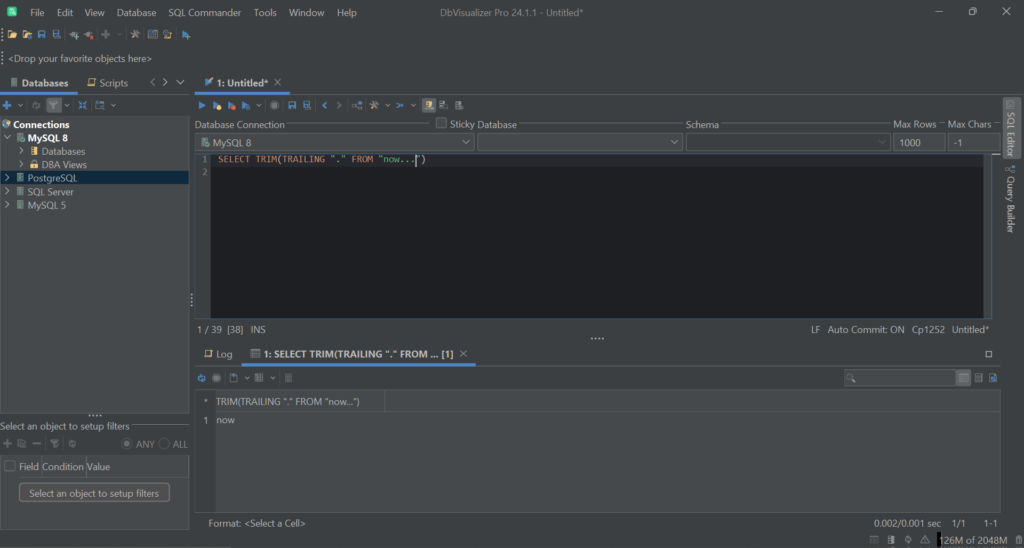
Similarly, suppose you want to remove the trailing “.” characters from the “now…” string. Achieve that with the following TRIM query in SQL:
                    1
                    SELECT TRIM(TRAILING "." FROM "now...")
The resulting string will be:
                    1
                    "now"
Next, remove all leading and trailing whitespace characters from a string with:
                    1
                    SELECT TRIM("                  Main title               ")
As expected, the result will be:
                    1
                    "Main title"

Note that some whitespace characters in the target string are white spaces, while others are tabs. If you are not familiar with this concept, a whitespace character is any character that represents a blank space between two characters.
Keep in mind that if target_string is NULL, then the TRIM SQL function will return NULL:

If you instead try to call TRIM in SQL with no target_string, you will get an SQL syntax error. That is because target_string is the only mandatory argument in the SQL TRIM syntax.
When to Use the TRIM SQL Function
Now that you know what the TRIM SQL function is and how it works, it is time to explore its most common use cases.
Data Cleansing
Assume you need to import data from external sources. These could be different data storage technologies or even the Web. In such a scenario, it is common for strings to have leading or trailing spaces. A TRIM query in SQL can clean up such data.
Assume you retrieved football data from a site via web scraping. You can clean that data with an [UPDATE query](https://www.dbvis.com/thetable/crud-advanced-update-queries/):
                    1
                    UPDATE players


                    2
                    SET first_name = TRIM(first_name),


                    3
                        middle_name = TRIM(middle_name),


                    4
                        last_name = TRIM(last_name);
User Input Validation
When dealing with user input—especially in forms—it is essential to sanitize the data before writing it to the database. This is key to preventing errors.
Use the SQL TRIM function to remove any extra spaces that users might input inadvertently:
                    1
                    INSERT INTO form_contact (full_name, email, message)


                    2
                    VALUES (TRIM("Jhon Doe"), TRIM("jhon.doe@gmail.com "), TRIM(" I would like to schedule a call...  "));
Basically, it all boils down to wrapping each input data with the TRIM function in the [INSERT query](https://www.dbvis.com/thetable/crud-advanced-insert-queries/).
Comparing String
When comparing strings, you may need to focus on the meaning of the two strings, regardless of leading or trailing spaces. For this reason, it is useful to trim them before a comparison operation:
                    1
                    SELECT *


                    2
                    FROM posts


                    3
                    WHERE TRIM(tag) = TRIM("Technology ");
While the TRIM SQL function call will add a performance overhead, this approach leads to more accurate results. That is especially true if the string data in the database does not have a consistent format.
Best Practices With SQL TRIM
Here is a list of some tips and tricks you should keep in mind with dealing with TRIM in SQL:
Conclusion
In this guide, you’ve understood what the SQL TRIM function in SQL is and how it works. You now know that TRIM is a standard SQL function to remove leading and trailing spaces and more. Thanks to the examples shown here, you have also learned how and when to use it.
Using functions like TRIM in SQL becomes easier with a powerful database client. The best one based on user satisfaction? DbVisualizer! This powerful database client supports many DBMS technologies, comes with advanced query optimization functionality, and can generate ERD-like schemas with a single click. Try DbVisualizer for free!
FAQ
What are the variants of TRIM in SQL?
In SQL, there are three variants of the TRIM function:
How to SQL TRIM leading zeros in MySQL?
The TRIM function in MySQL also accepts numbers. To trim leading zeros in MySQL, you can just use a plain TRIM query:
                    1
                    SELECT TRIM(LEADING 0 FROM 007);
The result will be:
                    1
                    7
Note that such a syntax won’t be effective in PostgreSQL and SQL Server.
Is the TRIM SQL Server function available?
Yes, TRIM is a function in SQL Server. Its purpose is to remove leading and trailing given characters from a string. The TRIM SQL Server support also extends to LTRIM and RTRIM for removing characters at the beginning and at the end of a string, respectively.
Is there any performance consideration with the TRIM SQL function?
Yes, there are performance considerations with the TRIM function. It may impact query performance, especially on large datasets or when used excessively. Avoid unnecessary use of TRIM to maintain optimal performance. Regularly assess and optimize queries involving TRIM for efficient data processing.
What is the difference between the SQL TRIM function and the SQL REPLACE function?
The SQL TRIM function removes the specified leading and trailing characters from a string, while the SQL REPLACE function replaces occurrences of a specified substring within a string with another substring. In short, TRIM operates on the edges of the string, while REPLACE can modify any part of it.


