intro
Learn PostgreSQL backup and restore procedure with this hands-on tutorial. Master pg_dump, pg_restore, and disaster recovery scenarios using real examples.

Last month, my team's routine server update turned into a 6-hour outage when our PostgreSQL database became corrupted. We recovered the data, but it highlighted how many teams treat backups as an afterthought—until they need them.
This tutorial simulates a real database disaster and walks through the complete recovery process. You'll learn PostgreSQL's backup tools (pg_dump and pg_restore), encounter common restore errors, and practice the troubleshooting techniques that experienced DBAs use.
Setting Up
Before we go into this tutorial, ensure you have these:
Time to get right into this PostgreSQL backup and restore tutorial!
Step 1: Set Up Your Working Directory
Create a directory for your project and move into it:
                    1
                    mkdir ~/postgresql-backup-demo


                    2
                    cd ~/postgresql-backup-demo
Then, create the local data directory:
                    1
                    mkdir postgresqldata
OrbStack will directly mount that directory.
Step 2: Create the Docker Compose File
Create a file called postgresql.yml:
                    1
                    nano postgresql.yml
Then, populate it with this content:
                    1
                    version: '3.8'


                    2


                    3
                    services:


                    4
                      survey-postgresql:


                    5
                        image: postgres:17


                    6
                        volumes:


                    7
                          - ./postgresqldata:/var/lib/postgresql/data


                    8
                        environment:


                    9
                          - POSTGRES_USER=dbadmin


                    10
                          - POSTGRES_PASSWORD=securepassword123


                    11
                          - POSTGRES_DB=postgres


                    12
                        ports:


                    13
                          - "5432:5432"
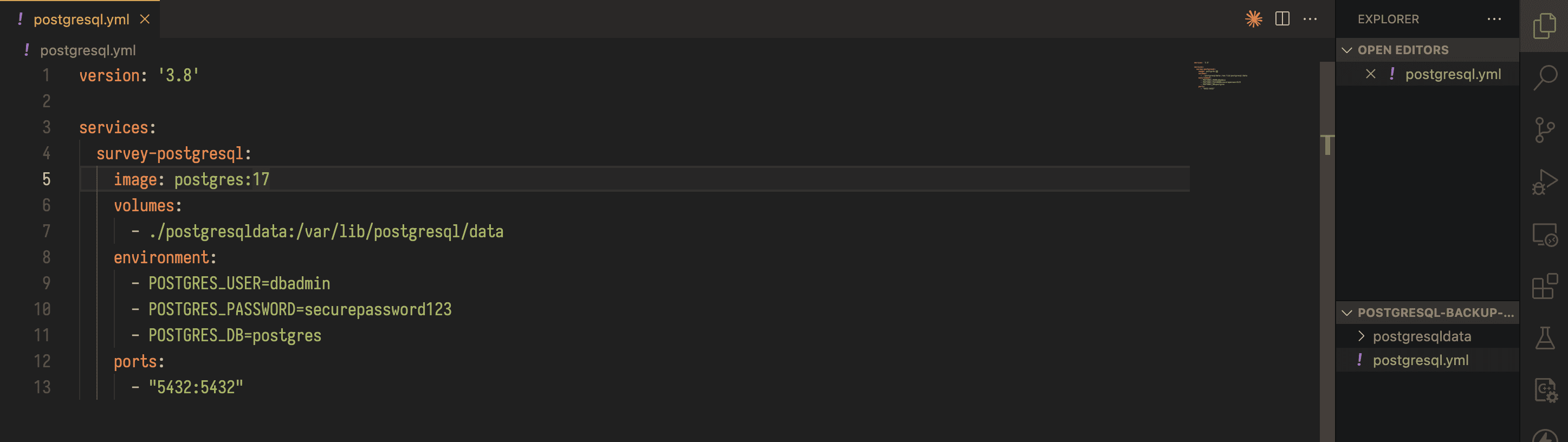
Its worth noting that in production environments, you should use an even stronger authentication mechanism.
Step 3: Create PostgreSQL Container
Start your Docker composer for PostgreSQL server initialization with:
                    1
                    docker compose -f postgresql.yml up -d
This is the output you should get:
                    1
                    $ docker compose -f postgresql.yml up -d


                    2
                    [+] Running 2/2


                    3
                     ✔ Network postgresql-backup-demo_default                                 Created      0.0s


                    4
                     ✔ Container postgresql-backup-demo-survey-postgresql-1                   Started      0.3s
Now, access the database server and log in:
                    1
                    docker exec -it $(docker ps -q --filter ancestor=postgres:17) bash
                    1
                    psql -U dbadmin -d postgres
Step 4: Build the Survey Platform Database and Create the Survey Data Structure
Create a dedicated role for our application, which is a security best practice:
                    1
                    CREATE ROLE demo;
Then, create the sample database that will contain survey info:
                    1
                    CREATE DATABASE surveyplatform OWNER demo;
Now, populate the surveyplatform database with a sample respondents table:
                    1
                    CREATE TABLE respondents (


                    2
                        id SERIAL PRIMARY KEY,


                    3
                        name VARCHAR(255),


                    4
                        school_id INTEGER


                    5
                    );


                    6


                    7
                    INSERT INTO respondents (name, school_id) VALUES


                    8
                    ('Mark', NULL),


                    9
                    ('Jeff', NULL),


                    10
                    ('Jude', NULL),


                    11
                    ('Kiki', NULL),


                    12
                    ('Rodry', NULL),


                    13
                    ('Vini', NULL),


                    14
                    ('Dahnke', NULL),


                    15
                    ('Arafat', NULL),


                    16
                    ('Emmanuel', NULL),


                    17
                    ('Franco', NULL);
Finally, exit the PostgreSQL process to prepare our backup:
                    1
                    \q
Step 5: Creating the Safety Net (The Initial Backup)
This is the crucial moment. Create a backup before disaster strikes using pg_dump:
                    1
                    pg_dump -U dbadmin -h localhost -W -F c -f /var/lib/postgresql/data/2025-04-01-original.dump surveyplatform
                    1
                    exit
The -F c flag creates a "custom format" backup. This is PostgreSQL's most versatile backup format: compressed, fast to restore, and supports selective recovery. The -W flag prompts for a password, ensuring proper authentication.
Simulating Real-World Database Failure
Now comes the heart-pounding part. We are going to simulate what happens when things go horribly wrong. In the real world, this might be any of these:
Simulate that with these commands:
                    1
                    # Return to our "crashed" database server


                    2
                    docker exec -it $(docker ps -q --filter ancestor=postgres:17) bash


                    3


                    4
                    # Connect as the admin to assess the damage


                    5
                    psql -U dbadmin -d postgres
                    1
                    -- Simulate catastrophic data loss


                    2
                    DROP DATABASE surveyplatform;


                    3
                    DROP ROLE demo;


                    4


                    5
                    -- Exit to begin our recovery


                    6
                    \q
Imagine for example, your database is gone. All 10 survey respondents, vanished. In a real scenario, this represents potentially millions of dollars in lost business data. Your users can't access the platform and pressure is mounting.
Step 6: The First Recovery Attempt (And Why It Fails)
This is where most people panic. Let's see what happens when we try to restore the data using pg_restore, without understanding PostgreSQL's security model:
                    1
                    # Attempt to restore our backup


                    2
                    pg_restore -U dbadmin -h localhost -W -d postgres -C /var/lib/postgresql/data/2025-04-01-original.dump
This is the error we would get:

PostgreSQL tried to restore your database, but it could not complete the operation because the demo role (user account) that owned the database doesn't exist anymore. This is like trying to restore files to a user account that was deleted.
This is what we need to understand when databases crash, sometimes user accounts and permissions get corrupted or lost. Your backup contains not just data, but also ownership and permission information.
Step 7: The Fix — Understanding PostgreSQL Security
This is the methodical approach that experienced DBAs use:
                    1
                    # Connect to PostgreSQL to fix the underlying issue


                    2
                    psql -d postgres -U dbadmin
                    1
                    -- Recreate the missing role (this is the key step most people miss)


                    2
                    CREATE ROLE demo;


                    3


                    4
                    -- Check what databases exist (investigating the current state)


                    5
                    \l
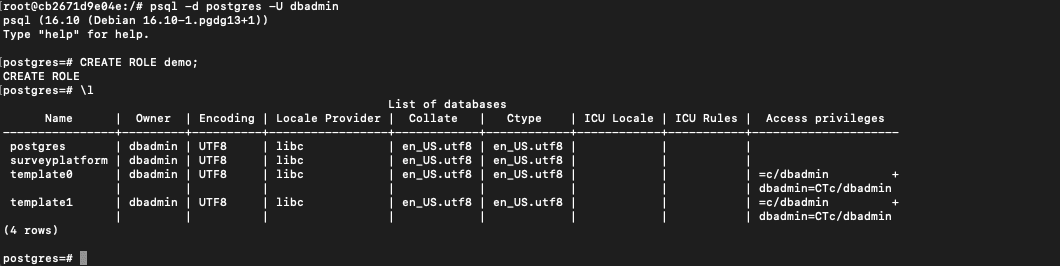
You might see that surveyplatform was partially created but incomplete. This is normal, as PostgreSQL stopped the restore when it hit the permission error:
Complete the restore procedure with:
                    1
                    -- Clean up the incomplete restore attempt


                    2
                    DROP DATABASE IF EXISTS surveyplatform;


                    3


                    4
                    -- Exit PostgreSQL


                    5
                    \q
It’s appropriate to learn that database recovery is not just about restoring data. It is about recreating the entire environment, including users, permissions, and database structures.
Step 8: The Successful Recovery
Now, for the satisfying part, watch everything come back to life:
                    1
                    # Attempt the restore again (with proper setup)


                    2
                    pg_restore -U dbadmin -h localhost -W -d postgres -C /var/lib/postgresql/data/2025-04-01-original.dump
Great! Our database is now restored. But did we actually recover everything? Let's verify our survey platform is fully operational:
                    1
                    # Connect to verify our recovery


                    2
                    psql -d postgres -U dbadmin
                    1
                    -- Switch to our restored database


                    2
                    \c surveyplatform


                    3


                    4
                    -- Check if our precious survey data survived


                    5
                    SELECT * FROM respondents;
The result will be:
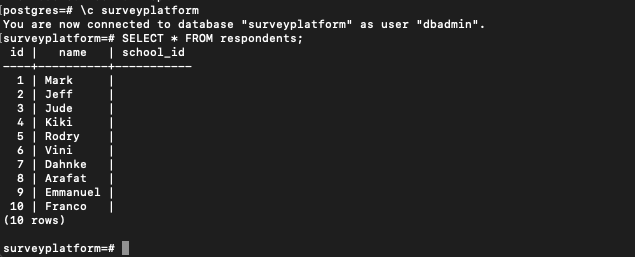
Victory! You should see all 10 survey respondents, exactly as they were before the disaster. Your survey platform database is back in shape. Crisis averted!
At this point, it is only right that we modify some data to test our backup strategy:
                    1
                    -- Simulate a data update (maybe Mark changed his name to Marcus)


                    2
                    UPDATE respondents SET name = 'Marcus' WHERE id = 1;


                    3


                    4
                    -- Verify the change


                    5
                    SELECT * FROM respondents WHERE id = 1;


                    6


                    7
                    -- Exit PostgreSQL


                    8
                    \q


                    9
                    exit
Now, we have modified the data. This will help us verify that our various backup formats can restore to specific points in time.
Mastering the Four Backup Formats: The Complete Toolkit
Real database administrators need multiple backup strategies. Each format serves different purposes, and knowing when to use each one can save you hours in emergency situations.
| Use Case | Backup Method |
|---|---|
| Version control systems, manually inspecting or modifying backups before restoring/great for debugging | pg_dump -f /var/lib/postgresql/data/2025-04-01-plaintext.sql -U dbadmin -h localhost -W surveyplatform |
| Compression, speed, and selective restoration | pg_dump -F c -f /var/lib/postgresql/data/2025-04-01-custom.dump -U dbadmin -h localhost -W surveyplatform |
| Huge databases/parallel processing, | pg_dump -F d -f /var/lib/postgresql/data/2025-04-01-directory -U dbadmin -h localhost -W surveyplatform |
| Easy file management, easy transfer of backups between systems | pg_dump -F t -f /var/lib/postgresql/data/2025-04-01-tar.tar -U dbadmin -h localhost -W surveyplatform |
Step 9: Creating our Complete Backup Arsenal
Let’s begin by creating our complete backup arsenal:
                    1
                    # Access your database server again


                    2
                    docker exec -it $(docker ps -q --filter ancestor=postgres:17) bash


                    3


                    4
                    # Create four different backup formats (this is your complete toolkit)


                    5
                    # 1. Plain Text SQL Backup (human-readable, great for debugging)


                    6
                    pg_dump -f /var/lib/postgresql/data/2025-04-01-plaintext.sql -U dbadmin -h localhost -W surveyplatform


                    7


                    8
                    # 2. Custom Format (compressed, most versatile)


                    9
                    pg_dump -F c -f /var/lib/postgresql/data/2025-04-01-custom.dump -U dbadmin -h localhost -W surveyplatform


                    10


                    11
                    # 3. Directory Format (parallel processing for large databases)


                    12
                    pg_dump -F d -f /var/lib/postgresql/data/2025-04-01-directory -U dbadmin -h localhost -W surveyplatform


                    13


                    14
                    # 4. TAR Format (easy file management)


                    15
                    pg_dump -F t -f /var/lib/postgresql/data/2025-04-01-tar.tar -U dbadmin -h localhost -W surveyplatform
Step 10: Preparing for Restore Tests
First, let's reset our data to the "Marcus" state for testing:
                    1
                    psql -d surveyplatform -U dbadmin -h localhost
                    1
                    -- Reset the name back to Mark for our restore test


                    2
                    UPDATE respondents SET name = 'Mark' WHERE id = 1;


                    3


                    4
                    -- Verify current state


                    5
                    SELECT * FROM respondents WHERE id = 1;


                    6
                    \q
Now we'll test each restore method to see how they handle our backed-up data (where the name was "Marcus").
Step 11: Testing Plain Text Restore (The Exception)
Try to restore the plain text backup with pg_restore:
                    1
                    pg_restore -U dbadmin -h localhost -W -d surveyplatform -c /var/lib/postgresql/data/2025-04-01-plaintext.sql
This is expected to fail with:
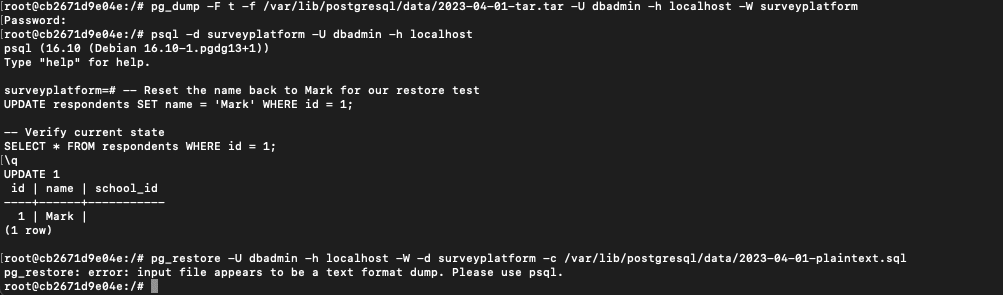
This is because plain text backups require a different tool. In particular, it needs psql instead of pg_restore:
                    1
                    # The correct way to restore plain text backups


                    2
                    psql -U dbadmin -h localhost -W -d surveyplatform -f /var/lib/postgresql/data/2025-04-01-plaintext.sql
Step 12: Testing Custom Format Restore
                    1
                    # This should work flawlessly (the most reliable method)


                    2
                    pg_restore -U dbadmin -h localhost -W -d surveyplatform -c /var/lib/postgresql/data/2025-04-01-custom.dump
After running this, verify it worked:
                    1
                    # Check if the restore worked


                    2
                    psql -d surveyplatform -U dbadmin -h localhost -c "SELECT * FROM respondents WHERE id = 1;"
You should see "Marcus" - proving the backup captured the exact state when we created it.

The final verification showing "Marcus" provides that satisfying moment of proof that everything works correctly.
Tutorial complete!
Conclusion
You've now successfully navigated a complete PostgreSQL disaster recovery scenario. You understand why backups fail, how to fix common restore errors, and most importantly, you've verified that your backup strategy actually works. The custom format backup you've mastered will handle the majority of real-world scenarios you'll encounter as a database administrator.
While command-line tools like pg_dump and pg_restore form the backbone of PostgreSQL backup operations, visual database management tools like DbVisualizer can simplify your daily database administration tasks, from monitoring backup schedules to quickly inspecting restored data structures. The combination of solid backup fundamentals and efficient management tools gives you the complete toolkit for confident database administration.
Download DbVisualizer for free today, and happy querying!
FAQ
Which PostgreSQL backup format should I use for daily backups?
Use the custom format (-F c) for most situations. It's compressed, fast to restore, and supports selective recovery.
The command is:
                    1
                    pg_dump -U username -F c -f backup.dump database_name
Custom format works with pg_restore and handles the majority of real-world backup instances.
How often should I test my PostgreSQL backups?
Test backups monthly at minimum. Create a test database, restore your backup, and verify the data integrity. Many backup failures are only discovered during emergencies.
A simple test: restore to a test database and run SELECT count(*) FROM your_main_table; to verify row counts match your expectations.
Why do I get "role does not exist" errors when restoring backups?
This happens when the database role (user) that owned the original database doesn't exist in the target system. Before restoring, create the missing role:
                    1
                    CREATE ROLE rolename;
Then run your pg_restore command.
Can I restore a PostgreSQL backup to a different database name?
Yes. First create the target database:
                    1
                    createdb new_database_name
Then, use pg_restore without the -C flag:
                    1
                    pg_restore -U username -d new_database_name backup.dump
The -C flag creates the database with the original name, so omit it when restoring to a different database.