intro
It’s widely known that indexes are amongst the best ways to improve database performance. But they also need to be maintained. Here’s what you need to know about SQL index maintenance in open source databases.


If you’re a seasoned developer, you would have certainly heard about ways to improve database performance. Methods to improve open source database performance vary from developer to developer and may be impacted by a variety of things, however, most of us would agree that SQL index would be amongst the best ways to improve query and database performance no matter our seniority.
Let’s learn more about them!
What are Indexes?
At a high level, indexes are data structures used to improve data performance. That’s the case because a SQL index acts as a “pointer” to data telling our database where certain data is located and how best to reach it.
Think of indexes as an index in a book: if you would read a book like “Hacking MySQL: Breaking, Optimizing, and Securing MySQL for Your Use Case,” you would notice that the start of the book contains an index. In this case, an index is a reference to certain contents in a book. It isn’t hard to realize that indexes help book readers quickly skip to and find content of interest.
Indexes in database management systems work in a very similar fashion and although some database management systems have more index types than others do, all indexes have something in common: they rapidly speed up access to data when data is being read!
Types of Indexes
Take a look at this:
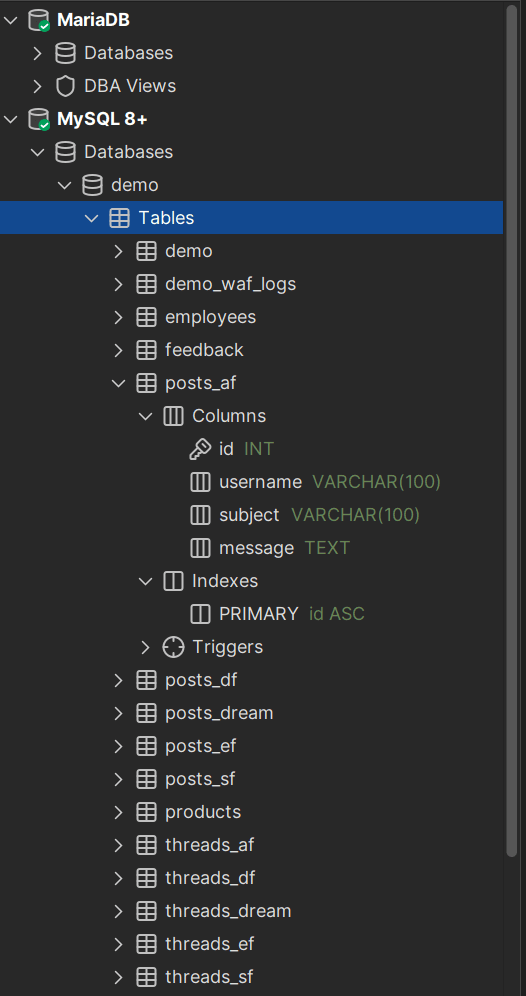
This is the left side of an SQL client, DbVisualizer to be exact. This part of the tool depicts the databases overseen by DbVisualizer and the tables within them and everything within the tables can be expanded: if we expand a table, we can see the columns it has and the indexes within.
If you look closely, we also have a primary index on the table. A primary index:
Each type of index is suitable for a different task: depending on what database management system you use, too, indexes can have a variety of types that are suitable for different use cases.
How to Maintain an SQL Index?
Regardless of the type of SQL index you find yourself using, your database (and the indexes within) needs to be maintained. To maintain an SQL index:
● Assess whether or not the SQL index is used in the first place: Make use of the SQL EXPLAIN query clause and employ it before your SELECT query to see if the index is used by your database. Depending on what database management system you use, it will return columns and values in those columns. One of those columns will be titled key and it will concern any indexes that your database used. To the left and to the right, you will see columns possible_keys and key_len depicting possible indexes that may have been chosen but been ignored and the length (data length) of the values within that index.

● Identify and remove redundant indexes: Employ the aforementioned EXPLAIN clause in your database management system to quickly identify and remove redundant and unused indexes. To see if a SQL index is redundant, add the EXPLAIN clause in front of your SELECT query and if you constantly see your index in the possible_keys column but not in the key column (that’s your database saying that I considered using this index, but I didn’t use it due to your query structure), refine your queries by:
● Manage indexes during and after data modification processes: After you insert, update, or delete data, data is deleted from the SQL index structure as well. Always keep that in mind and consider rebuilding your indexes after some time of inserting, updating, or deleting data from the table/columns related to the index.
● Design indexes carefully and limit the number of indexes in use: Always consider your database structure, your use case, and the people and circumstances your application is being used before adding any indexes. Consider the disk space, too: every index is a data structure, and every data structure will occupy some space on the disk.
When maintaining indexes, consider the use case of your application and the SQL queries crafted by your application. Maintaining queries and indexes, contrary to popular belief, is rather simple: all you have to do is identify the scripts that issue SELECT queries, then run them again adding EXPLAIN at the beginning of the query, and inspect the output keeping in mind the tips given above. Do that and you will notice what indexes need to be modified, updated, rebuilt, or removed altogether.
Sometimes, maintaining indexes can seem like very tedious work: such tasks can be made significantly easier by using tools like DbVisualizer. DbVisualizer is a well-known SQL client that can alleviate many issues concerning more than 50 databases from ClickHouse to DataBricks and it also comes with a 21-day free trial, so if you want to optimize your database performance beyond an SQL index, so we suggest you give it a try today.
Conclusion
To maintain your SQL index structures, assess the use case facilitating the use of an index in the first place. Then, identify and remove redundant SQL indexes by following the tips given in this article. Finally, don’t forget to manage your indexes before, during, and after data modification processes, and make sure your indexes are designed carefully.
To do that, read blogs like the one produced by DbVisualizer, read books on your database management system of choice, and don’t forget to follow applicable advice given in the documentation.
FAQ
How to maintain an SQL index?
To maintain an SQL index, apply the proper type of index relevant to your use case, follow advice given in blogs and the documentation of your DBMS, attend industry conferences and seminars, and read books.
Why should I use DbVisualizer?
Consider using DbVisualizer as it is a versatile SQL client able to alleviate a variety of database-related problems regardless of what database management system you find yourself using. One of its flagship features is its SQL client allowing you to quickly and easily interact with the database management system of choice, but you have many other options from the ability to edit your tables as if it were a spreadsheet, to dragging and dropping the tables you want to query inside of the tool.