

AZURE SYNAPSE serverless CLIENT
The Azure Synapse Serverless client leading in user ratings



a top-performing azure synapse SERVERLESS CLIENT
An Azure Synapse Serverless client you can trust



Azure Synapse Analytics offers two main types of SQL pool models where Azure Synapse Serverless is one, it provides on-demand SQL query capabilities over data stored in Azure Data Lake without needing to provision resources in advance.
DbVisualizer for Azure Synapse Serverless is a powerful SQL client and has been a top performing database editor for a long time. It includes all you need to connect, develop and manage your Azure Synapse Serverless databases. It has support for Azure Synapse Serverless specific object types and everything else that makes your Azure Synapse Serverless databases great.
OBJECT TYPES AND ACTIONS
Supports object types specific to Azure Synapse Serverless
DbVisualizer gives you full control of your Azure Synapse Serverless databases. It even offers support for object types and actions specific to Azure Synapse Serverless. Here are some examples.
Views
A virtual table of a predefined SQL query that doesn't store any data itself.

Procedures
Stored code blocks in Azure Synapse Serverless for repetitive tasks and logic.

DBA
Object types to manage Users, Roles and Processes.

PROPERTIES
Configurable for how you want to work
These properties, as well as numerous others, can be adjusted to align perfectly with your preferred way of working.
Utilize the properties panel to customize the Azure Synapse Serverless client to suit your specific preferences. Ensure that users provide a User-ID and password for IDE access. You can also configure various properties, such as enabling script pre-processing, establishing auto-commit, and more, right from this interface.


SQL client
The universal
database tool
DbVisualizer seamlessly handles objects and properties specific to Synapse - and it includes powerful features that work across almost any data source.
VISUALIZATION
Automatic visualizations
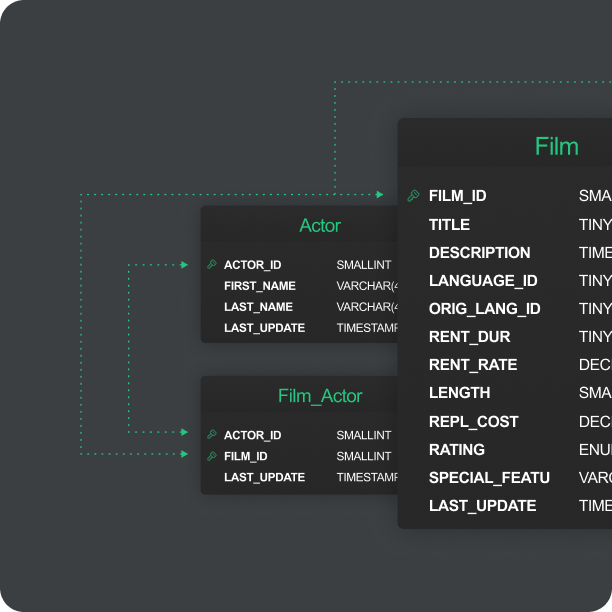
Relations are crucial in Azure Synapse Serverless, and DbVisualizer will help you automatically generate visual Entity Relationship Diagrams, These diagrams enable you to intuitively understand the dependencies and opportunities.
EDITOR
A powerful editor for Azure Synapse Serverless
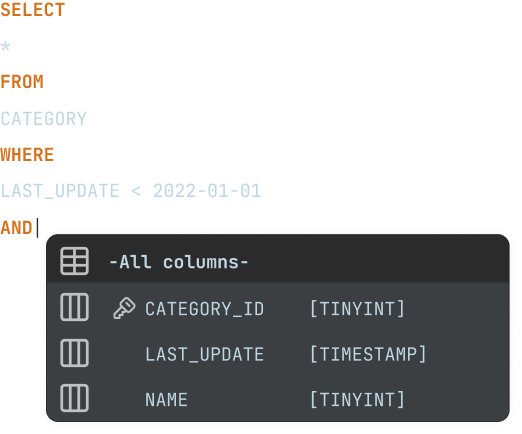
Writing SQL for Azure Synapse Serverless is similar, but not exactly the same as for other data sources. DbVisualizer understands these nuances and helps you you write SQL queries more efficiently.
MAVEN
JDBC driver management via Maven
Utilizing the JDBC driver manager, you can easily establish connections to your Azure Synapse Serverless databases using JDBC drivers, offering a variety of available versions. Additionally, DbVisualizer includes the latest built-in JDBC driver for Azure Synapse Serverless.



reviews
Our users love our product
Users love using DbVisualizer with Azure Synapse.
Mike V
Corporate Director of Information Systems
Pros: Easy to install and configure; use same interface across multiple database platforms. Quick and dirty use of SQL while still being able to do things like browse tables.Cons: Rough upgrade process, but the most recent major release fixed this with a more automatic process.Overall: We needed...
Pros: Easy to install and configure; use same interface across multiple database platforms. Quick and dirty use of SQL while still being able to do things like browse tables.Cons: Rough upgrade process, but the most recent major release fixed this with a more automatic process.Overall: We needed a tool to just be able to get data out of RDMS'. This fit the bill. It uses a JDBC common denominator to show less

Verified user.
Review from SourceForge
Michel M.
Oracle Exprt
User-friendly tool Pros The integrated "compare" functionality The GIT integration The robustness of the software The number of regular updatesCons The "describe" function using Oracle data dictionary. Apart from that, I don't see any real "flaws" to point out. In any case, nothing insurmountable.Switched from ToadPrice and functionalities. User-friendly
Pros The integrated "compare" functionality The GIT integration The robustness of the software The number of regular updatesCons The "describe" function using Oracle data dictionary. Apart from that, I don't see any real "flaws" to point out. In any case, nothing insurmountable.Switched from ToadPrice and functionalities. User-friendly show less

Verified user.
Review from Capterra
Daniel P.
Analyst
DbVis Best Choice Very positive, I've had amazing service when I've had to email in, and very fast responses to all inquiries.Pros Absolutely flawless GUI with ease of navigation, robust ability to connect with multiple conne...
Very positive, I've had amazing service when I've had to email in, and very fast responses to all inquiries.Pros Absolutely flawless GUI with ease of navigation, robust ability to connect with multiple connections of varying types, or versions, and outstanding query formatting abilities. Database Dictionary creation could use a little bit of work, but with the addition of AI in the newest version the groundwork is definitely there.Cons Pay wall. I understand show less
Verified user.
Review from Capterra
Rob G.
Operations and Systems Director
What is not to like about DbVisualizer? Superb. I use it every day! I have a number of databases that I regularly use to either develop against or to extract information for whatever analysis I want to perform. My goto is DbVisual...
Superb. I use it every day! I have a number of databases that I regularly use to either develop against or to extract information for whatever analysis I want to perform. My goto is DbVisualizer. No other tool I have used comes anywhere close.Pros What I love most is that I can EASILY post lots of data to and from a spreadsheet!! What you are looking to seed data this is show less
Verified user.
Review from Capterra
Michael F.
CTO
Really great database tool Really positive experience with a great product that I can recommend to anybody that works with different databases.Pros Really easy to use with many different databases and auth options. Have not yet found any thing that can’t be done.Cons Java setup and dependencies can be a bit tricky on some setups, but I have it working on both windows and Linux, so not that bad.
Really positive experience with a great product that I can recommend to anybody that works with different databases.Pros Really easy to use with many different databases and auth options. Have not yet found any thing that can’t be done.Cons Java setup and dependencies can be a bit tricky on some setups, but I have it working on both windows and Linux, so not that bad. show less
Verified user.
Review from Capterra
Karl Nicoletti
My DB Client of choice! DbVisualizer is the easiest, most straightforward database development and troubleshooting tool I have used in my 30+ years as a developer. I have been using the Pro edition for almost five years ...
My DB Client of choice! DbVisualizer is the easiest, most straightforward database development and troubleshooting tool I have used in my 30+ years as a developer. I have been using the Pro edition for almost five years now. Some of the features I find MOST useful are: 1) View complete DDL including all constraints, 2) Debug Window!, 3) Drill down into and view blob field contents, 4) Format SQL, show less

Verified user.
Review from g2.com
The multi-database tool your mom warned you about What do you like best about DbVisualizer? DbVis's biggest strength in my work flow is the ability to connect to multiple database backends. The ability to name tabs with...
What do you like best about DbVisualizer? DbVis's biggest strength in my work flow is the ability to connect to multiple database backends. The ability to name tabs without saving, the logging interface, ability to export results, and doing so while feeling snappy. It makes for a fantastic experience. I don't use the AI features as of now, but hope to dig into them when I finally have time. I've never show less
Verified user.
Review from g2.com
Eric F.
Business Intelligence Developer
DbVisualizer Streamlines Data Gathering Needs into 1 Application DbVisualizer streamlines my query needs by making it a one-stop shop. I have MongoDB, T-SQL, Oracle, etc. connections set up so I can access everything from o...
DbVisualizer Streamlines Data Gathering Needs into 1 Application DbVisualizer streamlines my query needs by making it a one-stop shop. I have MongoDB, T-SQL, Oracle, etc. connections set up so I can access everything from one simple query tool. I like how I can connect to multiple database types from one application. I also like being able to quickly view the data without having to write or wait for a default show less
Verified user.
Review from Capterra
Anup C.
Software Engineer
DbVisuaizer: A Reliable and Versatile Tool for Everyday Database Management Overall, DbVisualizer is a dependable and powerful database tool that excels in relational data management.Pros - Easy to use. - Clean interface - Lea...
Overall, DbVisualizer is a dependable and powerful database tool that excels in relational data management.Pros - Easy to use. - Clean interface - Learning curve is moderate - Like visual query building, ER diagrams, and clear table relationship views making easier to understand complex database structures.Cons So far, I genuinely have not encountered any significant issues or drawbacks with the tool, and it has consistently met my expectations across all areas of show less
Verified user.
Review from Capterra
DBViz is the go-to for multi-database development. Multi-database development. Query results that can be searched. Connection highlighting to denote prod and dev environments. Link to your scripts folder and directly open them in the tool.
DBViz is the go-to for multi-database development. Multi-database development. Query results that can be searched. Connection highlighting to denote prod and dev environments. Link to your scripts folder and directly open them in the tool. show less
Verified user.
Review from g2.com
AWARDS
Used and rated
by the best
Recognized by industry leaders and honored
across top review platforms!





FAQs
Azure Synapse Serverless is one of two SQL pool models in Azure Synapse Analytics that is a cloud-based data integration, data warehousing, and big data analytics service.
The Azure Synapse Serverless client is used to connect, manage and develop your Azure Synapse Serverless databases.
The database client is used to manage your Azure Synapse Serverless database with actions like insert, delete and update tables.
DbVisualizer has a driver manager, JDBC, built in so you can easily connect to Azure Synapse Serverless.
DbVisualizer is a feature-packed query tool where you write SQL queries. It helps you by providing clever highlighting operations and auto-complete suggestions. The tool can visualize your database in an ERD where you see all relationships and dependencies. You can also use the visual query builder, which automatically generates SQL code as you drag and drop tables and select what values you want to include. And a lot more.
Download DbVisualizer and connect to your Azure Synapse Serverless database. The client can be used for free with limited functionality or you can try the Pro version for 21 days or buy the Pro version to get the full function set.
The ability to run ad-hoc queries directly on data stored in Azure Data Lake without needing to move, transform, or pre-provision resources.
Yes you can. With DbVisualizer you get one tool to navigate and manage all (on this list) data sources that are used in your business.
DbVisualizer has a built-in driver manager where you connect to Azure Synapse Serverless from the list of available databases, enter the credentials and DbVisualizer automatically sets up the connection.
DbVisualizer has extended support for Azure Synapse Serverless object types and functions, you can see the full list of supported object types here.
DbVisualizer is built to make your life easier and you can easily customize the layout and functions to match your workflow. You can, for example put multiple SQL editors next to each other for quick comparisons, re-arrange tabs, work with variables, save scripts, get help with the auto-complete feature, and a lot more.
All of these are different environment labels for how people refer to the application in which you do the actual coding, though they mean more or less the same thing. A client refers to that you connect to a server somewhere else, and the GUI refers to the system's graphical interface. While the IDE refers to the larger "integrated development environment", the editor refers to a specific part of the client in which you write the code. A workbench focuses more on the process of development itself.
Yes, you browse your database with DbVisualizer. You can navigate and manage the tables, relations, and custom objects, and there are automatic visualization tools for generating entity relationship diagrams (ERDs) and a lot more.