Generating SQL for a Procedure or Function
To generate SQL for one or more procedures or functions, select them in the Databases tab, right-click and select Script Procedure or Script Function. You can generate a CALL, CREATE or DROP statement, or just the name of the object. Generating SQL for several objects at once is only in DbVisualizer Pro.
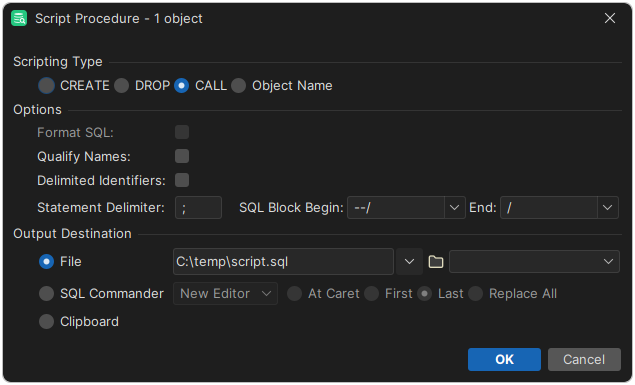
In the dialog, choose the type of statement to generate, and set options such as delimited identifiers, qualified names and the statement delimiter. Under Output Destination, choose whether to insert the text in an open or a new SQL Commander editor, save it to a file, or copy it to the clipboard. For an editor, you can also choose where to insert the text.
To format the generated SQL using your SQL formatting settings, select Format SQL. This option isn't available for CALL and Object Name, or when the legacy formatter is selected.
You can also open the dialog by dragging objects from the Databases tab to an editor; see Generating SQL for an object.
For CREATE statements, the SQL Block Begin and End delimiters are used instead of the statement delimiter. They enclose each statement, so that the semicolons in the body don't split it.