Executing a Procedure or Function
Only in DbVisualizer Pro
This feature is only available in the DbVisualizer Pro edition.
You can execute a procedure or function from its code editor, or using the @call command in SQL Commander. You can also execute a procedure or function in a package from the code editor of the package.
Executing from the code editor
In the code editor, click Execute Procedure in the toolbar. If there are unsaved changes, save them first. For a package, select the procedure or function to execute in the Available Routines dialog. DbVisualizer then generates a script that calls the object, with a variable for each parameter, and executes it.
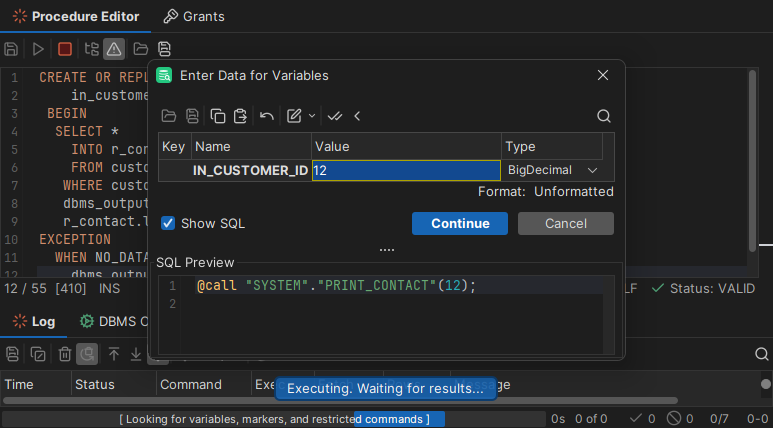
Enter the parameter values in the dialog that opens, and click Continue. The result is shown below the code editor. Return values and output parameters are written to the Log tab.
Executing from the code editor isn't supported for functions in Snowflake, Exasol and Cassandra, or for packages in MariaDB.
Using @call in SQL Commander
To call a procedure, use the following syntax:
@call <ProcedureName>(<ParamList>)
To call a function and get its return value:
@call <OutVariable> = <FunctionName>(<ParamList>)
<ParamList> is a comma-separated list of values and variables. Qualify the procedure or function name with a schema or catalog if the database needs it, for example "HR"."GET_STATUS". <OutVariable> is a variable with dir=out, described below.
For a variable, use the dir option to say whether it is an input (dir=in), an output (dir=out) or both (dir=inout). A variable that gets a value, such as a return value or an output parameter, needs dir=out. Add noshow so that you aren't asked for a value for it. For example:
@call my_process('literal input',
                 ${var_in||(null)||String||dir=in}$,
                 ${var_out||(null)||String||dir=out noshow}$,
                 ${var_inout||'in_value'||String||dir=inout}$);
To see the value of an output variable, write it to the Log tab using @echo:
@call ${STATUS||(null)||String||noshow dir=out}$ = "HR"."GET_STATUS"(1002);
@echo STATUS: ${STATUS}$;
You can also use an output value as input to another call. Then change the direction of the variable to dir=in:
@call ${STATUS||(null)||String||noshow dir=out}$ = "HR"."GET_STATUS"(1002);
@call "HR"."UPDATE_STATUS"(1000, 2000, ${STATUS||||String||noshow dir=in}$);
To generate a @call script instead of writing it, right-click the procedure or function and select Script Procedure or Script Function, and choose CALL. See Generating SQL for a Procedure or Function.