SQL clients

Best Cross-Platform Database IDEs in 2026

intro

What are the best cross-platform database IDEs? Read this blog and find out!

Tools used in the tutorial
Tool Description Link
Dbvisualizer DBVISUALIZER
TOP RATED DATABASE MANAGEMENT TOOL AND SQL CLIENT

Software tooling to manage your database is everywhere, but only IDEs enable you to unify workflows across teams teams using different platforms thus making them versatile and highly sought after.

Let's discover the best cross-platform database IDEs and clients of the year!

Why Choose a Database IDE?

Developers opt to work work with a database IDE (a specialized Integrated Development Environment for databases) because, as the name suggests, it can significantly improve your database development and management experience.

A database IDE provides you with:

  1. An all-in-one setup: Consolidate everything you need for database work (e.g., query writing, schema design, data browsing, and performance analysis) into a single interface. This eliminates the need to juggle multiple tools or applications.
  2. Smart autocomplete for SQL: Database IDEs offer suggestions as you type queries, helping you write correct SQL faster and reducing syntax errors. While some features may take a bit to get used to, they can dramatically speed up database operations in the long run.
  3. Error checking and query debugging: Most IDEs for databases highlight syntax errors, warn about potential issues, and even allow you to step through queries or stored procedures before running them on live data.
  4. Integrated version control and collaboration: Many of these tools integrate with Git or other version control systems, letting you track schema changes, manage migrations, and collaborate on SQL scripts directly within the tool.
  5. Support for multiple database platforms: From MySQL and PostgreSQL to SQL Server and Oracle, a good database IDE works across multiple database systems, so you do not need a separate tool for each platform.

Beyond these features, database IDEs help you manage complex databases with ease. Visual schema diagrams, dependency tracking, and query history allow for more efficient database administration.

Many database IDEs are also highly customizable, letting you adjust layouts, themes, and workflow behaviors to match your personal preferences.

Best Cross-Platform Database IDEs

Having a cross-platform database IDE is essential for anyone who work across different operating systems and database systems. It ensures consistent workflows, faster query development, and seamless collaboration. In this article, we’ll explore the best options available on the market.

So, what are the cross-platform databases? Let’s find out!

DbVisualizer

Auto-complete in DbVisualizer

DbVisualizer is a popular database client available for Windows, macOS, and Linux. It supports more than 60 data sources, including SQLite, MongoDB, ClickHouse, and MySQL. With powerful autocomplete features in its SQL editor, DbVisualizer offers a wide range of tools to help streamline your daily database work.

👍 Core features of DbVisualizer are as follows:

  • DbVisualizer comes with a powerful SQL editor with auto-complete capabilities: Besides data visualization, perhaps the second most well-known side of DbVisualizer is its SQL editor. The SQL client of DbVisualizer is a very powerful database IDE that is able to solve many database issues in 2026 and beyond: and if you’re not sure of something, you can just ask the AI.
  • Advanced visualization of database objects: Users of DbVisualizer can generate ER-like diagrams, and, unlike other SQL clients, drag-and-drop tables and design and modify database schemas right then and there too.
  • The highest user satisfaction: According to G2, the SQL tool with the highest user satisfaction in the market was DbVisualizer. DbVisualizer remains in the top position.

👎 However, DbVisualizer does:

  • Come with a learning curve: While it is true that there’s a great variety of features within DbVisualizer, it’s also true that some developers may find its extensive feature list overwhelming at times.
  • Have a limited amount of free features: Those who need advanced features like the explain plan in the SQL editor or support for more database types will have to upgrade to unlock premium features.

DBeaver

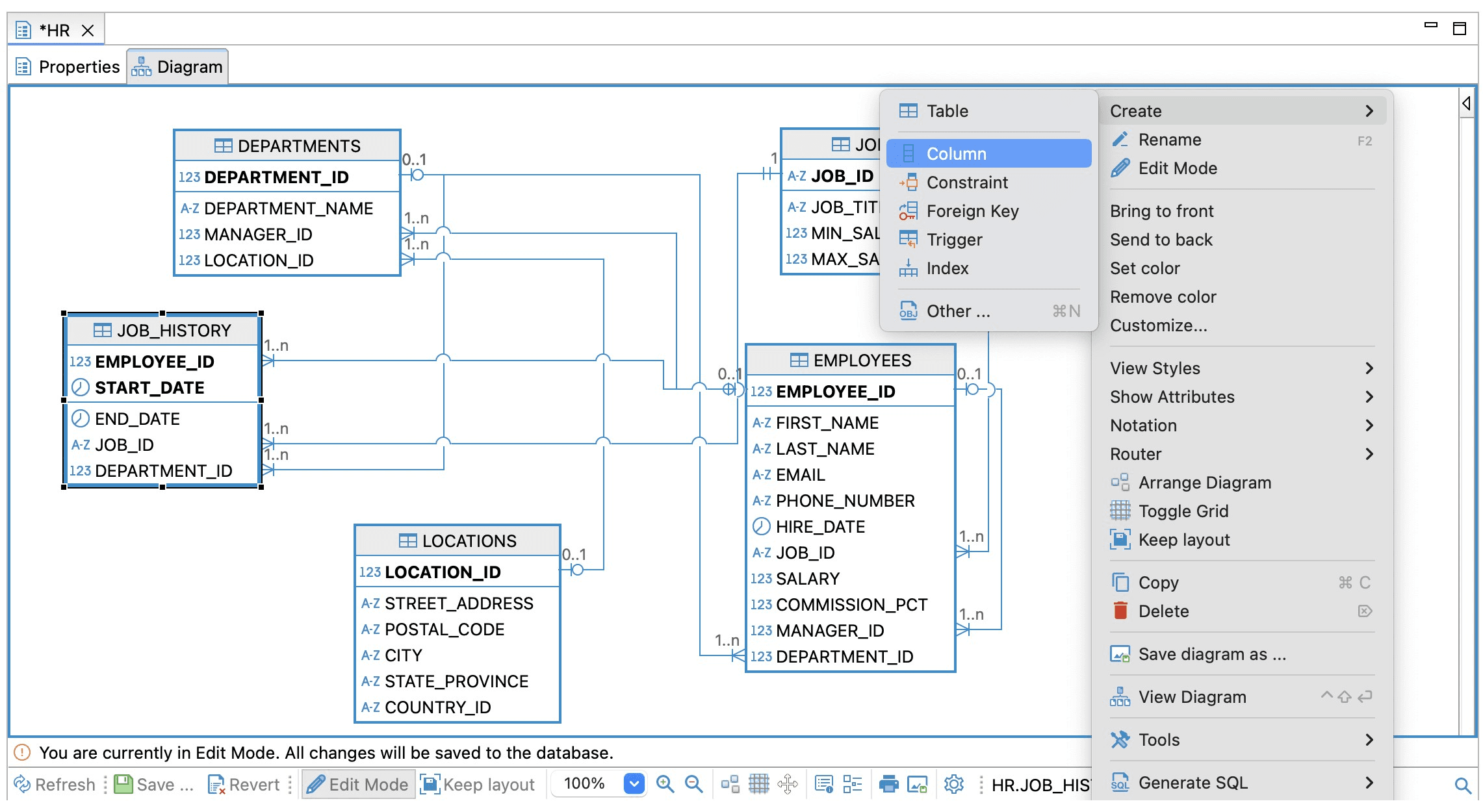
An entity-relationship diagram (ERD) in DBeaver

DBeaver is a well-known name in the cross-platform database IDE industry. With support for MySQL, PostgreSQL, SQL Server, SQLite, MongoDB, and many more, it is a reliable tool that helps developers offering an intuitive interface for viewing and editing data directly in the database, coming with an SQL editor, and other useful features.

👍 Core features of DBeaver include:

  • Comprehensive database administration tools: Built-in backup and restore, user, role, and permission management across multiple databases.
  • Open-source with community support: Free to use and backed by an active community ready to help.
  • Powerful SQL editor: Features syntax highlighting, autocomplete, automatic formatting, SQL history, and more.

👎 However:

  • Free version is limited: The community version of DBeaver Does not make all database engines available.
  • DBeaver is sometimes unstable: DBeaver’s connection sometimes goes down and may be time-consuming to restore the tool to its glory.

DataGrip

Auto-completing a query in DataGrip

DataGrip is the tool that connects to your databases and gives you a smart environment to write, analyze, and manage any SQL script.

👍 The upsides of DataGrip include:

  • DataGrip’s SQL editor: DataGrip comes with an intelligent SQL editor with syntax highlighting, context-aware autocomplete, automatic query formatting, and other features.
  • A deep look into your data: The database client is known for its ability to provide a deeper insight into your databases and data within. It can build internal models of tables, columns and indexes, procedures, views, foreign keys, and other attributes.
  • JetBrains ecosystem: Because DataGrip comes from JetBrains, the tool shares the same ecosystem as PyCharm, WebStorm, and some IntelliJ tools. Cool, right?

👎 However, DataGrip has downsides too:

  • Jetbrains ecosystem: Since DataGrip is a part of the Jetbrains ecosystem, it’s built by the same developers and those who don’t like the tools developed by this company so much will have to look elsewhere.
  • Expensive and heavy on resources: Another downside of DataGrip would be that it’s quite expensive and resource-hogging. Since the tool is built on the IntelliJ IDE, it uses more memory and CPU power, which can cause slower startup time, sluggish performance, and other performance hiccups.

Conclusion

Finding the best cross-platform database IDE in 2026 may be a daunting task. If you know what you’re searching for in terms of other features though, the circle gets smaller quite quickly: not all tools support specific databases, so narrow down your circle and you will be fine.

That being said, many tools come with evaluation periods, too: there is one within DbVisualizer as well, so you may take it for a spin before purchasing if you so desire.

FAQ

What is the best cross-platform database IDE?

There’s no definitive answer to that question as “the best” depends on the developer(s) using the tool, but we can confidently say that since DbVisualizer has been repeatedly ranked #1 for user satisfaction on G2, it’s more than a good choice.

Are there any free database management tools?

While not permanently free (i.e. no permanent free version), there are some database management tools that allow you to try them free of charge and DbVisualizer is one of them. Its UX may look overwhelming for some, but it may be worth a shot. Why not give it a try today?


Dbvis download link img
About the author
LukasVileikisPhoto
Lukas Vileikis
Lukas Vileikis is an ethical hacker and a frequent conference speaker. He runs one of the biggest & fastest data breach search engines in the world - BreachDirectory.com, frequently speaks at conferences and blogs in multiple places including his blog over at lukasvileikis.com.
The Table Icon
Sign up to receive The Table's roundup
More from the table
Title Author Tags Length Published
title

Comparing Git Support in Popular SQL Clients

author Leslie S. Gyamfi tags SQL SQL clients 7 min 2026-04-02
title

Best SQL Clients for Startups in 2026: Complete Comparison

author Antonello Zanini tags Recommendations SQL clients Startups 10 min 2026-03-02
title

Best DbGate Alternatives for SQL and NoSQL Management

author Antonello Zanini tags Database clients DbGate SQL clients 10 min 2026-02-23
title

dbForge Alternatives for SQL Management

author Antonello Zanini tags Database clients SQL clients 10 min 2026-02-16
title

Best SQL Clients for SSH Tunneling and Secure Access in 2026

author Lukas Vileikis tags SQL clients 5 min 2026-02-09
title

Best SQL Clients for Analysts: Complete List

author TheTable tags Data analysis SQL clients 9 min 2026-01-19
title

Database Clients: A Security Comparison of the Most Popular Tools

author Lukas Vileikis tags SQL 5 min 2026-04-09
title

SQL Interview Questions and Answers: Part 2 — Problems & Solutions

author Lukas Vileikis tags MARIADB MySQL SQL 7 min 2026-04-06
title

SQL Interview Questions and Answers: Part 1 — The Basics

author Lukas Vileikis tags DBMS MARIADB MySQL POSTGRESQL SQL SQL SERVER 10 min 2026-03-30
title

The Best SQL Clients for Explain/Query Plan Visualization (2026)

author Lukas Vileikis tags 5 min 2026-03-23

The content provided on dbvis.com/thetable, including but not limited to code and examples, is intended for educational and informational purposes only. We do not make any warranties or representations of any kind. Read more here.