
intro
Let's explore the SQL string functions available across MySQL, PostgreSQL, SQL Server, and Oracle, along with some useful examples.

Manipulating string data is one of the most common operations performed directly in queries, stored procedures, or scripts on a database. To support common scenarios (e.g., finding the length of a string, concatenating strings, changing case, etc.), SQL provides a set of dedicated functions known as SQL string functions.
In this guide, you will learn what these functions are, which ones are available in MySQL, PostgreSQL, SQL Server, and Oracle, and how to use the most popular ones with practical, real-world examples.
Let’s dive in!
What Are SQL String Functions?
SQL string functions are built-in functions used to manipulate and process text data within a database. More specifically, they allow you to perform various operations on strings, such as formatting, extracting substrings, searching for patterns, changing the case from uppercase to lowercase, and more.
Each DBMS comes with its own set of string functions although many are common across systems (many SQL string functions between different database management systems overlap) because they are part of the ANSI SQL standard.
String Functions in SQL: Complete List
Now, we discover the SQL string functions available in MySQL, PostgreSQL, SQL Server, and Oracle.
MySQL String Functions
| Function Name | Description |
|---|---|
ASCII() | Returns the numeric value of the leftmost character. |
BIN() | Returns the binary representation of a number as a string. |
BIT_LENGTH() | Returns the length of the argument in bits. |
CHAR() | Returns the character(s) corresponding to the given integer(s). |
CHAR_LENGTH() / CHARACTER_LENGTH() | Returns the number of characters in the argument. |
CONCAT() | Returns a concatenated string from multiple arguments. |
CONCAT_WS() | Concatenates strings using a specified separator. |
ELT() | Returns the string at the specified index. |
EXPORT_SET() | Returns a string representing each bit in a value as an "on" or "off" string. |
FIELD() | Returns the index of the first argument within a list of subsequent arguments. |
FIND_IN_SET() | Returns the position of the first argument within a comma-separated list. |
FORMAT() | Formats a number to the specified number of decimal places. |
FROM_BASE64() | Decodes a base64-encoded string. |
HEX() | Returns the hexadecimal representation of a number or string. |
INSERT() | Inserts a substring at a specified position, replacing a number of characters. |
INSTR() | Returns the position of the first occurrence of a substring. |
LEFT() | Returns the leftmost characters of a string. |
LENGTH() / OCTET_LENGTH() | Returns the length of a string in bytes. |
LOAD_FILE() | Loads the contents of a named file. |
LOCATE() / POSITION() | Returns the position of the first occurrence of a substring. |
LOWER() / LCASE() | Converts the string to lowercase. |
LPAD() | Left-pads a string with a specified string to a certain length. |
LTRIM() | Removes leading spaces. |
MAKE_SET() | Returns a comma-separated string of bits set in a value. |
MATCH() | Used when a full-text search is performed together with an AGAINST() clause. |
MID() | Returns a substring starting from a specified position. |
OCT() | Returns the octal representation of a number. |
ORD() | Returns the character code of the leftmost character. |
QUOTE() | Escapes a string for use in SQL statements. |
REGEXP_INSTR() | Returns the starting position of a substring matching a regular expression. |
REGEXP_LIKE() | Returns whether a string matches a regular expression. |
REGEXP_REPLACE() | Replaces substrings that match a regular expression. |
REGEXP_SUBSTR() | Returns the substring matching a regular expression. |
REPEAT() | Repeats a string a specified number of times. |
REPLACE() | Replaces occurrences of a specified substring. |
REVERSE() | Reverses the characters in a string. |
RIGHT() | Returns the specified number of rightmost characters. |
RPAD() | Right-pads a string with a specified string to a certain length. |
RTRIM() | Removes trailing spaces. |
SOUNDEX() | Returns the soundex representation of a string. |
SOUNDS LIKE | Compares the sound of two strings. |
SPACE() | Returns a string containing a specified number of spaces. |
STRCMP() | Compares two strings. |
SUBSTRING() / SUBSTR() | Returns a substring of a string. |
SUBSTRING_INDEX() | Returns a substring before a specified number of occurrences of a delimiter. |
TO_BASE64() | Converts a string to base64 encoding. |
TRIM() | Removes leading and trailing spaces. |
UNHEX() | Converts a hexadecimal string to its binary representation. |
UPPER() / UCASE() | Converts a string to uppercase. |
WEIGHT_STRING() | Returns a weight string for string comparison. |
For more information, refer to the official documentation page on MySQL string functions.
PostgreSQL String Functions
| Function Name | Description |
|---|---|
btrim() | Removes the longest string containing only specified characters (default space) from the start and end of the string. |
bit_length() | Returns the number of bits in the string (8 × octet_length). |
char_length() / character_length() | Returns the number of characters in the string. |
lower() | Converts the string to lowercase according to locale. |
lpad() | Left-pads string to a specified length using the given fill character(s). |
ltrim() | Removes the longest string of specified characters (space default) from the start. |
normalize() | Converts the string to the specified Unicode normalization form. UTF8 only. |
octet_length() | Returns the number of bytes in the string. |
overlay() | Replaces a substring at a specified position with another substring. |
position() | Returns the first index of a substring within a string, or 0 if absent. |
rpad() | Right-pads string to a specified length using the given fill character(s). |
rtrim() | Removes the longest string of specified characters (space default) from the end. |
substring() | Extracts a substring from a string using position, pattern, or regular expression. |
trim() | Removes specified characters from the start, end, or both ends of a string. |
unicode_assigned() | Returns true if all characters in the string have assigned Unicode codepoints. UTF8 only. |
upper() | Converts the string to uppercase according to locale. |
ascii() | Returns the numeric code of the first character. |
chr() | Returns the character corresponding to the specified numeric code. |
concat() | Concatenates text representations of all arguments, ignoring NULLs. |
concat_ws() | Concatenates values using a separator, ignoring NULLs. |
format() | Formats arguments according to a format string. |
initcap() | Converts the first letter of each word to uppercase and the rest to lowercase. |
left() | Returns the first n characters of a string. |
length() | Returns the number of characters in a string. |
md5() | Computes the MD5 hash of a string. |
regexp_count() | Counts occurrences of a POSIX regular expression in a string. |
regexp_replace() | Replaces matches of a POSIX regular expression in a string. |
repeat() | Repeats the string a specified number of times. |
replace() | Replaces all occurrences of a substring with another substring. |
reverse() | Reverses the string. |
right() | Returns the last n characters of a string. |
split_part() | Splits a string by a delimiter and returns the specified field. |
starts_with() | Returns true if the string starts with a specified prefix. |
string_to_array() | Splits a string into an array using a delimiter. |
strpos() | Returns the first index of a substring within a string. |
substr() | Extracts a substring from a string. |
to_ascii() | Converts a string to ASCII from another encoding. |
to_bin() | Converts a number to its binary representation. |
to_hex() | Converts a number to its hexadecimal representation. |
to_oct() | Converts a number to its octal representation. |
translate() | Replaces each character in a string according to a mapping from one set to another. |
unistr() | Evaluates escaped Unicode characters in a string. |
Get all the information on the “PostgreSQL String Functions” documentation page.
SQL Server String Functions
| Function Name | Description |
|---|---|
ASCII() | Returns the ASCII code of the first character of a string. |
CHAR() | Returns the character corresponding to an ASCII code. |
CHARINDEX() | Returns the starting position of a substring within a string. |
CONCAT() | Concatenates two or more strings. |
CONCAT_WS() | Concatenates strings with a specified separator, skipping NULLs. |
DIFFERENCE() | Returns a value indicating the difference between the SOUNDEX values of two strings. |
FORMAT() | Returns a formatted string based on a format pattern. |
LEFT() | Returns the leftmost number of characters from a string. |
LEN() | Returns the number of characters in a string, excluding trailing spaces. |
LOWER() | Converts a string to lowercase. |
LTRIM() | Removes leading spaces from a string. |
NCHAR() | Returns the Unicode character for the specified integer code. |
PATINDEX() | Returns the starting position of a pattern in a string (supports wildcard patterns). |
QUOTENAME() | Returns a string with delimiters added to make it a valid SQL identifier. |
REPLACE() | Replaces all occurrences of a substring with another substring. |
REPLICATE() | Repeats a string a specified number of times. |
REVERSE() | Reverses the characters in a string. |
RIGHT() | Returns the rightmost number of characters from a string. |
RTRIM() | Removes trailing spaces from a string. |
SOUNDEX() | Returns a four-character code representing how a string sounds. |
SPACE() | Returns a string of spaces of the specified length. |
STR() | Converts numeric data to a string. |
STRING_AGG() | Concatenates values from multiple rows into a single string, with a separator. |
STRING_ESCAPE() | Escapes special characters in a string for JSON or other formats. |
STRING_SPLIT() | Splits a string into rows based on a specified delimiter. |
STUFF() | Deletes a substring and inserts another substring at a specified position. |
SUBSTRING() | Returns part of a string starting at a specified position for a specified length. |
TRANSLATE() | Replaces a set of characters in a string with another set of characters. |
TRIM() | Removes leading and trailing spaces from a string. |
UNICODE() | Returns the Unicode code point of the first character in a string. |
UPPER() | Converts a string to uppercase. |
Discover all SQL Server string functions.
Oracle String Functions
| Function Name | Description |
|---|---|
ASCII() | Returns the ASCII code of the first character of a string. |
ASCIISTR() | Returns the ASCII representation of a string, converting multibyte characters. |
CHR() | Returns the character corresponding to the specified numeric code. |
COMPOSE() | Converts decomposed Unicode characters to precomposed form. |
CONCAT() | Concatenates two strings. |
CONVERT() | Converts a string from one character set to another. |
DECOMPOSE() | Converts precomposed Unicode characters to decomposed form. |
DUMP() | Returns the internal representation of a value, including datatype code, length, and internal bytes. |
INITCAP() | Capitalizes the first letter of each word in a string. |
INSTR() | Returns the position of a substring within a string. |
INSTR2() | Returns the position of a substring in a string counting characters (supports multibyte). |
INSTR4() | Returns the position of a substring in a string counting Unicode code points. |
INSTRB() | Returns the position of a substring in bytes. |
INSTRC() | Returns the position of a substring in characters. |
LENGTH() | Returns the length of a string in characters. |
LENGTH2() | Returns the length in characters considering multibyte characters. |
LENGTH4() | Returns the length in Unicode code points. |
LENGTHB() | Returns the length in bytes. |
LENGTHC() | Returns the length in characters, considering multibyte. |
LOWER() | Converts a string to lowercase. |
LPAD() | Left-pads a string to a specified length with a specified character. |
LTRIM() | Removes leading spaces or specified characters. |
NCHR() | Returns the Unicode character for a given code. |
REGEXP_INSTR() | Returns the starting position of a substring matching a regular expression. |
REGEXP_REPLACE() | Replaces substrings matching a regular expression with another string. |
REGEXP_SUBSTR() | Returns the substring matching a regular expression. |
REPLACE() | Replaces occurrences of a substring with another substring. |
RPAD() | Right-pads a string to a specified length with a specified character. |
RTRIM() | Removes trailing spaces or specified characters. |
SOUNDEX() | Returns a four-character code representing how a string sounds. |
SUBSTR() | Returns part of a string starting at a specified position for a specified length. |
TRANSLATE() | Replaces characters in a string with corresponding characters in another set. |
TRIM() | Removes leading and trailing spaces or specified characters. |
UPPER() | Converts a string to uppercase. |
VSIZE() | Returns the number of bytes used to store an expression in the database. |
Common String SQL Functions
From the tables above, you can see that some SQL string functions across various database management systems overlap. The overlapping functions are:
Note: Just because these SQL string functions are available in MySQL, PostgreSQL, SQL Server, and Oracle does not mean they are implemented in exactly the same way. They may accept different arguments, handle different data types, or return results differently. To avoid issues, always consult the official DBMS documentation.
SQL String Functions: Most Common Scenarios
See string functions in action through common use cases, with examples that illustrate the inputs they accept and the outputs they produce.
Note: The queries below use PostgreSQL syntax, but you can easily adapt them to MySQL, SQL Server, or Oracle whenever an equivalent SQL string function exists.
Concatenation
Use CONCAT to join multiple strings together:
                    1
                    SELECT CONCAT('Hello', ' ', 'World');
Output:
                    1
                    'Hello World'
Use CONCAT_WS to join strings with a separator:
                    1
                    SELECT CONCAT_WS('-', '2025', '09', '04');
Output:
                    1
                    '2025-09-04'
Case Conversion
Use LOWER to convert strings to lowercase:
                    1
                    SELECT LOWER('PostgreSQL');
Output:
                    1
                    'postgresql'
Use UPPER to convert strings to uppercase:
                    1
                    SELECT UPPER('PostgreSQL');
Output:
                    1
                    POSTGRESQL
Trimming
Use TRIM to remove leading and trailing spaces:
                    1
                    SELECT TRIM('   hello   ');
Output:
                    1
                    'hello'
Use LTRIM to remove leading spaces:
                    1
                    SELECT LTRIM('   hello   ');
Output:
                    1
                    'hello   '
Use RTRIM to remove trailing spaces:
                    1
                    SELECT RTRIM('   hello   ');
Output:
                    1
                    '   hello'
Padding
Use LPAD to pad a string on the left:
                    1
                    SELECT LPAD('42', 5, '0');
Output:
                    1
                    '00042'
Use RPAD to pad a string on the right:
                    1
                    SELECT RPAD('42', 5, '0');
Output:
                    1
                    '42000'
Substring Extraction
Use SUBSTRING to extract a portion of a string:
                    1
                    SELECT SUBSTRING('PostgreSQL', 1, 4);
Output:
                    1
                    'Post'
Use LEFT to get the first N characters:
                    1
                    SELECT LEFT('PostgreSQL', 4);
Output:
                    1
                    'Post'
Use RIGHT to get the last N characters:
                    1
                    SELECT RIGHT('PostgreSQL', 3);
Output:
                    1
                    'SQL'
Length and Position
Use LENGTH to get the length of a string:
                    1
                    SELECT LENGTH('PostgreSQL');
Output:
                    1
                    10
Use POSITION to find the starting position of a substring:
                    1
                    SELECT POSITION('SQL' IN 'PostgreSQL');
Output:
                    1
                    8
Use STRPOS as an alternative to find substring position:
                    1
                    SELECT STRPOS('PostgreSQL', 'SQL');
Output:
                    1
                    8
Replacement and Manipulation
Use REPLACE to replace substrings:
                    1
                    SELECT REPLACE('I love SQL', 'SQL', 'Linux');
Output:
                    1
                    'I love Linux'
Use REVERSE to reverse a string:
                    1
                    SELECT REVERSE('PostgreSQL');
Output:
                    1
                    'LQSergsotP'
Use TRANSLATE to replace specific characters:
                    1
                    SELECT TRANSLATE('abcdef', 'abc', '123');
Output:
                    1
                    '123def'
Other
Use ASCII to get the ASCII value of the first character of a string:
                    1
                    SELECT ASCII('ABBA');
Output:
                    1
                    65
Use CHAR to get the character corresponding to an ASCII value:
                    1
                    SELECT CHAR(65);
Output:
                    1
                    'A'
Conclusion
In this blog post, you explored the world of SQL string functions, understanding what they are and which ones are available across the major SQL systems. Remembering them all can be tricky, and that is where a multi-database client providing an SQL editor with autocomplete like DbVisualizer comes in handy:
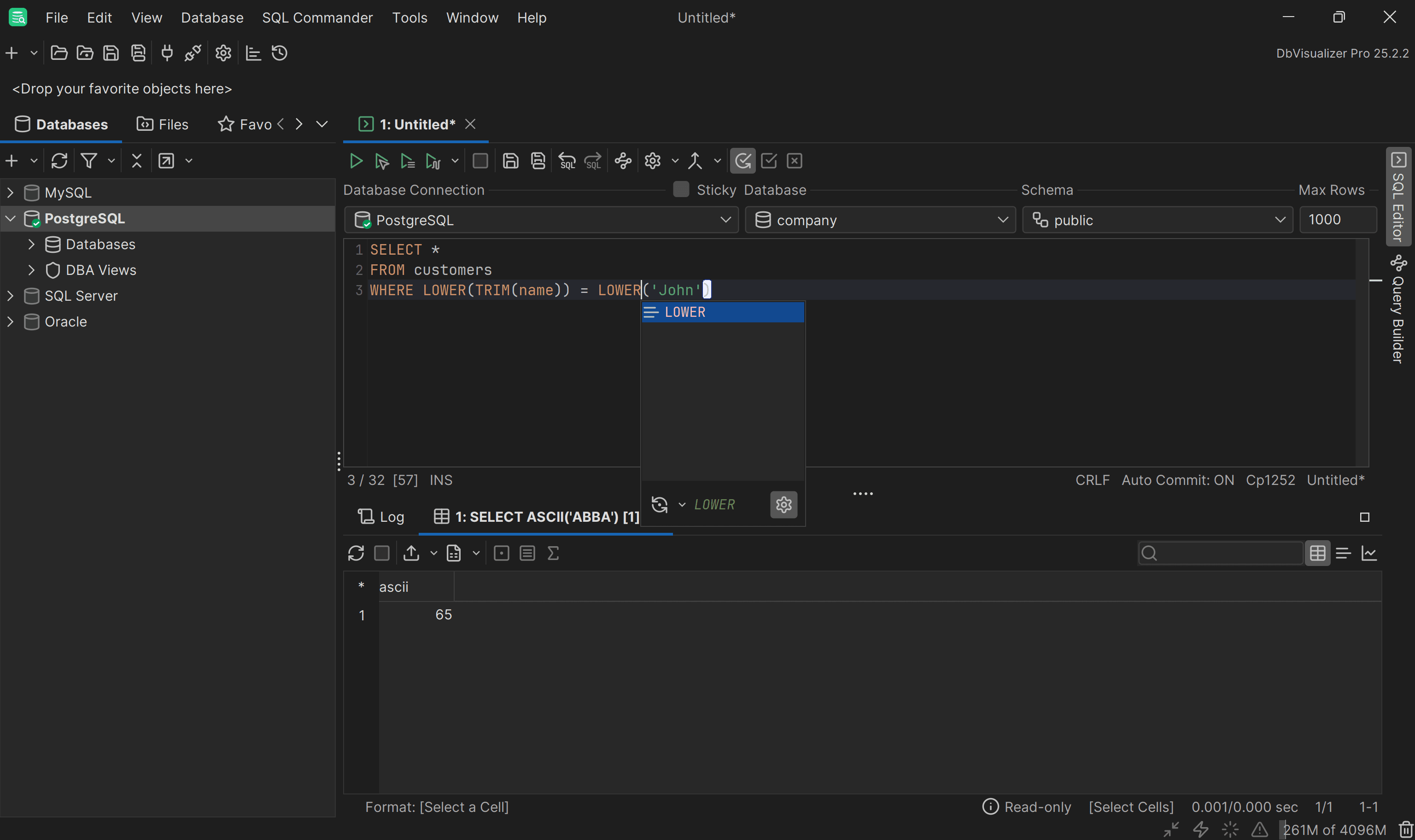
Note the contextual suggestions in the DbVisualizer SQL editor, enabled by its autocomplete capabilities
Simply press Ctrl + Space to get contextual suggestions, just like you would in a code IDE. This is only one of the many powerful features supported by the database client, which also includes ERD generation, in-context data editing, and more. Download DbVisualizer for free today!
FAQ
What are the most popular string SQL functions?
Some of the most popular string functions in SQL are:
These are all commonly used for data manipulation and cleaning.
What string functions overlap across MySQL, PostgreSQL, SQL Server, and Oracle?
| Function Name | Description | MySQL | PostgreSQL | SQL Server | Oracle |
|---|---|---|---|---|---|
ASCII() | Returns the ASCII code of the first character | ✅ | ✅ | ✅ | ✅ |
CONCAT() | Concatenates multiple strings | ✅ | ✅ | ✅ | ✅ |
LOWER() | Converts a string to lowercase | ✅ | ✅ | ✅ | ✅ |
LTRIM() | Removes leading spaces (or specified chars) | ✅ | ✅ | ✅ | ✅ |
REPLACE() | Replaces all occurrences of a substring | ✅ | ✅ | ✅ | ✅ |
RTRIM() | Removes trailing spaces (or specified chars) | ✅ | ✅ | ✅ | ✅ |
TRIM() | Removes leading and trailing spaces (or chars) | ✅ | ✅ | ✅ | ✅ |
UPPER() | Converts a string to uppercase | ✅ | ✅ | ✅ | ✅ |
Is it possible to concatenate the results of multiple SQL string functions in a single expression?
Yes, you can combine multiple SQL string functions in a single expression. For example, you could use CONCAT, UPPER, and TRIM together to clean up strings, convert them to uppercase, and then join them.
                    1
                    SELECT CONCAT(UPPER(TRIM('  hello  ')), ' ', UPPER(TRIM('world')));
Each function processes its input in sequence, and the result is passed to the next function, allowing complex string manipulations in a single query. So, the resulting string will be:
                    1
                    'HELLO WORLD'
Why use a visual database client?
A visual database client such as DbVisualizer makes database management easier by enabling you to explore, visualize, and query data. It offers an intuitive interface for handling tables, navigating schema relationships, and writing SQL in a powerful built-in editor. Other features that stand out are advanced data export tools, parametrized queries, and SQL statement history. Grab a 21-day free trial for DbVisualizer Pro!


