intro
Discover why MyDumper is a well-known open-source multi-threaded tool to help developers back up their MySQL and MariaDB databases!


Have you ever used MyDumper? Given that you’re reading this blog, there’s a huge probability of that being the case. Do you know everything about the tool though? Probably not. Let’s find out everything you need to know about it, including its features and advanced options!
What is MyDumper?
MyDumper is a tool that was developed by David Ducos, who is presently employed at Percona. David Ducos was interviewed and asked what MyDumper is and how does it differ from mysqldump. This is what he replied:
“MyDumper is a logical backup tool <…> the most important thing about it is that it’s using multithreading so that’s why it’s faster than other options. <…> It solves a problem of mysqldump which was that it was single-threaded. <…> DBAs can take backups much faster with MyDumper compared to other options.”
Why is It Important for Backing Up Bigger Data Sets?
When asked whether MyDumper is suitable for larger datasets, David Ducos stated that the tool works well for both large and small datasets because it can split huge tables into multiple chunks and process them using multiple threads.
Now, MyDumper isn’t the only tool we use to take backups of our beloved relational database management system, but due to its speed and parallelism, consistency, output management, flexibility, and ability to compress data, it’s a contender to many backup tools on the market right now.
Backup Integrity with MyDumper
As for backup integrity, a downside of MyDumper is that it doesn’t enforce any checksum checks by default. At the same time, the tool does have options to for backup integrity checks when told to do so. To check for backup integrity, issue a query like so when taking the backup:
                    1
                    ./mydumper --host localhost --user mysqluser --password BrV9u2MbT


                    2
                    --outputdir /tmp/backups/ --M
Here:
Additionally, the --M option will tell MyDumper to check for backup checksum values: in other words, we will check for backup integrity too.
Here’s what’s going to happen: mydumper will obtain checksums of all of the data that is being backed up (that includes data itself, indexes, triggers, schema definitions, routines, etc.), then compare it to checksum values by performing the same steps as before upon restoration. If the data isn’t the same (if the checksum values differ signifying integrity changes), the backup won’t be restored.
To learn more about verifying checksum values and backup integrity, refer to Percona’s blog about MyDumper.
MyDumper Options and the Role of MyLoader
MyDumper is also able to kill long-running transactions, filter tables or databases from backups to include or exclude them if necessary, and assist with large-scale migrations. That’s the case not only because the tool is multithreaded, but also because it has a lot of options that will help you to:
Often, MyDumper is used together with MyLoader. That’s the case when we need to create and restore logical backups of very large MySQL databases.
The tandem works as follows:
Thus, MyLoader helps with speed and performance when restoring larger datasets that would be slow to backup/restore using traditional single-threaded tools like mysqldump.
Embrace an SQL Client for Better Backups and Data Management
When it comes to different kinds of tooling concerning your database, don’t forget to take a look at SQL clients. SQL clients like the one offered by DbVisualizer will not help you back up your databases or check your backup checksum values like MyDumper does, however, it does have a couple of features similar to checksum values. One of those features concern the SQL History window:
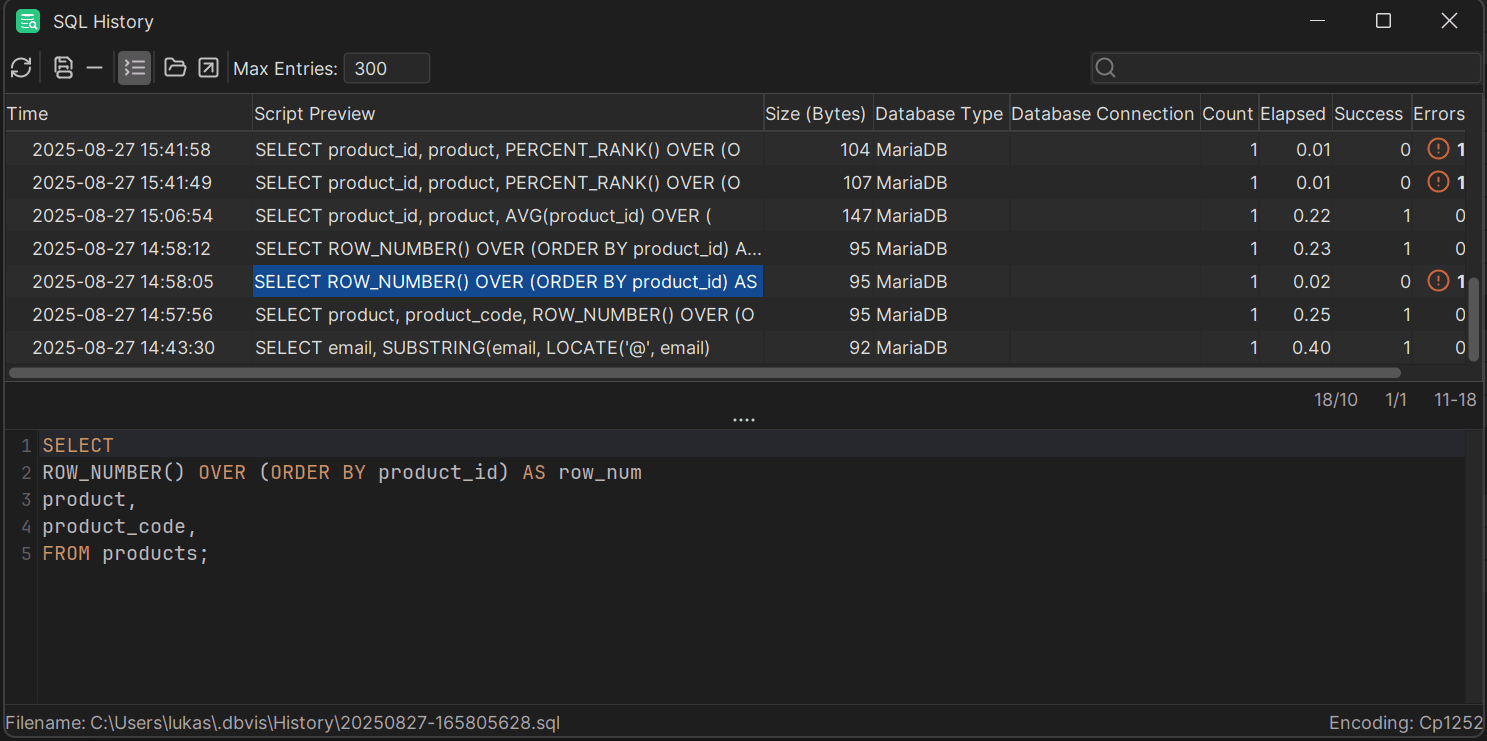
Besides the history of SQL queries, DbVisualizer has many other features unique to itself including the ability to drag-and-drop tables you want to query into the tool, the ability to bookmark your queries for them to be re-used in the future, as well as the ability to export result sets in all kinds of formats.
DbVisualizer really is a versatile tool you can use for pretty much any purpose: for data comparisons, data editing, or simply running SQL queries through the SQL editor. Tired of checksum-checking? Give it a try!
Summary
MyDumper comes with an immense list of options, as well as the ability to take backups using multiple threads at once.
With that being said, backups aren’t the only thing you need to worry about; if someone messes around with your data after it’s restored, that’s never good, and that’s why MyDumper comes with the ability to check for checksum values, too.
Since checksum values aren’t the only thing we need to worry about either, make sure to manage your databases with powerful SQL clients like DbVisualizer. DbVisualizer comes with a free 21-day trial meaning that all of the features of the tool will be free for you to try for 21 days. Grab a free evaluation trial, and until next time!
FAQ
What is MyDumper and how does it differ from mysqldump?
MyDumper is a logical backup tool with a primary difference from mysqldump being that MyDumper is multithreaded and mysqldump is not. Learn more about core differences in the interview with the developer of MyDumper (David Ducos) on YouTube.
Are MyLoader and MyDumper the same?
No, MyLoader and MyDumper are not the same thing. They’re two different tools, but they’re often used in conjunction (one after the other or vice versa) because MyLoader assists us when loading data into a database, and MyDumper assists us when taking a backup or two.
How to use MyDumper?
To take a backup using MyDumper, invoke mydumper through the CLI by specifying the host of your database, the user and the password (the --M option is optional here, and you can use it for backup integrity):
                    1
                    ./mydumper --host localhost --user YOUR_USERNAME --password YOUR_PASSWORD


                    2
                    --outputdir OUTPUT_DIR_PATH --M