Opening and Saving Files
To open and save files, DbVisualizer uses file chooser dialogs and file chooser fields.
File chooser dialog
In the file chooser dialog, you browse the file system and select files. On most platforms, it is the dialog of your operating system.
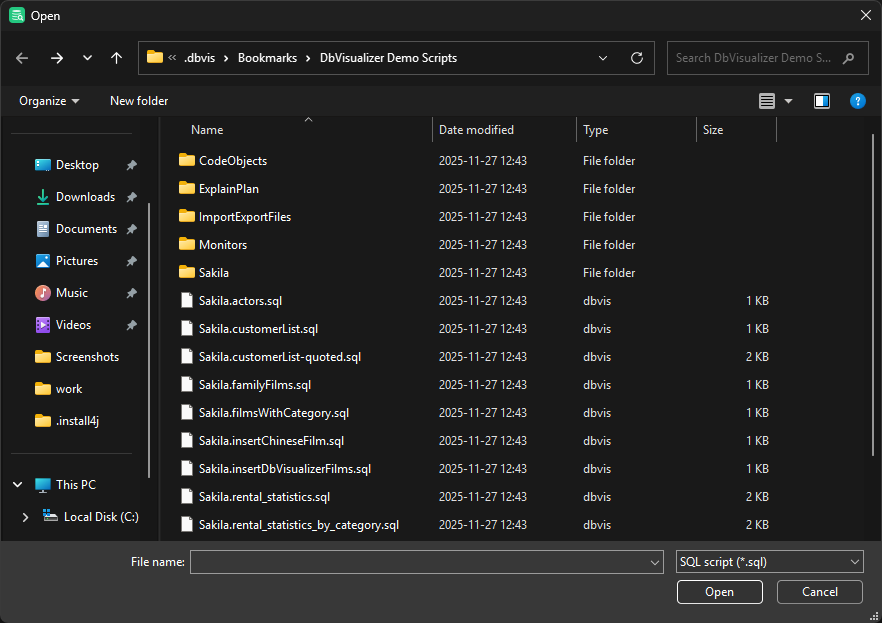
Using the DbVisualizer file chooser
On platforms where the native file chooser isn't supported, DbVisualizer uses its own. It doesn't look quite native, but depending on where you use it, it lets you go to recent paths, choose the file encoding, and more.
To switch between the native file chooser and the DbVisualizer one, use the Files category in Tools → Tool Properties.
On Windows, we recommend the native file chooser. If slow or unavailable network drives are mounted, the DbVisualizer file chooser may block DbVisualizer for several seconds when it opens.
File chooser field
In many dialogs, such as when you import table data, you enter a file or folder path in a file chooser field. To open a file chooser dialog, click the folder button next to the field.

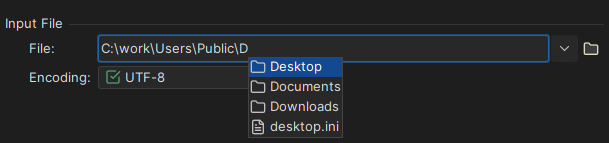
To complete a path, start typing and press Ctrl+Space, and choose from the list:
To use a recent path, click the arrow next to the field and select it:
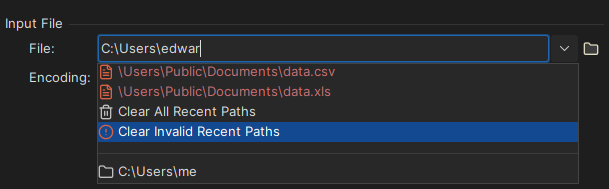
Paths in red don't exist or aren't available. To remove them, select Clear Invalid Recent Paths.
You can also drag a file or folder from another application to the field.
Using a tilde
A tilde (~) at the start of a path stands for your home folder. For example, if your home folder is /Users/ben, ~/Documents/project/SQL-Files is /Users/ben/Documents/project/SQL-Files.
Dragging files from the operating system
You can drag files and folders from your file browser to DbVisualizer, for example to:
- Open files in SQL Commander.
- Mount folders in the Files tab.
- Add repositories in the Git tab.
- Mount connection folders in the Databases tab.
Using the Files and Git tabs
In the Files tab, you mount folders with your scripts, so that you can open them without a file chooser. The Git tab gives access to Git repositories, so that you can work with scripts under version control.