Kubernetes
SQL clients

Best Tools for Managing Databases Running on Kubernetes in 2026

intro

In this blog, we walk you through the best tools for managing databases within Kubernetes in the present day. Have a read!

Tools used in the tutorial
Tool Description Link
Dbvisualizer DBVISUALIZER
TOP RATED DATABASE MANAGEMENT TOOL AND SQL CLIENT

Over the years, Kubernetes has become the go-to platform for containerized workloads. Kubernetes users may be especially overwhelmed by the number of options available to help them streamline the management, scaling, and automation of databases in their clusters.

So what are the best tools to manage your databases in 2026? Let’s dive right in!

What Are Developers Searching For?

First, we must understand that development today isn’t the same as it was 10 or 15 years ago. Nowadays, developers are after:

  1. Speed and agility: These days, development teams demand faster execution, deployment, and rapid responses and fixes to bugs in question. The tool needs to solve a solution and provide answers to the main pain points quickly.
  2. Scalability in architectures: The second thing developers are searching for has to do with the scalability of the tool. No one wants to run the same query over and over. Why would they do that if they can run one query and solve issues that way instead?
  3. The integration of AI and automation: The integration of chatbots like ChatGPT for answers to questions and Claude for coding is also important. They may make mistakes or give wrong answers occasionally, but if you’re not using AI right now, then what are you doing?
  4. Security-first mindset of the tool: Recent software needs to be developed having security top of mind. Data breaches are rampant and no one wants the data of their users or customers to be stolen for it just to be reused in other hacking operations.

So, developers are searching for speed, scalability, the ability to integrate AI into the tool, and have an eye for its security features. Judging by that set of requirements, what tooling fits this mold the best? Let’s find out!

Why Kubernetes?

If you’re a user of Kubernetes, you know that Kubernetes provides:

  1. Container orchestration: Kubernetes is used for the deployment, architecture, and scaling of containerized apps. This means that it operates based on containers and it also means automatic scaling.
  2. Automatic scaling: Automatic scaling means that Kubernetes is able to scale applications up or down based on requirements and demand. In other words, developers can adjust the number of running containers based on traffic, resource consumption, and other variables. And if they break, turn to self-healing capabilities of k8s, too.
  3. Self-healing and high availability: Clusters in Kubernetes are known for their self-healing and high availability features. We can assign pods to healthy nodes as well as make sure that all containers in our “orbit” are healthy and good to go whenever required.

This means that your applications are put into “containers” that encapsulate everything needed to run your application. “Everything” also includes your database, so start by asking yourself “what database(s) are necessary for our infrastructure?”, then look at what problems you’ve faced in the last 5-6 years, and go from there.

Best Tools for Managing Databases Running on Kubernetes

Once you have a good overview of the set of databases you’ve found yourself using over the years, you will need to choose a tool to manage your databases both now and in the future. Here are your best options.

DbVisualizer
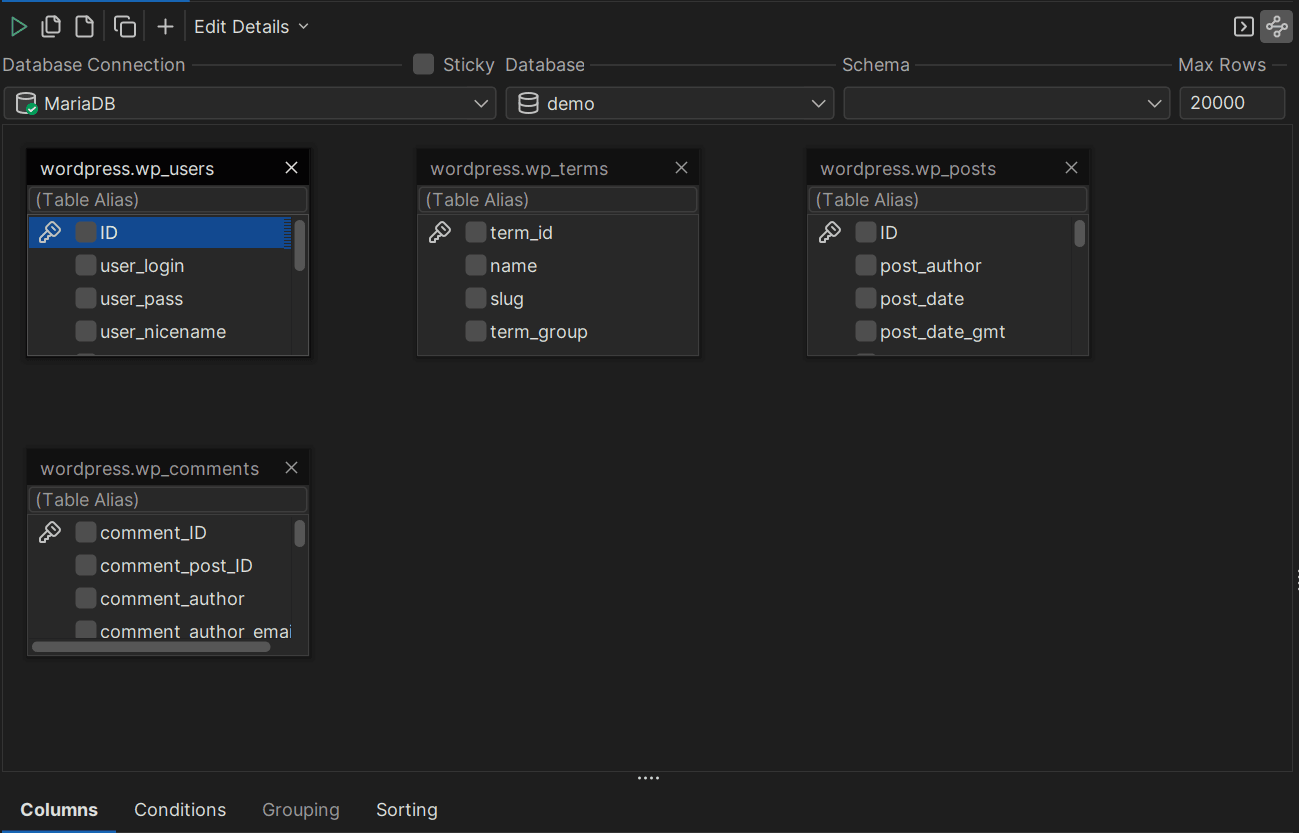
DbVisualizers drag-and-drop capability
DbVisualizer’s drag-and-drop capability

DbVisualizer is well-known for its data visualization capability (hence the name), but also other features that make its users come and stay around for a long time.

DbVisualizer:

  1. Is architected with the toughest security measures in mind: DbVisualizer has numerous security features that may be attractive to developers building applications using Kubernetes and other software. Specifically, DbVisualizer allows for SSH-based connections, permission-based access control, and other features that will make your life as a developer or DBA easier.
  2. Efficient data editing using an SQL client & beyond: One of the things DbVisualizer is known for is its ability to enable anyone to efficiently edit their own data using a SQL client called the SQL commander. The SQL commander has multiple features unique to itself, too: from formatting to showing you your SQL query history, it rarely leaves users without an impression.
  3. Has a drag & drop feature allowing you to drag-and-drop tables you want to query using the tool: Who has the time to write SQL queries to modify tables these days? Not you. Switch the SQL commander to the query builder instead (that’s SQL Commander → Show Query Builder) and you will be able to drag & drop tables too:

However, DbVisualizer isn’t without its cons either. They include:

  1. Some users may require some time to get used to the tool: As DbVisualizer has many features unique to itself, that makes its architecture quite complicated to get around. That also means that some users of the tool may need to take their time when familiarizing with everything it can do.
  2. Price tag: As with many SQL clients, DbVisualizer isn’t free. Is the price worth taking a shot for you in your specific use case? It depends, but only your use case can tell for certain.

DBeaver

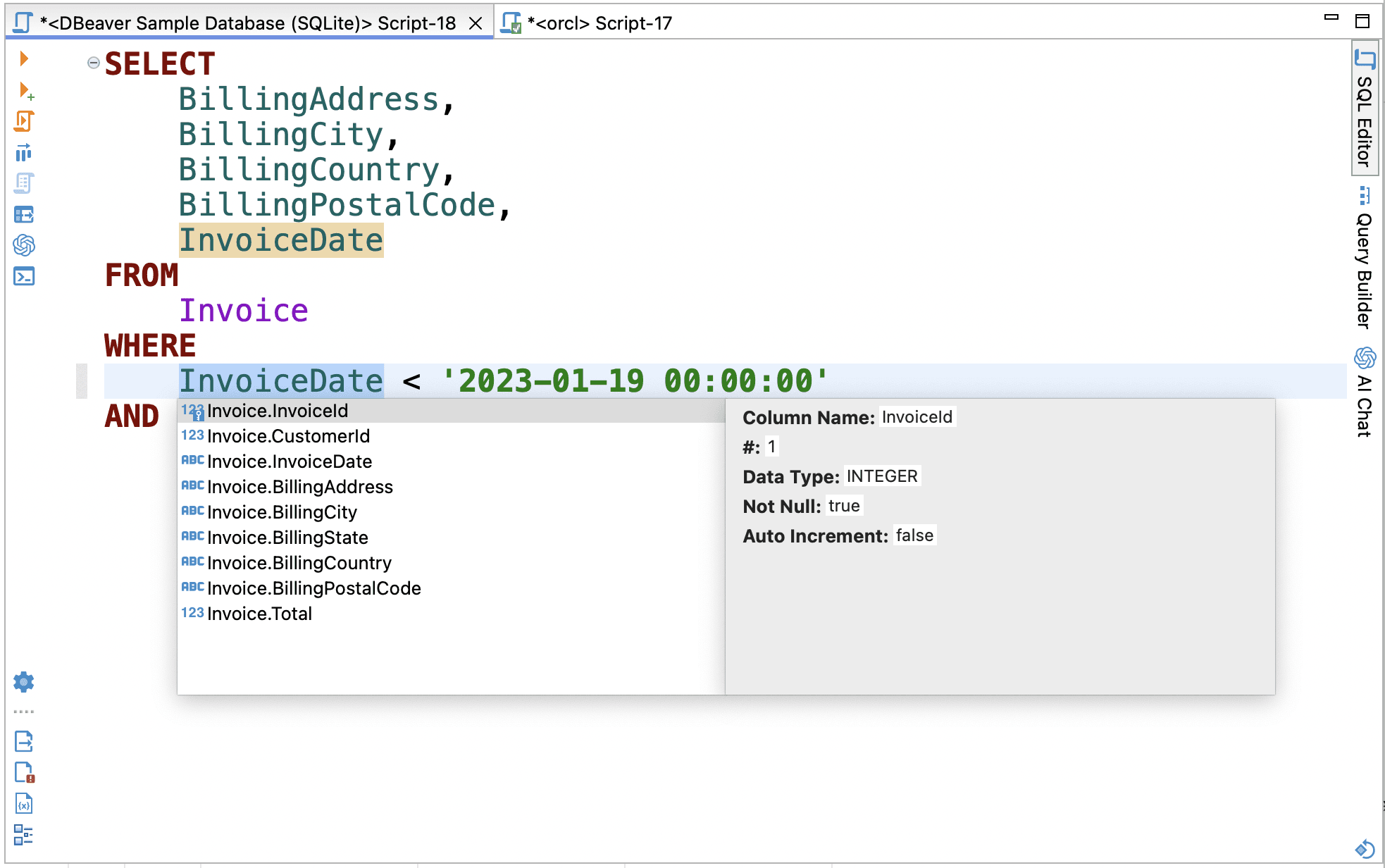
DBeavers query autocompletion feature
DBeaver’s query autocompletion feature

DBeaver has been around for a while. The project has been started in 2010 as a personal project by the company’s soon-to-be CTO, and over the years, has grown to a well-known brand in the industry serving giants.

A big part of why DBeaver is well-regarded are its features:

  1. Support for multiple database management systems: DBeaver comes with support for a lot of database management systems, including, but not limited to relational databases like SQL Server, Oracle, and MySQL, NoSQL databases like MongoDB, Cassandra, and others, as well as cloud players like Amazon Redshift.
  2. SQL editor with a lot of advanced features: As with almost any SQL tool, DBeaver does come with a rich SQL editor that has a lot of advanced features. The features provided by DBeaver’s SQL editor include syntax highlighting, autocompletion, query formatting, and others.
  3. The ability to craft Entity-Relationship diagrams (ER diagrams): As with many well-known database tools, DBeaver comes with the ability to easily create ER diagrams.

DBeaver is not without its issues though:

  1. Problems with bigger data sets: DBeaver might sometimes struggle with query performance when you’re dealing with big data sets or queries that return many rows at once.
  2. Some users may find the initial setup of DBeaver to be quite complicated: Although DBeaver indeed is a multifaceted powerful database tool, its setup can sometimes be overwhelming for novices or users unfamiliar with database management tools.

Vitess

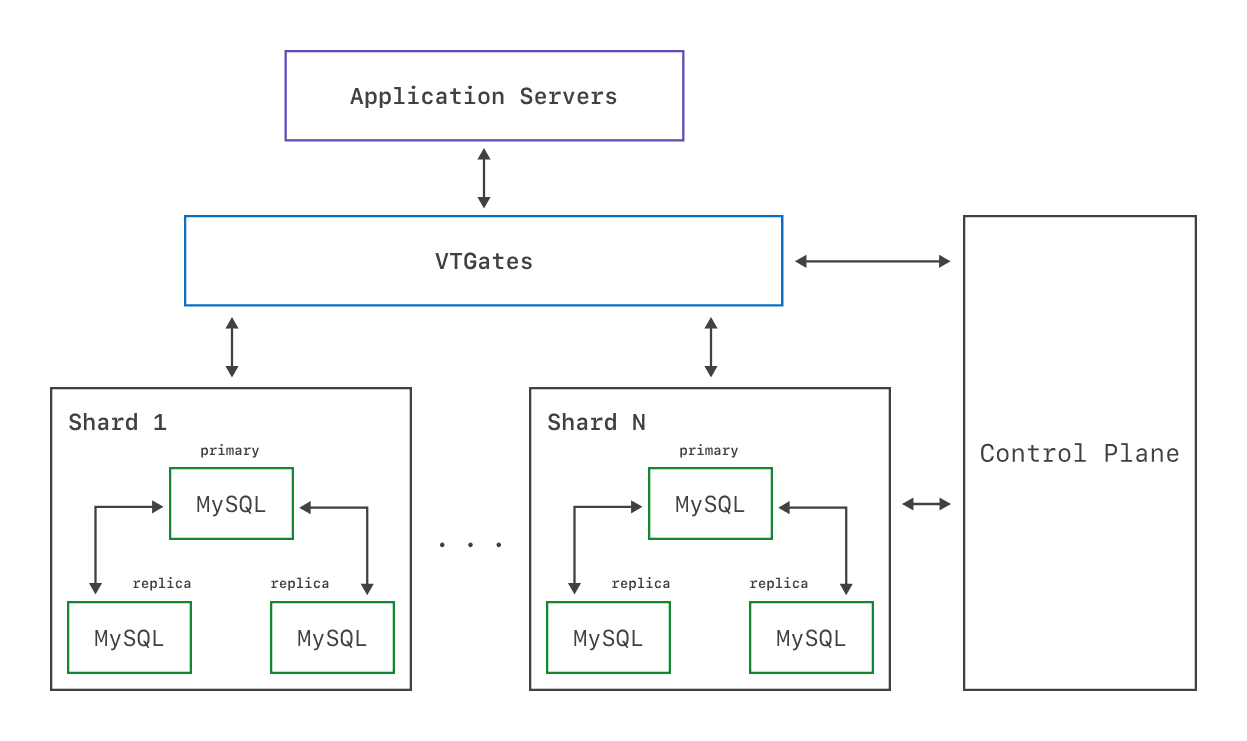
The architecture of Vitess

Originally developed at YouTube, Vitess is a well-known tool well-regarded for its sharding, high availability, and query routing features. Vitess:

  1. Scales seamlessly: One thing that Vitess is known for is its high availability and automatic sharding capabilities. Those two things combined make Vitess an ideal companion for MySQL-based Kubernetes clusters.
  2. Provides high availability and fault tolerance: Another positive of Vitess is that it’s able to provide high availability and fault tolerance where matters. Its self-healing and built-in redundancy features are key examples of this.
  3. Comes with a cloud-native design: Many will know that Vitess is built to adhere to modern cloud-native principles. That makes Vitess able to integrate well with Kubernetes and other operators, thus significantly simplifying setup, scaling, and other operations.

On the other hand, Vitess:

  1. Only works with MySQL: That may be a deal breaker for some developers right then and there.
  2. Introduces more moving parts into your infrastructure: The usage of Vitess would introduce several new components into your database architecture. Such components will include vtgate (a query router), vttablets (a data storage layer), and vtctld (a control plane for management.) While these components provide scalability and fault tolerance, they also increase the operational overhead.

Conclusion

The best tools for managing your databases using Kubernetes in 2026 include Vitess, DBeaver, and DbVisualizer. Each of them has quirks and features unique to itself, so you should closely evaluate your use case and only then make a decision. Vitess only supports MySQL, DbVisualizer may be expensive, while DBeaver may come with a steep learning curve, but you need to make a decision anyway, so read this blog, weigh the pros and cons of each tool, and choose wisely.

Choose wisely, read our blog to learn how to deal with the database of your choice, and we’ll see you in the next one.

FAQ

What is the best tool for managing databases running on Kubernetes?

The best tool for managing databases runnning on Kubernetes depends on your use case. If you’re exclusively using MySQL, Vitess may be the best choice. If you’re using a hoard of databases, you may want to look at DbVisualizer. If you’re not afraid of a complex setup, look at DBeaver.

Why does Vitess only upport MySQL?

Vitess was originally designed to scale and manage MySQL databases which is why it only supports MySQL and its compatible forks (like MariaDB).

Dbvis download link img
About the author
LukasVileikisPhoto
Lukas Vileikis
Lukas Vileikis is an ethical hacker and a frequent conference speaker. He runs one of the biggest & fastest data breach search engines in the world - BreachDirectory.com, frequently speaks at conferences and blogs in multiple places including his blog over at lukasvileikis.com.
The Table Icon
Sign up to receive The Table's roundup
More from the table
Title Author Tags Length Published
title

Best Tools for Role-Based Access Control (RBAC) in SQL Databases in 2026

author Lukas Vileikis tags SQL SQL clients 6 min 2026-04-27
title

The Best MySQL GUI for macOS: Top 4 Alternatives to Workbench

author Leslie S. Gyamfi tags SQL SQL clients 7 min 2026-04-20
title

Best Cross-Platform Database IDEs in 2026

author Lukas Vileikis tags SQL clients 6 min 2026-04-13
title

Comparing Git Support in Popular SQL Clients

author Leslie S. Gyamfi tags SQL SQL clients 7 min 2026-04-02
title

Best SQL Clients for Startups in 2026: Complete Comparison

author Antonello Zanini tags Recommendations SQL clients Startups 10 min 2026-03-02
title

Best DbGate Alternatives for SQL and NoSQL Management

author Antonello Zanini tags Database clients DbGate SQL clients 10 min 2026-02-23
title

dbForge Alternatives for SQL Management

author Antonello Zanini tags Database clients SQL clients 10 min 2026-02-16
title

Best SQL Clients for SSH Tunneling and Secure Access in 2026

author Lukas Vileikis tags SQL clients 5 min 2026-02-09
title

Best SQL Clients for Analysts: Complete List

author TheTable tags Data analysis SQL clients 9 min 2026-01-19
title

Setting Up MySQL HeatWave: A Guided Tutorial

author Lukas Vileikis tags MySQL 4 min 2026-06-29

The content provided on dbvis.com/thetable, including but not limited to code and examples, is intended for educational and informational purposes only. We do not make any warranties or representations of any kind. Read more here.