
intro
Let’s go over everything you need to know about the INSERT INTO ... SELECT statement in SQL!

INSERT INTO ... SELECT, INSERT INTO table FROM SELECT, INSERT ... SELECT (or whatever you prefer to call it) may not be very widely used but is an extremely powerful SQL tool. This statement allows you to select data from one table and insert it directly into another. It is perfect for quick data copying, moving records between tables, or even creating backups.
By the end of this guide, you will know exactly how to get the most out of this SQL gem. Let’s dive in!
What Is the SQL INSERT INTO … SELECT Statement?
The SQL INSERT INTO ... SELECT statement, also called the INSERT INTO table FROM SELECT statement (or even INSERT ... SELECT), selects data from one table and inserts it directly into another table. In simpler terms, it is useful for copying data from one table to another.
Unlike a traditional INSERT statement, which requires specifying values manually, INSERT INTO ... SELECT allows you to select rows from a source table (or even multiple tables using joins) and insert them into a target table in a single operation.
INSERT INTO table from SELECT: Syntax and Support
The SQL INSERT INTO ... SELECT statement follows this de facto standard syntax:
                    1
                    INSERT INTO target_table (column_1, column_2, column_3, ..., column_n)


                    2
                    SELECT column1, column2, column3, ..., column_n


                    3
                    FROM source_table


                    4
                    [WHERE condition];
Where:
Notes:
INSERT INTO … SELECT: Complete Example
Disclaimer: The example below refers to PostgreSQL, but the mentioned query will also work in MySQL, SQL Server, and Oracle. The database client used to execute the query and explore the tables is DbVisualizer, a top-rated, multi-database, feature-rich client.
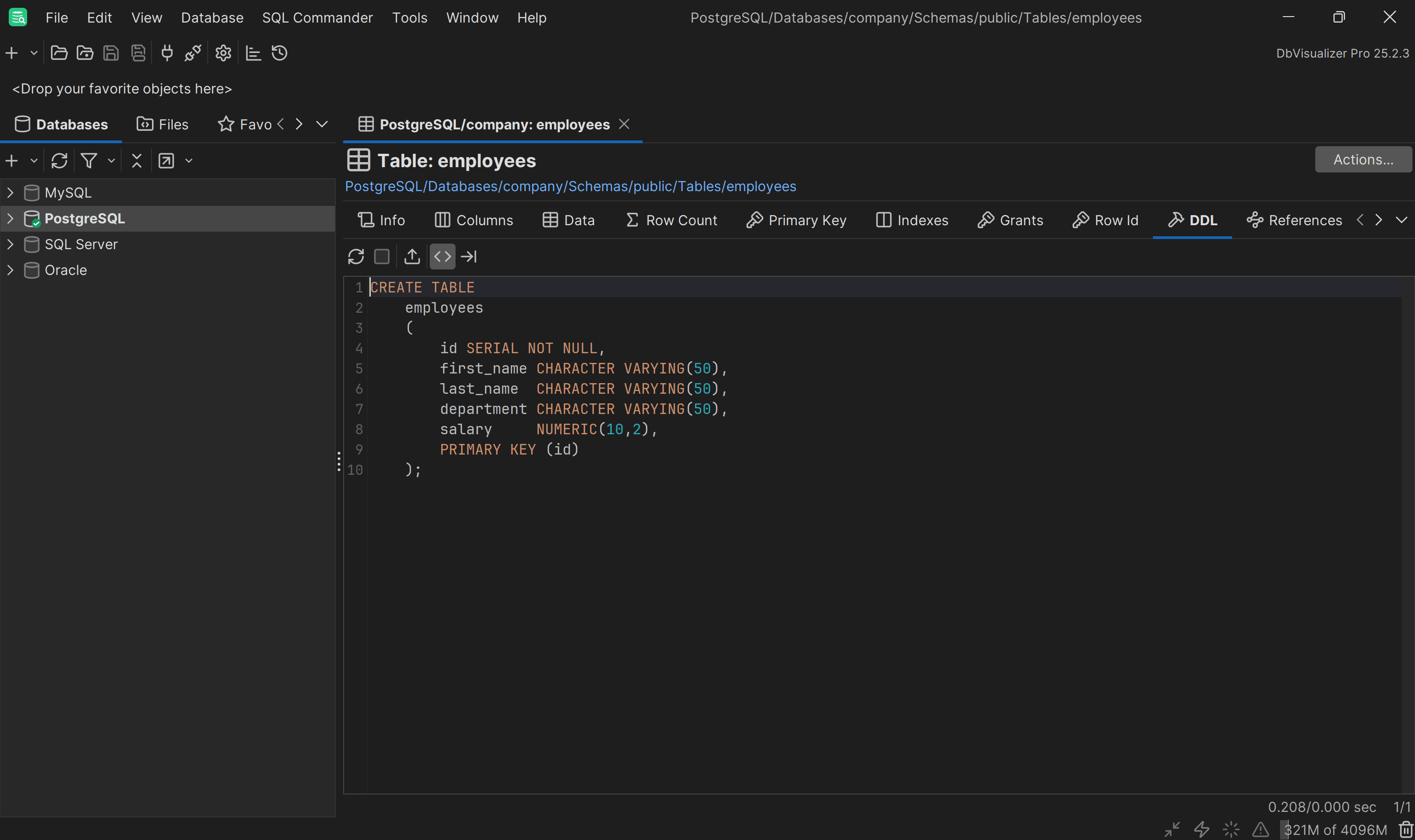
Suppose you have an employees table with the following SQL DDL definition:
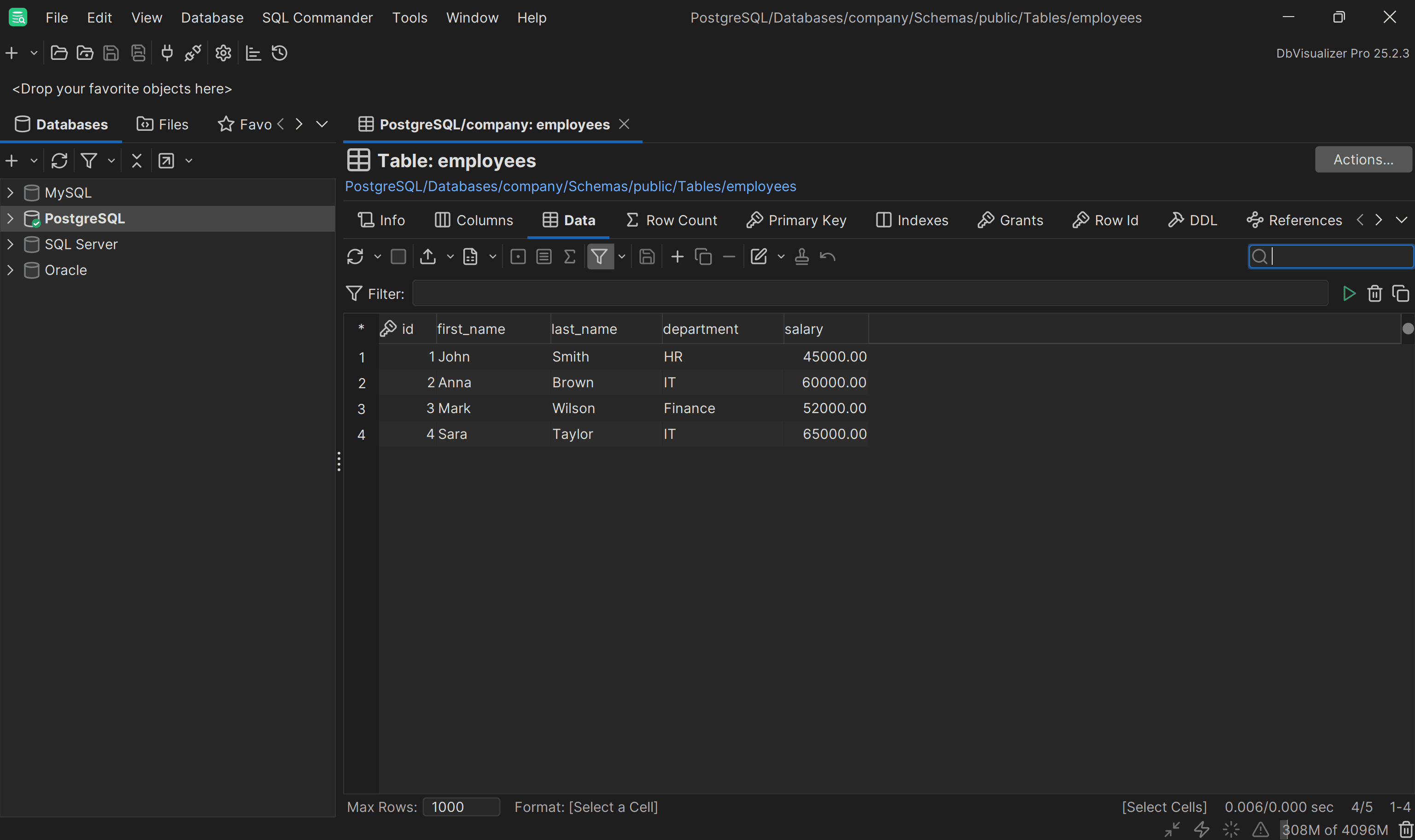
This contains the following sample records:
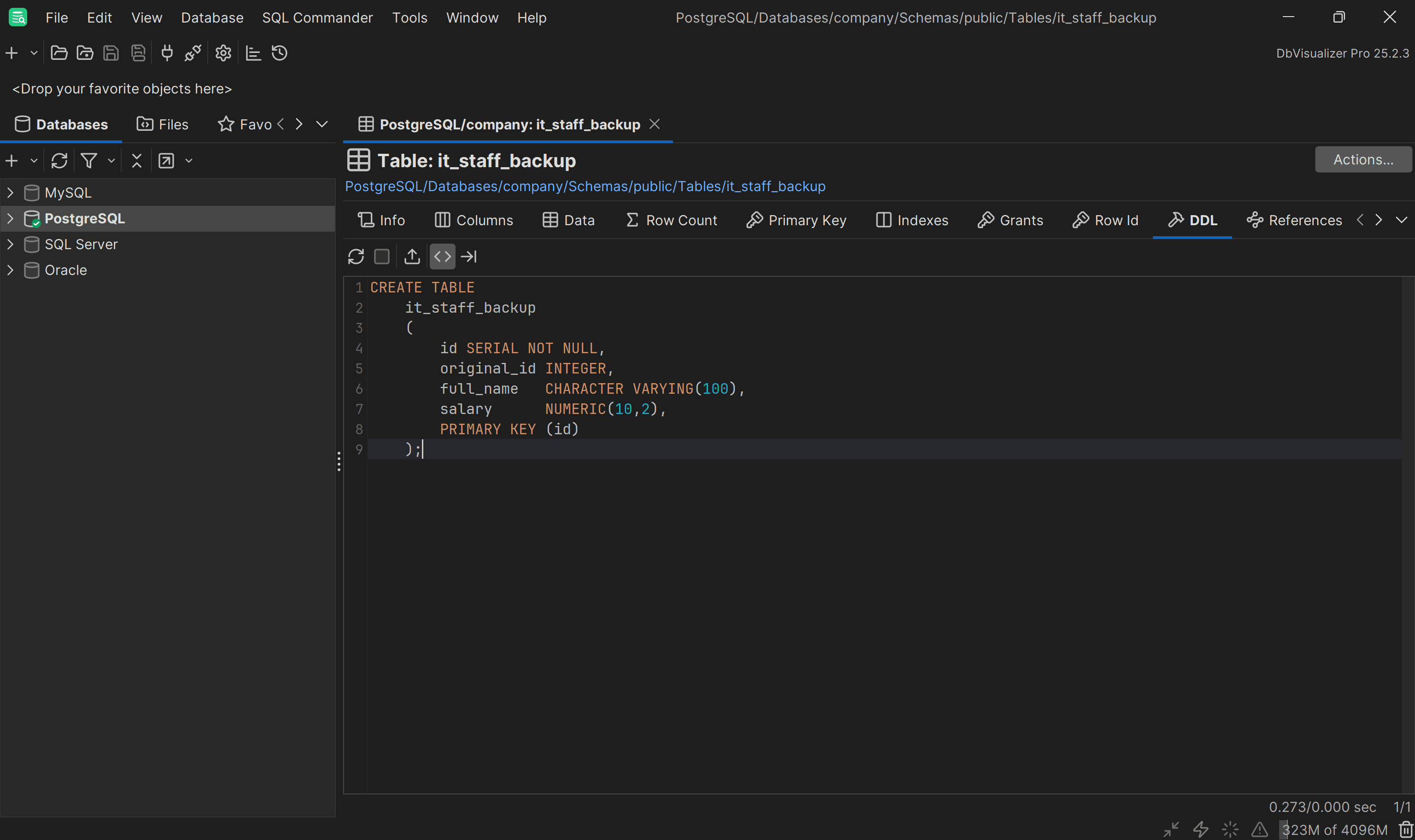
Now, suppose you want to copy only the most important data about IT employees into another table called it_staff_backup, which has a different structure:
You can achieve the goal with the following INSERT INTO ... SELECT query:
                    1
                    INSERT INTO it_staff_backup (original_id, full_name, salary)


                    2
                    SELECT id, first_name || ' ' || last_name, salary


                    3
                    FROM employees


                    4
                    WHERE department = 'IT';
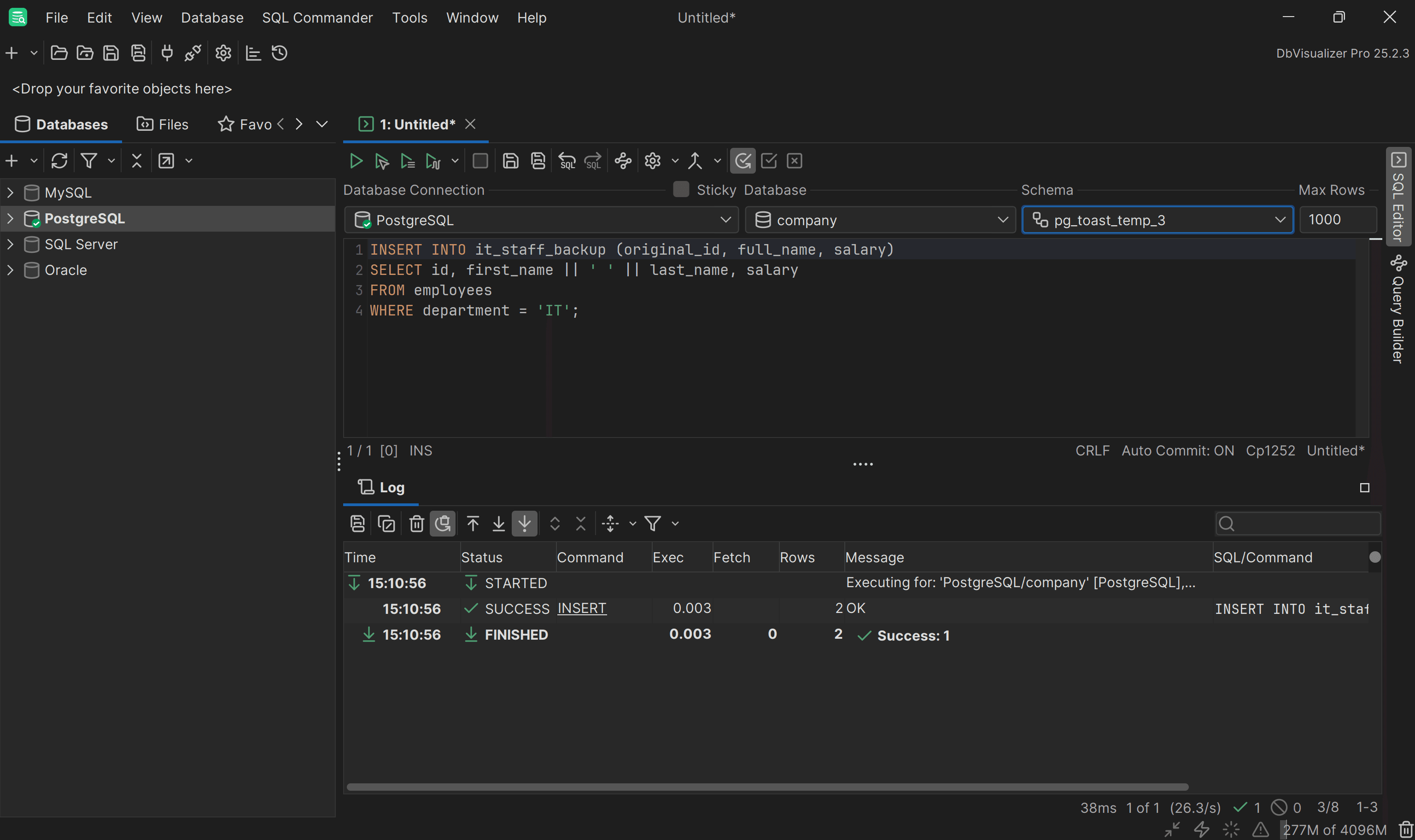
The query copies employee records from the employees table into the it_staff_backup table, but only for those who work in the “IT” department. Specifically, this is what the query does:
As a result, only IT employees are transferred, with names merged into one column:
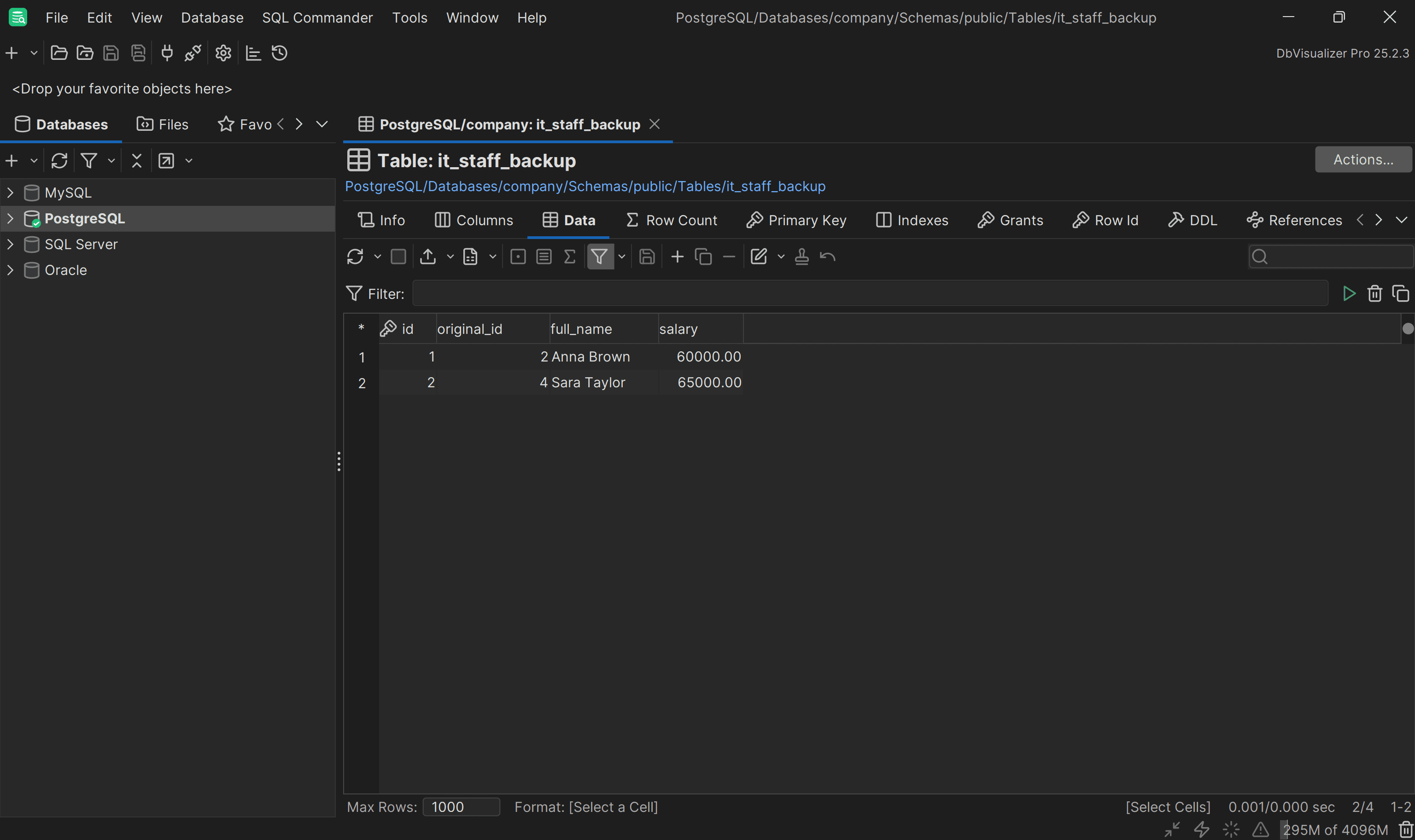
Et voilà! You just see the SQL INSERT INTO table from SELECT statement in action.
Conclusion
In this blog post, you learned the importance of knowing the SQL INSERT INTO … SELECT statement (also called INSERT INTO table FROM SELECT or INSERT … SELECT). As demonstrated here, dealing with database management becomes much easier with a visual database client like DbVisualizer. This tool offers powerful features such as an auto-complete SQL editor, ERD generation, in-context data editing, and many others. Download DbVisualizer for free today!
FAQ
Which SQL statement is used to copy data from one table to another?
You can copy data from one table to another using the INSERT INTO ... SELECT statement. For example:
                    1
                    INSERT INTO new_table (column_1, column_2, ..., column_n)


                    2
                    SELECT column_1, column_2, ..., column_n FROM old_table WHERE condition;
What is the difference between INSERT INTO ... SELECT and INSERT INTO table from SELECT?
There is no difference, as both refer to the same operation. The variation in wording comes from different developers or documentation styles. Some prefer one phrasing, while others use the alternative. The functionality remains identical, though.
What is the INSERT INTO table from SELECT Oracle syntax?
The INSERT INTO table from SELECT Oracle statement lets you insert data into a table by selecting it from another table or query. Its basic syntax follows the de facto standard:
                    1
                    INSERT INTO target_table (column_1, column_2, ..., column_n)


                    2
                    SELECT column_1, column_2, ..., column_n FROM source_table WHERE condition;
This efficiently moves or transforms data without manually specifying each value.
What is the difference between INSERT INTO … SELECT and CREATE TABLE ... SELECT?
The INSERT INTO … SELECT statement adds data from one table or query into an existing table, preserving the table’s structure. In contrast, CREATE TABLE ... SELECT creates a new table based on the result of a query and populates it with data immediately.
INSERT INTO … SELECT | CREATE TABLE … SELECT | |
|---|---|---|
| Purpose | Inserts data into an existing table | Creates a new table and populates it with data |
| Table requirement | The target table must already exist | New table is created automatically |
| Data handling | Appends selected data to existing table | Copies selected data into the new table |
| Use case | Adding or merging data | Creating backups or derived tables |
Why use a visual database client?
A visual database client like DbVisualizer makes database management much easier. It provides an intuitive interface to explore, visualize, and query data, allowing you to navigate schema relationships and write SQL in a powerful built-in editor in a simplified way. Other standout features include advanced data export tools, support for parameterized queries, and a complete history of executed SQL statements. Grab a 21-day free trial for DbVisualizer Pro!


