intro
In this blog, we walk you through a bunch of best practices for using Git so that your usage leaves your database (and your users) happy. Have a read!


Your databases are an inseparable part of your application, and your application is an inseparable part of your business. On the other hand, we have Git that is drastically improving the workflow of the developers working on your application and allowing for collaboration efforts like never before.
With that in mind, there are some things you should know to employ Git without harming your database or anyone around it in the process. Let’s discover them!
When and How to Use Git with Databases
Moving towards the best practices for using Git with your database, there are some things you should not use Git for in the first place.
The first thing worth remembering is that Git isn’t a backup system or application and you shouldn’t store any backups in it. What does belong in Git, on the other hand, are:
Together with it, your Git deployment should not include any of the following:
In other words, don’t commit mysqldump --all-databases (or anything production-grade) because it will end in tears and damage, but otherwise, weigh the risk and you may be good to go.
Best Practices for Managing Databases with Git
Now that you know when to actually use Git in your database workflow, you’re ready to explore the best practices for using Git with your database.
Commit Changes, Not Sensitive Data
While committing plain text passwords or the configuration of your database here and there may not be the smartest idea, there is something Git can help you with.
Think about it, when do you turn to Git? The answer is simple: we turn to it whenever we need to save (commit) something to it that may be visible to our teammates.
In other words, our commit logic saves small, incremental changes to our infrastructure, human-readable differences, and related things. That means that Git may be a very good companion for those saving differences to data: don’t save incremental backups, however, it may be a good idea to save incremental changes to some parts of your database infrastructure.
A common pattern for Git commits is one change per migration file. In other words, consider saving files that don’t include critical information and title them in such a way that helps you discern what’s made and when, for example:
                    1
                    migrations/


                    2
                      20260121_add_3index_to_orders.sql


                    3
                      20260122_change_datatype_customer_table.sql
It is also advisable for you to commit code that doesn’t fail catastrophically (or doesn’t do any damage at all, preferably) if it is re-applied by someone else or yourself.
Store SQL Code Like Server-Based Code
It is also advisable for you to store SQL scripts like any other server-based code (PHP, .NET, etc.) In other terms, that means that when storing procedures, functions, triggers, and/or views, you should ensure that all of them live in directories dedicated to them (that helps with organization) and that all of them are explicitly versioned and titled appropriately (that helps with recognition and understanding who did what and when.)
If you do use Git, consider using it like this:
                    1
                    database/


                    2
                      ctes/


                    3
                        order_editing_cte_202601.sql


                    4
                      views/


                    5
                        active_accounts.sql


                    6
                        accounts_payable_202601.sql


                    7
                        accounts_receivable_202601.sql


                    8
                        ...
Remember What Git is Useful For
Last but not least, also remember that Git is not a playground and use it appropriately.
Git is useful for:
At the same time, Git doesn’t provide:
Play around, but know where the line ends!
Using Git Directly in Your SQL Client
When working with databases, having Git built into your SQL client can save time and keep your workflow smooth.
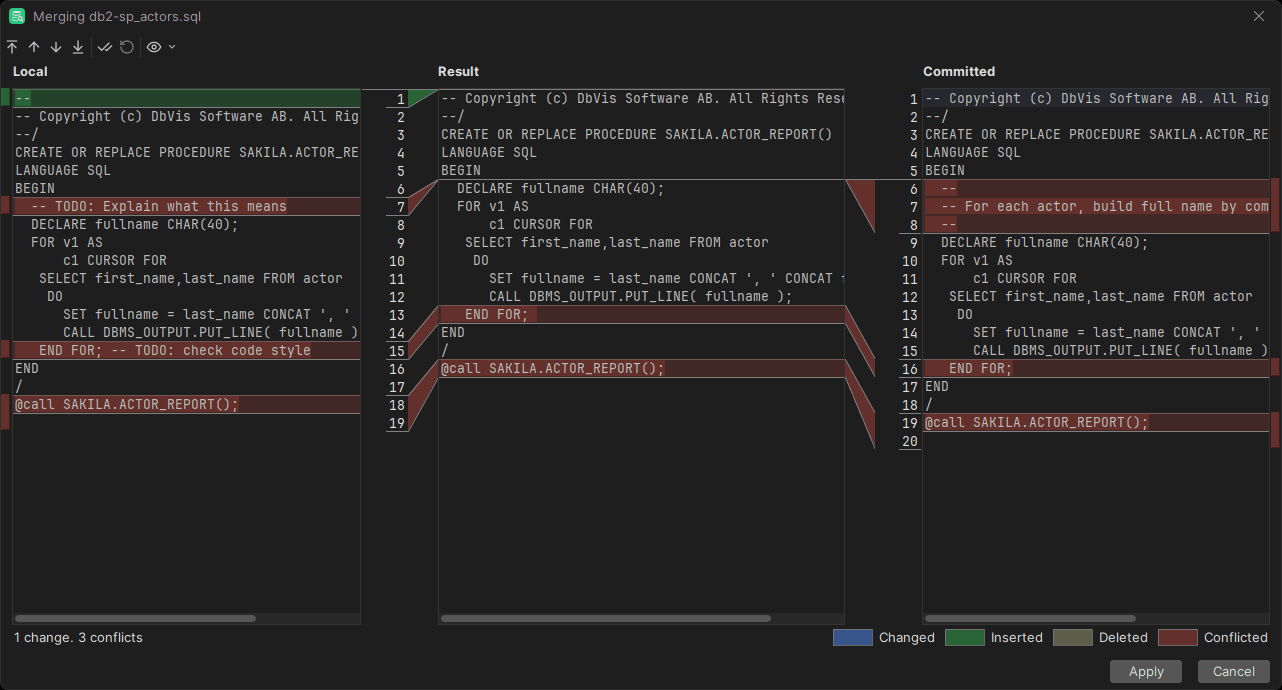
DbVisualizer Pro lets you manage repositories, commit changes, and track differences without leaving the client. You can mount existing repositories or clone new ones, with support for GitHub authentication, SSH keys, and personal access tokens.
Changes to scripts or migration files are automatically listed, and you can view differences using the built-in diff tool. Rollback allows you to safely revert files to their last committed state. Commits can be made locally or pushed to a remote repository immediately. Branch management and Git log viewing are all integrated, giving you full control of your version history.
By keeping Git inside DbVisualizer, you can safely version-control database changes, track incremental updates, and collaborate with your team while staying directly connected to your live data and workflows.
Summary
As far as your database is concerned, Git is a venue that should be approached carefully: do not use Git to store sensitive personal information or backups because everyone will be able to see what you store.
Instead, treat Git as a companion for saving changes to data. This way, it can help you track migrations, stored procedures, or CTEs, which is useful for maintaining coding history, accountability, and reviewability, exactly the kind of work Git was originally designed for.
Besides Git, keep in mind that SQL clients like DbVisualizer come with built-in Git integration. With advanced features such as AI tools, working directly in the client makes managing your database changes and workflows much easier.
Try DbVisualizer today, don’t store sensitive data inside Git, and until next time!
FAQ
What is git and what does it do?
Git is a version control system that helps developer teams track changes to files over time.
How to use git with my database?
Use Git with your database to store stored procedures, views, or CTEs without storing sensitive data (PII, etc.) Remember that Git is useful for tracking coding changes and code observability and not so much to store backups: don’t use it in ways it’s not intended to be used, and you should be good to go.
Does DbVisualizer support Git?
Git integration is available in DbVisualizer Pro. While it may not replace dedicated Git tools for complex workflows, having Git directly in the client lets you track changes to scripts, migrations, and other database files. You can commit, push, pull, and manage branches without leaving the interface, making version control safer and more convenient within your database environment.