intro
Let’s explore the MOD function in SQL and see how and when to use it to perform the mathematical modulo operation in your database.

When developing applications, the required mathematical operations usually go beyond the basic four (i.e., addition +, subtraction −, multiplication *, and division /). No surprise, programming languages provide many other useful operations, including the powerful modulo operator.
In computing, the modulo operator is as important as the basic arithmetic operators. The same applies to databases, where the MOD function in SQL plays a key role in performing modulus operations.
Read this article to learn everything you need to know about the SQL modulo operations using MOD or the % operator (which is the same character used as a wildcard in SQL LIKE operator).
Let’s dive in!
What Is the SQL MOD Function?
In SQL, the MOD function is a mathematical function that returns the remainder of a division operation. In other words, it performs the modulo operation (hence the name “MOD”) known in computing and mathematics.
For example, MOD(11, 3) returns 2 because 11 divided by 3 equals 3 with a remainder of 2.
The MOD function in SQL is particularly useful for detecting repetition, alignment, or offsets. Essentially, you should use it when you need to check if a number fits a repeating pattern or cycle.
Common MOD SQL function use cases include:
How to Use the MOD Function in SQL
The MOD operation is part of the SQL standard, meaning most databases implement it in the same way. However, some specific DBMSs may deviate from the standard and use a custom implementation. Thus, it is worth reviewing how the SQL MOD function works in various database management systems, including MySQL, PostgreSQL, SQL Server, and Oracle.
MOD in MySQL
The MySQL MOD function follows this syntax:
                    1
                    MOD(N, M)
It returns the remainder of N divided by M, where N and M can be either integers or floating-point values.
Notes:
MOD in PostgreSQL
The Postgres modulo function uses the following syntax:
                    1
                    MOD(y, x)
It returns the remainder of y / x, where x and y can be smallint, integer, bigint, or numeric PostgreSQL data types.
Notes:
MOD in SQL Server
SQL Server does not provide a built-in MOD function. Attempting to use it will result in the error:
                    1
                    'MOD' is not a recognized built-in function name.
Specifically, the SQL Server MOD function equivalent is the % operator (also called “Modulus” or “modulo operator”). Its syntax is:
                    1
                    dividend % divisor
It returns the remainder of one number divided by another. Both dividend and divisor must be valid expressions of integer, monetary, or numeric data types.
MOD in Oracle
You can call the Oracle MOD function like this:
                    1
                    MOD(n2, n1)
This returns the remainder of n2 divided by n1. If n1 is 0, it returns n2.
This function takes as arguments any numeric data type or any nonnumeric data type that can be implicitly converted to a numeric data type. Oracle determines the argument with the highest numeric precedence, implicitly converts the remaining arguments to that data type, and returns that data type.
Notes:
SQL Modulo Function: Complete Example
Note: The following example is built around the MySQL MOD function, but you can easily adapt it to PostgreSQL or Oracle. The queries will be executed in a multi-database client like DbVisualizer, though you are free to use your preferred database client.
Assume you are a college instructor and want to assign all students enrolled in your class (ID 101, title “Computer Science”) into three groups in a round-robin fashion. You have:
Each student in the class is assigned a sequential, incremental enrollment_number based on their enrollment order.
You can verify the assumptions with this query:
                    1
                    SELECT


                    2
                        student_id,


                    3
                        s.full_name,


                    4
                        e.enrollment_number


                    5
                    FROM students S


                    6
                    JOIN enrollments E ON  S.id = E.student_id


                    7
                    WHERE E.class_id = 101


                    8
                    ORDER BY enrollment_number;
Execute the above query in DbVisualizer on your database with college info:
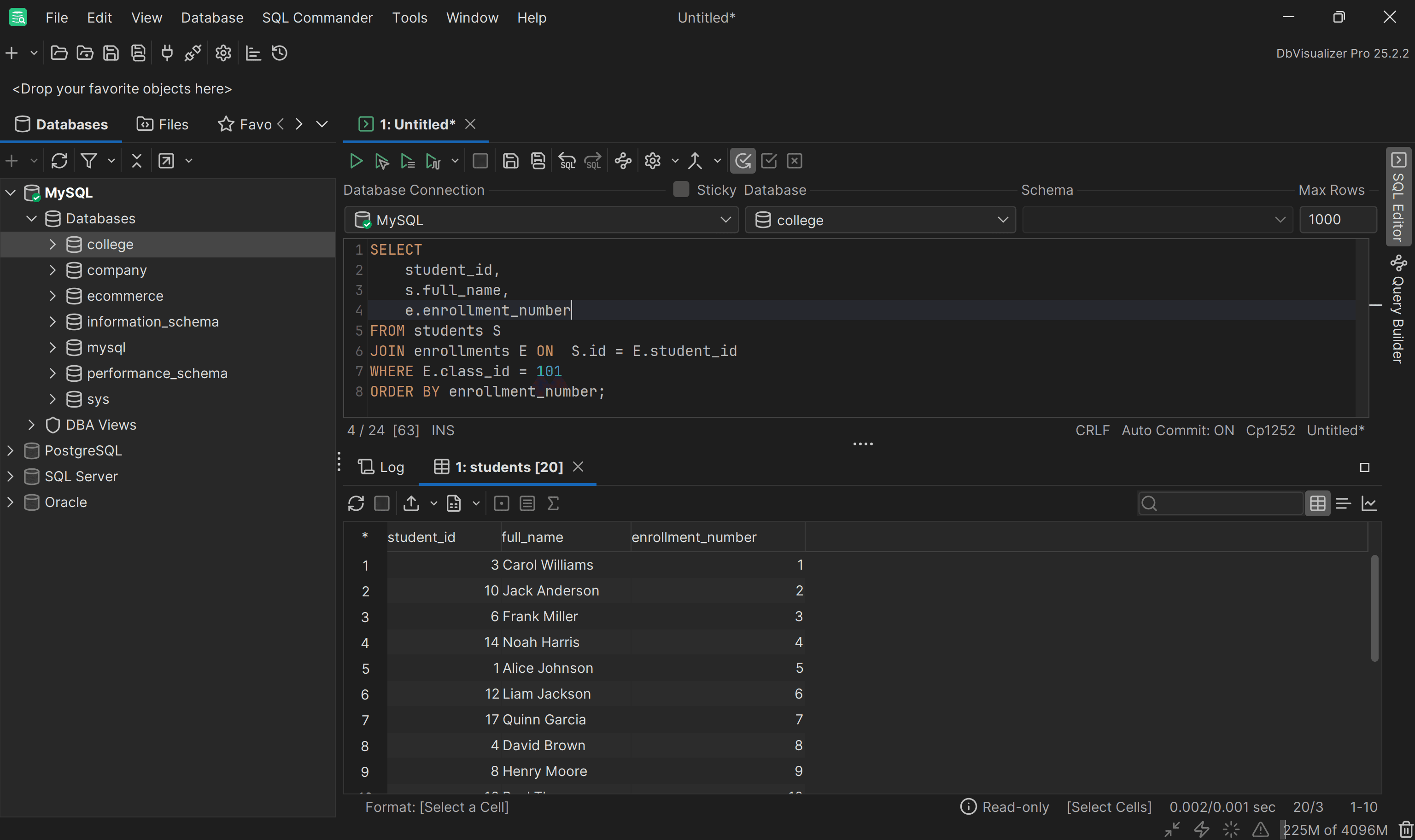
The enrollment_number column in the resulting table shows that students have incremental enrollment numbers for class 101.
Now, the MOD function in SQL allows you to distribute students evenly into three groups:
To implement this logic, add a calculated column called group_number using the SQL MOD function:
                    1
                    SELECT


                    2
                        student_id,


                    3
                        s.full_name,


                    4
                        e.enrollment_number,


                    5
                        MOD(e.enrollment_number - 1, 3) + 1 AS group_number


                    6
                    FROM students S


                    7
                    JOIN enrollments E ON  S.id = E.student_id


                    8
                    WHERE E.class_id = 101


                    9
                    ORDER BY enrollment_number;
The -1 ensures that the first enrollment number (1) maps to 0 in MOD. Adding +1 converts it to start at Group 1.
Running the query in DbVisualizer:
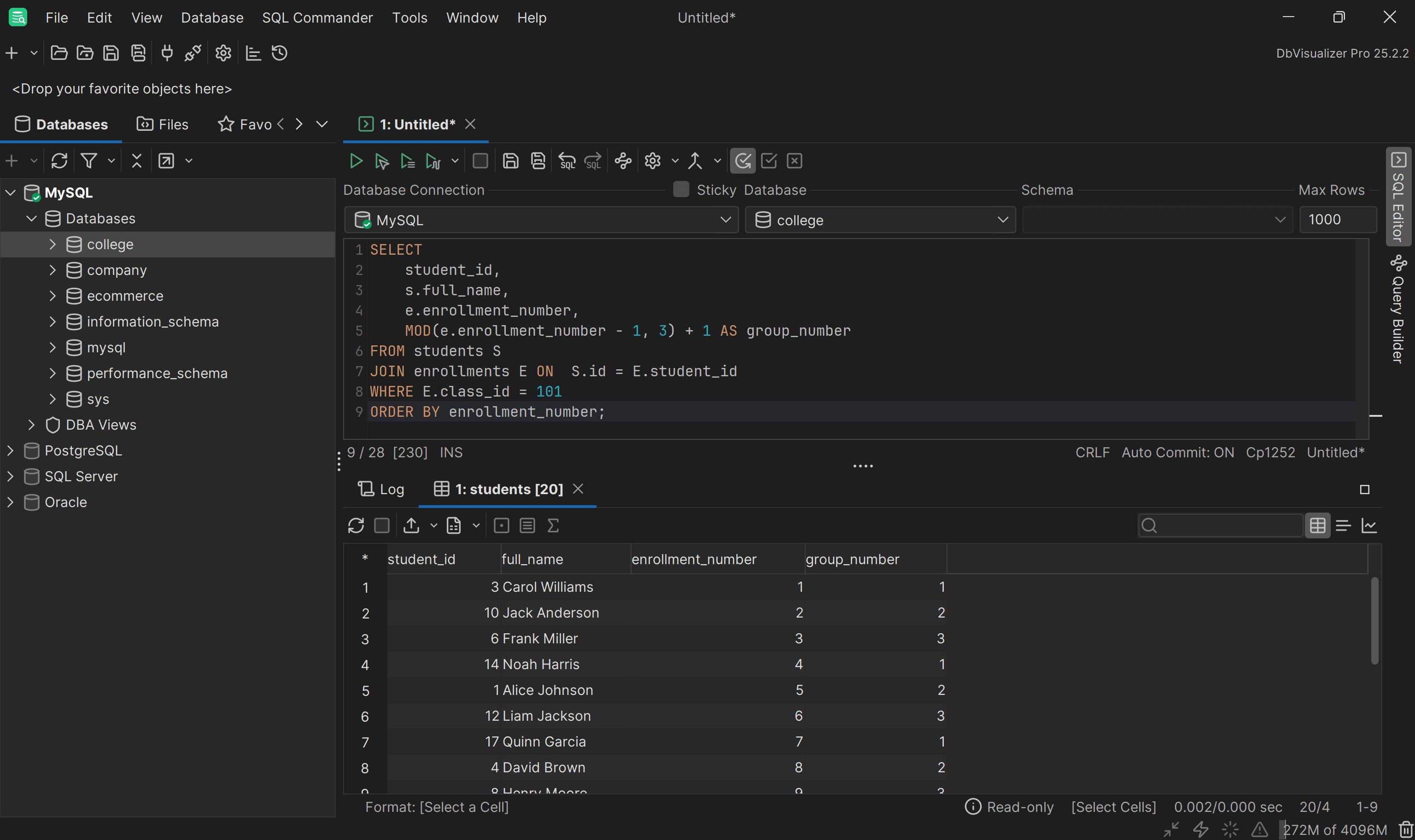
See how it assigns students evenly across Group 1, Group 2, and Group 3, cycling through the groups repeatedly as desired.
Awesome! Mission complete.
As an extra, suppose you want to see the full names of students in each group. To achieve that, you can use a GROUP BY query with a nested subquery:
                    1
                    SELECT


                    2
                        SG.group_number,


                    3
                        GROUP_CONCAT(SG.full_name SEPARATOR ', ') AS student_names


                    4
                    FROM (


                    5
                        SELECT


                    6
                            student_id,


                    7
                            s.full_name,


                    8
                            e.enrollment_number,


                    9
                            MOD(e.enrollment_number - 1, 3) + 1 AS group_number


                    10
                        FROM students S


                    11
                        JOIN enrollments E ON  S.id = E.student_id


                    12
                        WHERE E.class_id = 101


                    13
                        ORDER BY enrollment_number


                    14
                    ) SG


                    15
                    GROUP BY SG.group_number


                    16
                    ORDER BY SG.group_number;
The MySQL GROUP_CONCAT function concatenates all student names in each group into a single comma-separated string.
This time, the results will be:
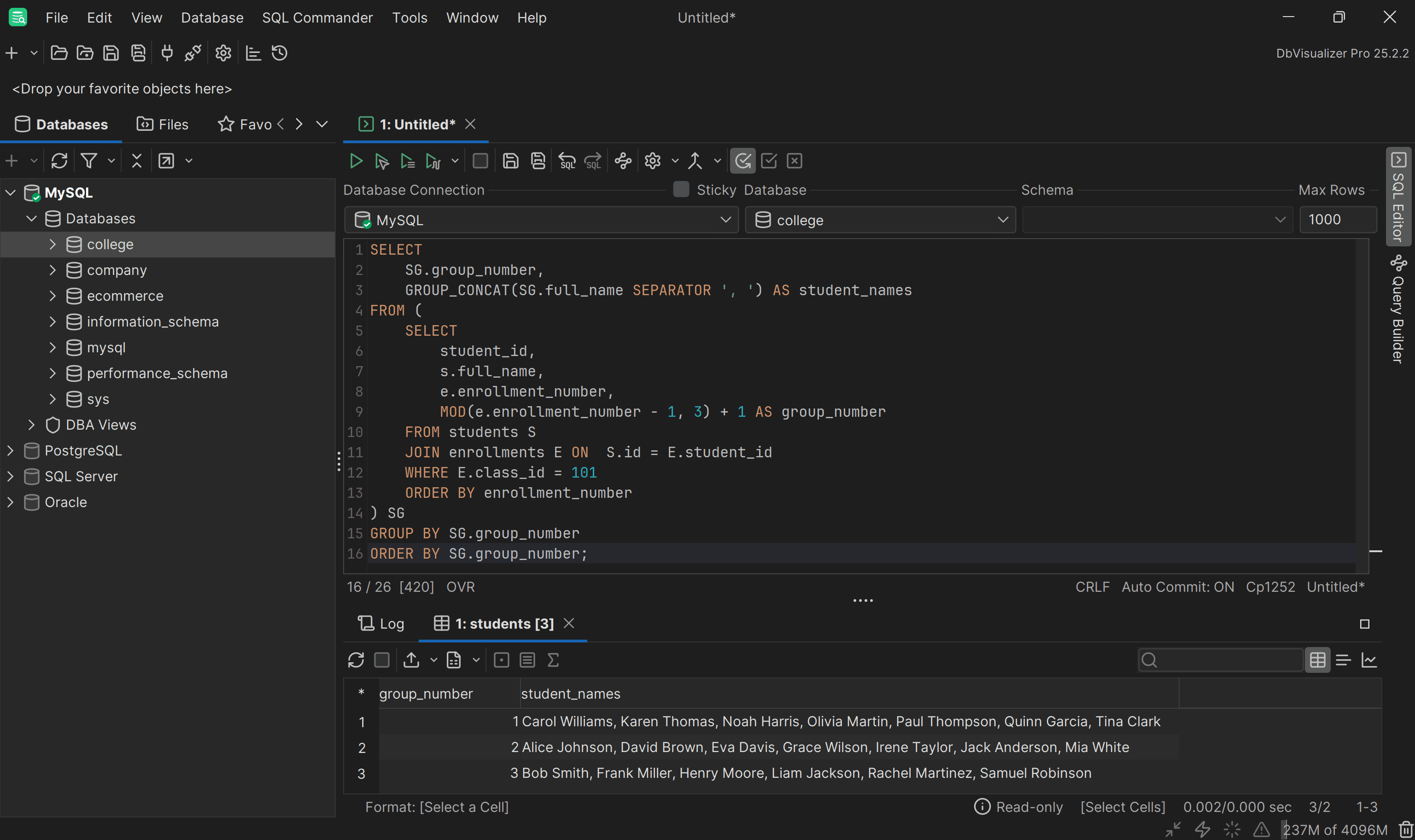
You now have a complete list of students for each group, evenly distributed using the SQL MOD function.
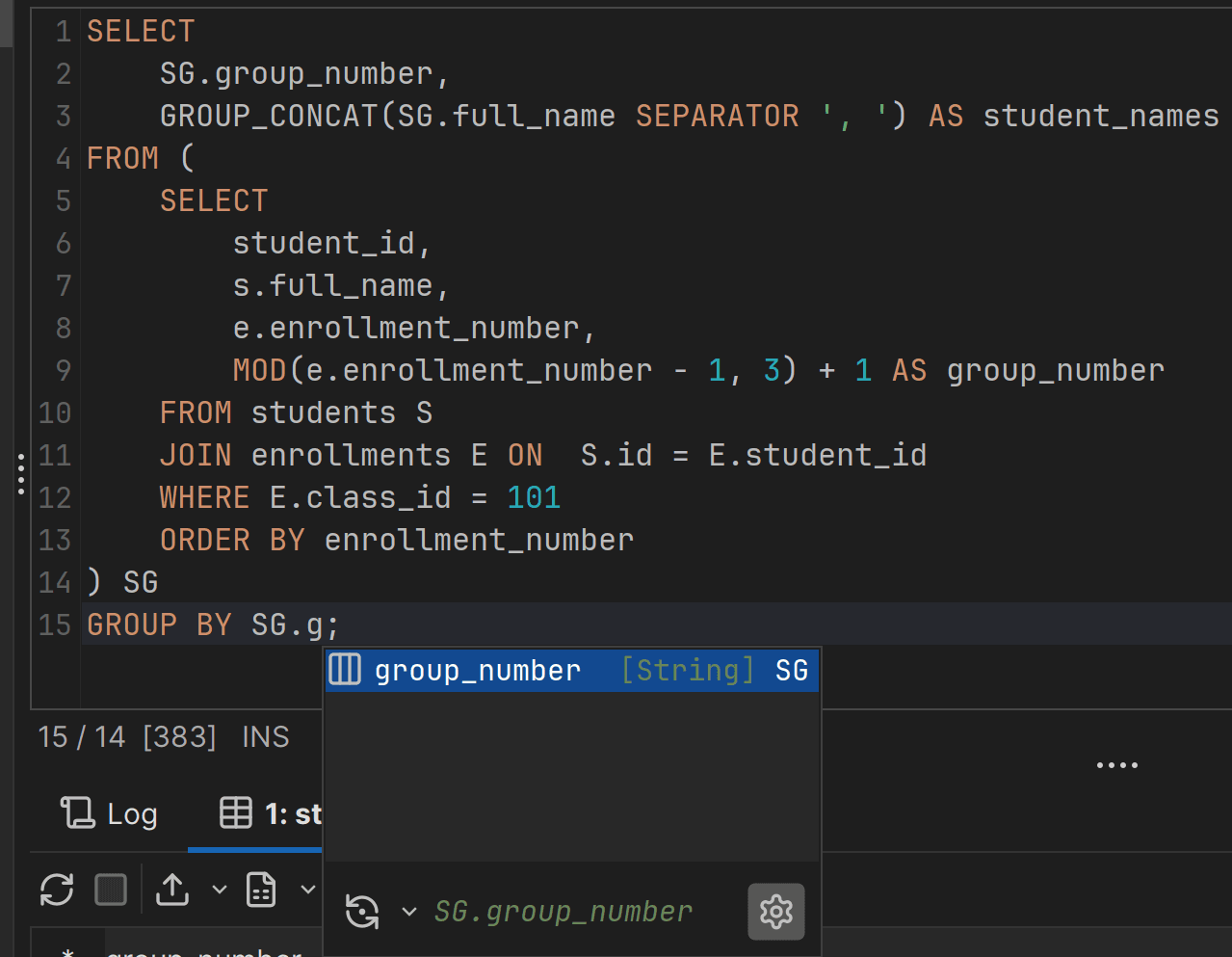
Thanks to DbVisualizer’s SQL editor autocomplete, writing complex queries gets easier. You do not need to remember all column names or aliases. Just press Ctrl+Space (Command(⌘)+Space on macOS) to access autocomplete and get contextual tips while building your query, as shown below:
Conclusion
In this blog post, you learned more about the MOD function in SQL. Specifically, you saw how it allows you to perform the modulo operator within SQL queries. You also discovered how to use it in MySQL, PostgreSQL, SQL Server, and Oracle.
As shown here, DbVisualizer simplifies writing and executing SQL queries. It supports over 50 databases and offers powerful features like SQL formatting, ER diagrams, and query optimization tools. Download DbVisualizer for free today!
FAQ
Is MOD in SQL part of the standard?
Yes, the MOD function has been part of the ANSI/ISO SQL standard since SQL:1999 (formerly known as SQL3). In detail, it is included as part of the optional ANSI/ISO SQL feature T441. Still, not all databases support it. For example, the SQL Server MOD function does not exist.
Is there a modulo operator in SQL?
Yes, the modulo operator (MOD in SQL:1999, also available as the % alias in SQL:2011) is part of the standard ANSI SQL. This means that most databases provide and support it as one of their standard mathematical operators.
What is the difference between the modulo operator in SQL and the MOD function?
In SQL, the MOD function and the modulo operator % perform the same basic operation: they calculate the modulus of two numbers, which is the remainder of a division. Typically, MOD and % are interchangeable, with one that may be serving as a shorthand for the other, depending on the SQL dialect.
Which databases support the MOD SQL function?
| Database | MOD support | Notes |
|---|---|---|
| MySQL | ✅ | Fully supported with numeric and fractional values. |
| PostgreSQL | ✅ | Supports integers and numeric types; fractional remainders allowed. |
| SQL Server | ❌ | Use the % operator instead |
| Oracle | ✅ | Accepts numeric and convertible types; returns the highest precedence type. |
| MariaDB | ✅ | Compatible with MySQL syntax. |
What is the difference between the modulo function in SQL and the modulus function in SQL?
There is no real difference between the “modulo function” and the “modulus function” in SQL. Both expressions refer to the same operation, which is getting the remainder of a division between two numbers.