
intro
Let’s analyze the best Navicat alternatives for companies and enterprises seeking a solution, comparing these selected database clients across common criteria.

Navicat is well-known for its range of products, comprising both single-database solutions and all-in-one database management software. However, no tool is perfect, and its pricing can be a concern, making it worth exploring other options.
Fortunately, there are several fantastic Navicat alternatives available. In this article, we highlight the most noteworthy options for you to consider!
An Overview of Navicat
Before exploring the alternatives to Navicat, let’s understand why you may want to consider other database management tools in the first place.
What is Navicat?
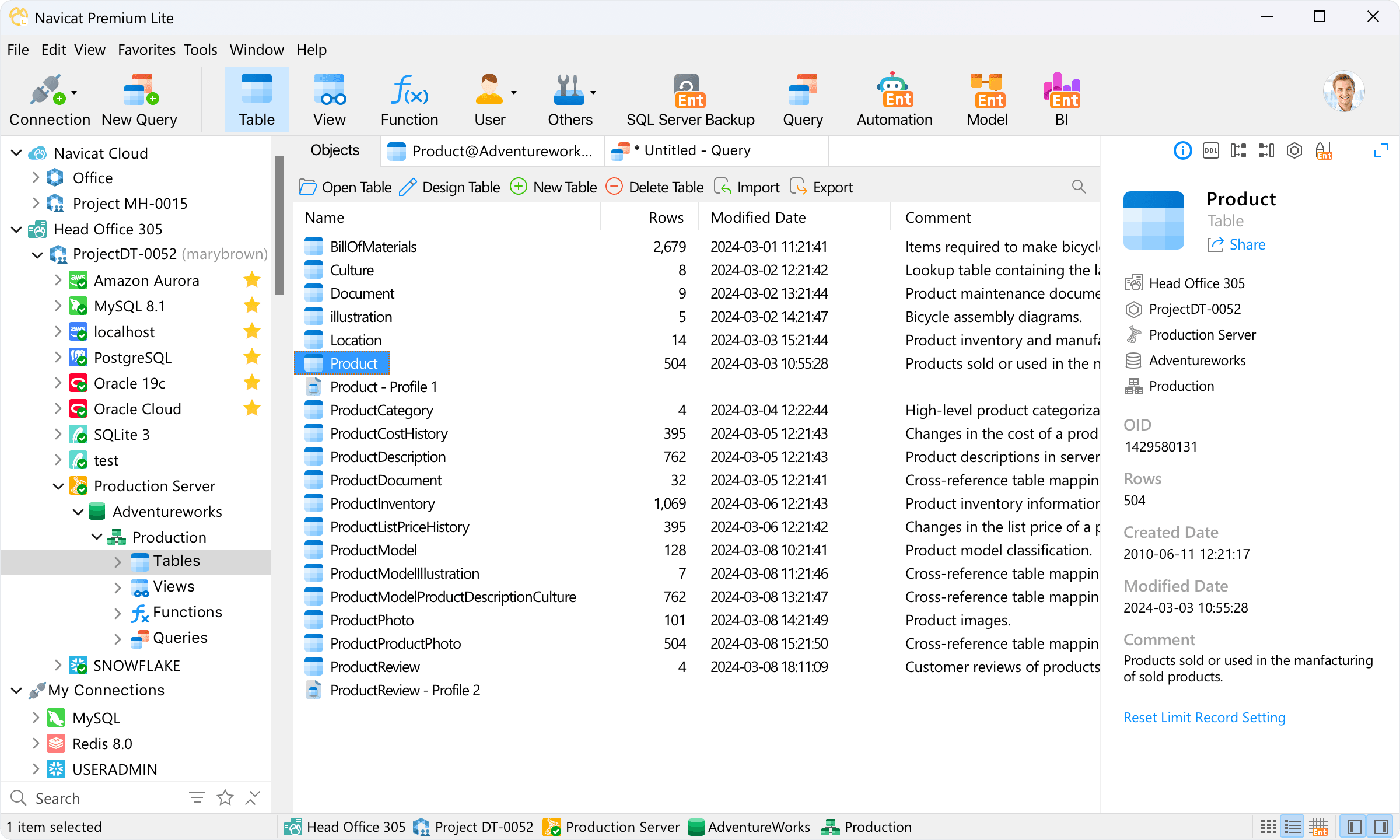
Navicat is a suite of graphical database management tools. It offers specialized versions for MySQL, PostgreSQL, MongoDB, MariaDB, SQL Server, Oracle, SQLite, Redis, and Snowflake, as well as an all-in-one solution called Navicat Premium, which enables you to connect to all of them from the same single application.
The tool is developed by PremiumSoft CyberTech Ltd., a multinational corporation headquartered in Hong Kong, and is available for Windows, macOS, and Linux.
Each Navicat product is available in both commercial and non-commercial versions, with the latter offered at a significant discount. Additionally, there is a feature-limited Premium Lite version that can be downloaded for free and used even for commercial purposes.
Navicat offers multiple licensing options, including both subscription plans and perpetual licenses. A perpetual license grants lifetime access to the specific version you purchased, without expiration. For Navicat Premium, pricing is $79.99 for the monthly license, $799.99 for the annual license, and $1,599.00 for the perpetual license.
Why Even Look for Navicat Alternatives?
Navicat is a trusted database client and administration tool that has been around since 2002. However, no solution is without flaws, and some users have raised concerns about this tool.
On Capterra, users have reported issues related to data migration and occasional bugs on macOS. Some Trustpilot reviews have also highlighted inconsistencies between the macOS and Windows versions of the tool, leading to data synchronization problems. Plus, the list of databases supported by Navicat is not as extensive as that of DbVisualizer, DBeaver, or other popular database clients on the market.
The most common concern, mentioned across Trustpilot and Reddit is pricing. The annual fee of $799.99 for the Premium version is significantly higher than that of most other database clients on the market, positioning Navicat almost exclusively within the enterprise segment.
The high price alone is enough reason to start considering Navicat alternatives. That is particularly true if you are looking for a more affordable, equally feature-rich, stable, and platform-consistent database management solution.
Core Factors to Consider When Evaluating Navicat Alternatives
The market counts a plethora of database management alternatives, especially within the enterprise segment. To identify the best replacement for Navicat, you should take into account factors such as:
Best Alternatives to Navicat for Enterprise-Ready Database Management
Discover the most interesting Navicat alternatives, selected and ranked based on the criteria presented earlier.
DbVisualizer
📌 Quick facts:
| Founded | Sweden, 1999 |
|---|---|
| Supported databases | MySQL, PostgreSQL, SQL Server, Oracle, SQLite, MongoDB, and 40+ others (All popular SQL via JDBC + some NoSQL) |
| Platforms | Windows, macOS, Linux |
| OS support | Supported equally across all operating systems |
| G2 user rating | 4.7/5 (243 reviews) |
| Versions | Free forever version + Premium version (with 21-day free trial) |
| Non-commercial option | The Free version supports both commercial and non-commercial scenarios |
| Perpetual license | Included in all plans |
| Entry price | $199/year ($89/year from the second year) |
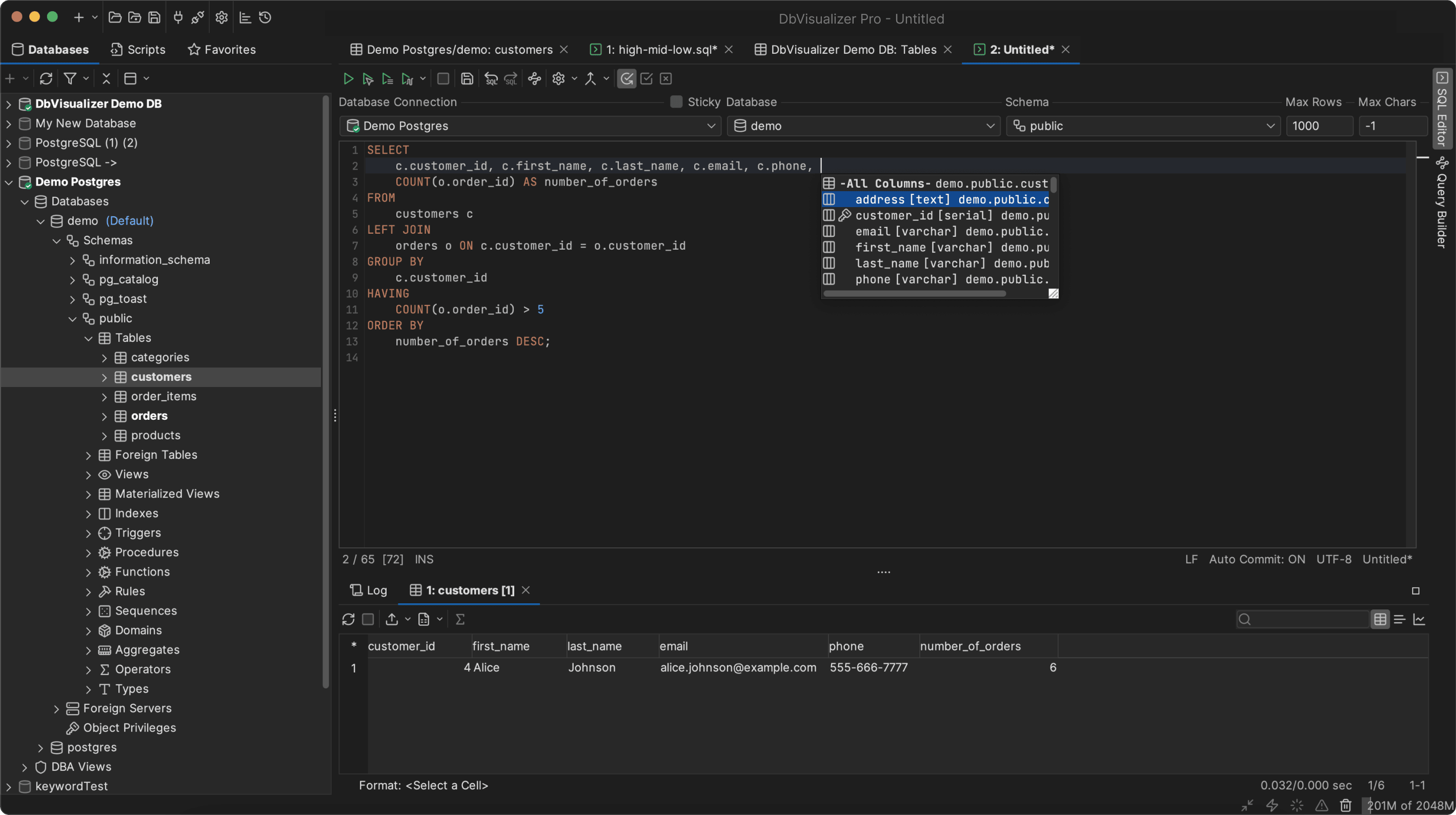
DbVisualizer is a top-rated database client that can connect to MySQL, MariaDB, PostgreSQL, SQL Server, Oracle, MongoDB, and many other databases via JDBC. Its database coverage is much broader than Navicat’s, while offering a comparable feature set.
DbVisualizer has been in development for over two decades, making it a stable and reliable tool. Its JVM-based architecture ensures consistent feature availability across macOS, Windows, and Linux.
The Pro plan includes a perpetual license, allowing continued use of all software versions released during the active subscription period. Pricing starts at $199/year, with a reduced rate of $89/year from the second year, making it much more affordable than Navicat.
Overall, DbVisualizer is one of the best alternatives to Navicat, thanks to its broader database support, comparable feature set, true cross-platform consistency, and competitive pricing.
🛠️ Features:
👍 Pros:
👎 Cons:
dbForge

📌 Quick facts:
| Founded | 2005, Ukraine |
|---|---|
| Supported databases | SQL Server, MySQL, MariaDB, Oracle, PostgreSQL |
| Platforms | Windows, macOS, Linux |
| OS-specific features | Windows is prioritized |
| G2 user rating | 4.7/5 (100 reviews) |
| Versions | Multi-db/Db-specific free version(s) + Multi-db/Db-specific premium version(s) (with 30-day free trial) |
| Non-commercial option | The Express (free) version supports both commercial and non-commercial use cases |
| Perpetual license | Yes, available for $1,539.95 for dbForge Edge |
| Entry price | $769.95 per 1 year subscription via dbForge Edge, with multiple pricing options for db-specific tools |
dbForge is a series of database clients, each built to support a specific database. Similar to Navicat, it also offers database-specific solutions, and the pricing is comparable.
On the contrary, the all-in-one plan from dbForge is just a bundle that provides access to all the main single-database tools, rather than a fully integrated solution like Navicat Premium. That bundle is called dbForge Edge and consists of:
🛠️ Features:
👍 Pros:
👎 Cons:
DataGrip
📌 Quick facts:
| Founded | Czech Republic, 2015 |
|---|---|
| Supported databases | MySQL, PostgreSQL, SQL Server, Oracle, SQLite, MongoDB + 20 others (via JDBC/ODBC drivers) |
| Platforms | Windows, macOS, Linux |
| OS-specific features | Supported equally across all operating systems |
| G2 user rating | 4.6/5 (124 reviews) |
| Versions | Free version for non-commercial use cases + Premium version (with 30-day free trial) |
| Non-commercial option | Yes, via the Free version (or Student version) |
| Perpetual license | Available in all yearly subscriptions |
| Entry price | $10.90/month or $109/year for individuals; $25.90/month or $259/year for organizations |
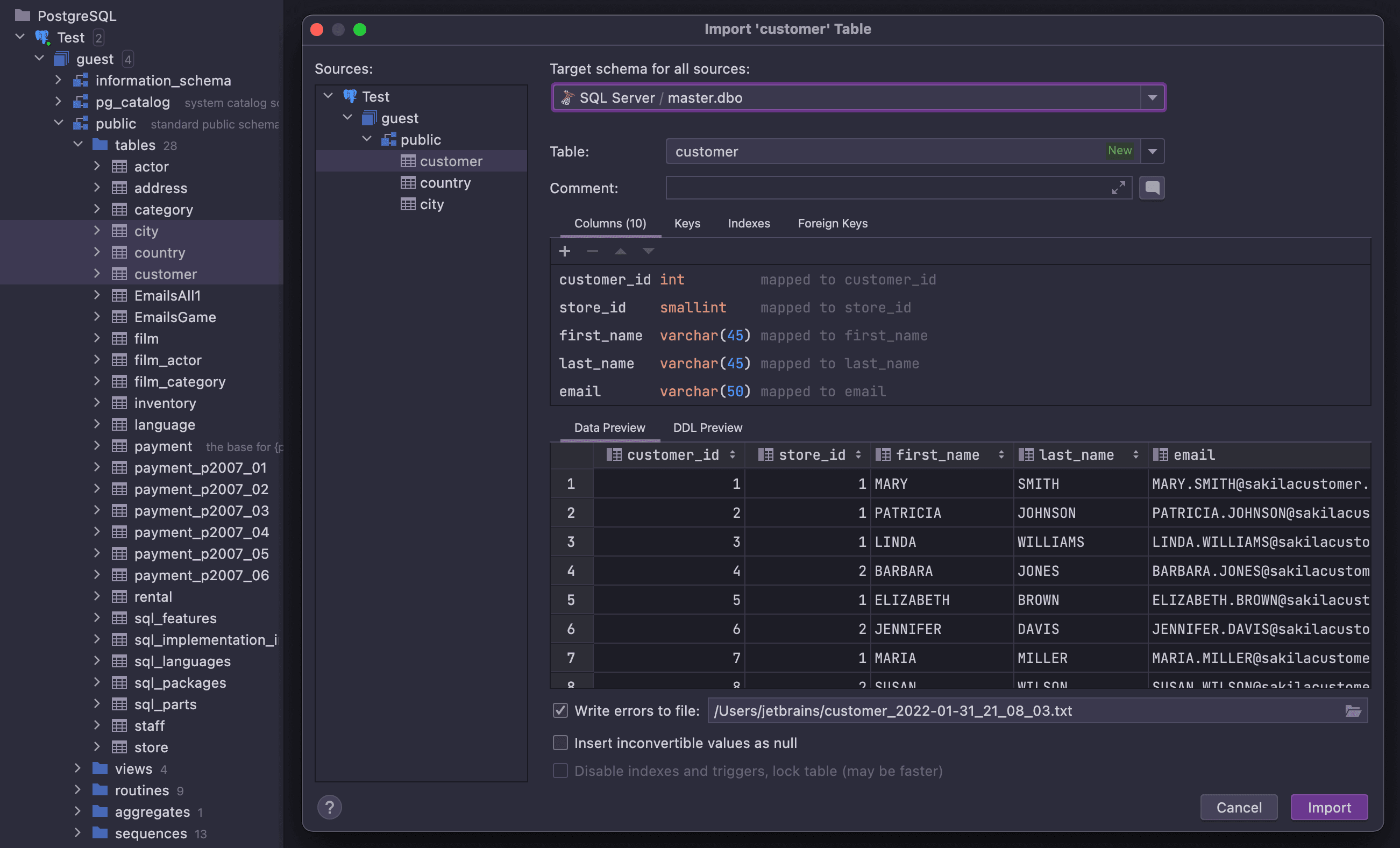
DataGrip is a database client from the JetBrains ecosystem of IDEs that provides multi-database support from a single interface. Unlike Navicat, it does not feature database-specific tools.
DataGrip is built on the JVM, which means it works consistently across all operating systems. Thus, it provides the same feature set without any OS-specific limitations.
All annual subscriptions include a perpetual license, which allows you to use that version (and any minor updates released during that year) indefinitely. On the downside, there is no free version available for commercial use.
🛠️ Features:
👍 Pros:
👎 Cons:
DBeaver

📌 Quick facts:
| Founded | Russia, 2011 |
|---|---|
| Supported databases | MySQL, PostgreSQL, SQLite, Oracle, and SQL Server, MongoDB, and 100+ more |
| Platforms | Windows, macOS, Linux |
| OS-specific features | Supported equally across all operating systems |
| G2 user rating | 4.4/5 (149 reviews) |
| Versions | Free, open-source version + Premium version (with 14-day free trial) |
| Non-commercial option | The open-source version supports both commercial and non-commercial use cases |
| Perpetual license | No |
| Entry price | $110/year for individual users. $250/year for organizations |
DBeaver is a database client that can connect to a long list of databases. Among the Navicat alternatives on this list, it is the only one with an open-source core.
The solution was created by Serge Rider, a Russian developer, and it now has over 44k GitHub stars. DBeaver offers favorable pricing, and its premium version includes features such as an advanced SQL editor, ER diagrams, data import/export tools, and a visual query builder.
The main drawbacks are the lack of a perpetual license—the software stops working when the subscription ends, and the user interface can feel somewhat outdated.
🛠️ Features:
👍 Pros:
👎 Cons:
Best Navicat Alternatives: Comparison Table
Compare all Navicat alternatives presented here in the summary table that follows:
| Founded | Supported databases | Platforms | Support for multiple DBs | G2 user rating | Free-forever version | Perpetual license | Entry price (yearly) | |
|---|---|---|---|---|---|---|---|---|
| Navicat | Hong Kong, 2002 | MySQL, PostgreSQL, MongoDB, MariaDB, SQL Server, Oracle, SQLite, Redis, Snowflake | Windows, macOS, Linux (with some issues reported on macOS) | ✅ + Different solutions for each database | 4.4/5 (53 reviews) | ✅ | ✅ (at $1,599.00 forNavicat Premium) | $799.99/year (or $399.99/year for non-commercial use) |
| DbVisualizer | Sweden, 1999 | MySQL, MariaDB, PostgreSQL, SQL Server, Oracle, MongoDB, SQLite + 40+ others | Windows, macOS, Linux (all equally supported) | ✅ | 4.7/5 (243 reviews) | ✅ | ✅ (on all plans) | $199/year ($89/year from 2nd year) |
| dbForge Edge | Ukraine, 2005 | SQL Server, MySQL, MariaDB, Oracle, PostgreSQL | Windows, macOS, Linux (with focus on Windows) | ❌ (suite of tools that has different solutions for each database) | 4.7/5 (100 reviews) | ✅ | ✅ (at $1,539.95 for dbForge Edge) | $769.95/year (dbForge Edge) |
| DataGrip | Czech Republic, 2015 | MySQL, PostgreSQL, SQL Server, Oracle, SQLite, MongoDB + 20+ others | Windows, macOS, Linux (all equally supported) | ✅ | 4.6/5 (124 reviews) | Only for non-commercial use | ✅ (only on yearly plans) | $109/year for individuals; $259/year for organizations |
| DBeaver | Russia, 2011 | MySQL, PostgreSQL, SQLite, Oracle, SQL Server, MongoDB + 100+ others | Windows, macOS, Linux (all equally supported) | ✅ | 4.4/5 (149 reviews) | ✅ | ❌ | $110/year for individuals; $250/year for organizations |
For other comparisons of database clients, read the following articles:
Summary
The best alternative to Navicat depends on your specific needs, such as database compatibility, budget, and preference for an integrated versus database-specific solution.
For users prioritizing broad database support, stability, and perpetual licensing, DbVisualizer is a top contender. Built on a JVM architecture and in development for over two decades, it equips you with a consistent, reliable experience across Windows, macOS, and Linux.
If your work centers on a single database platform, the dbForge product line is a comparable alternative, though it comes at a higher cost. It offers database-specific tools and a feature set similar to Navicat’s, including strong AI support for query generation and troubleshooting.
DataGrip, part of the powerful JetBrains ecosystem, is an excellent choice for teams and individuals seeking a highly customizable, all-in-one multi-database solution, while DBeaver is a powerful, truly cross-platform tool with an open-source core.
We hope that this article will help you make an informed decision!
FAQ
What is the best Navicat alternative for enterprises?
Navicat is quite expensive and mainly targets enterprise users, providing custom support in its higher-tier plans, which is what large companies usually need. Something similar is available with DbVisualizer, which comes with a special plan guaranteeing access to premium support. No wonder many organizations choose DbVisualizer. That is because it is well-established, highly reliable, and trusted by major companies such as Apple, Netflix, and Google.
I am on a Mac. What Navicat alternative should I use?
Navicat runs on macOS, but some users have reported errors and bugs on that platform. If you want a database client that fully supports macOS, the most reliable options analyzed here are DbVisualizer, DataGrip, and DBeaver. Since they are developed in Java, they provide a consistent experience across all operating systems.
What is the best database client for startups?
DbVisualizer is definitely the most startup-friendly database client. It is the only one on the list that offers discounts of up to 50% for startup companies, making it a more budget-friendly option for growing businesses.


