intro
A practical, up-to-date comparison of Git support across popular SQL clients, including DbVisualizer, DataGrip, DBeaver, and Oracle SQL Developer. Learn what the Git support in these SQL clients are all about.

The days of emailing SQL scripts back and forth, storing procedures in shared folders, or worse, making changes directly in production and hoping someone remembered to document them are thankfully behind us, at least for teams that have embraced version control.
Git is no longer optional for teams working with databases. Schema changes, migration scripts, and performance tuning queries increasingly live alongside application code. As a result, SQL clients are expected to work smoothly with Git instead of treating version control as an afterthought.
This has become the expectation over the past few years. The question today is no longer whether a SQL client supports Git, but how it does so and how effectively it has been implemented.
In this blog, we compare Git support in popular SQL clients, focusing on what actually helps developers get work done without breaking established Git practices!
What “Git Support” Means in a SQL client
Before comparing tools, it is only right and helpful that we clarify the term itself. Git support in SQL clients are typically divided into three types, namely:
Most SQL clients use a mix of these approaches, and the balance is of greater importance than the feature checklist.
The Current State of Git in SQL Clients
The database world has been slower than application development in embracing distributed version control, but Git adoption has accelerated dramatically in recent years.
Some SQL clients have taken a different approach based on their architecture and user base needs and we are going to compare them, starting with DbVisualizer.
DbVisualizer
DbVisualizer introduced the functionality of Git integration right within DbVisualizer starting with version 25.2. This feature is all about what database developers work on the most, thus, managing SQL scripts.
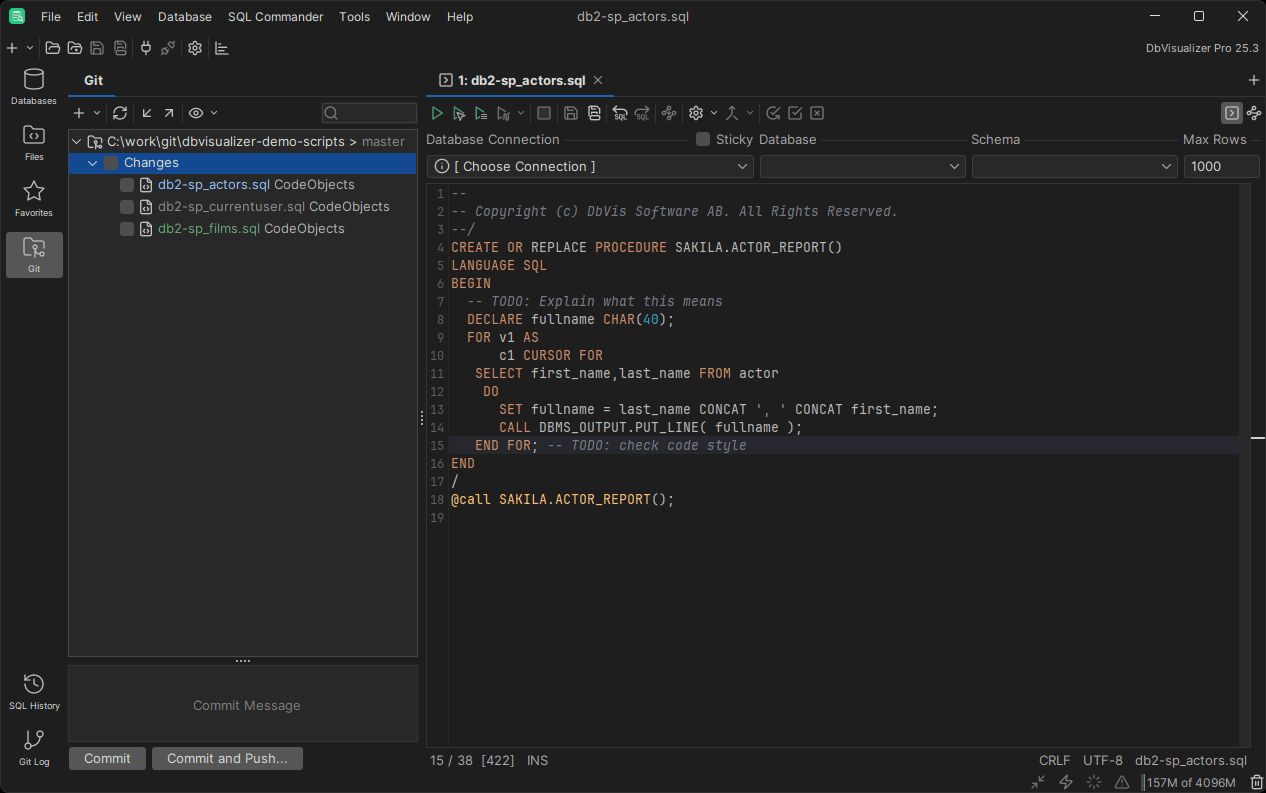
The workflow is pretty much straightforward. Using DbVisualizer, it is possible to clone a remote repository, mount an existing one, switch branches, push changes, or view the commit history all from the same place. GitHub users benefit from web-based authentication, which simplifies the login process considerably.
DbVisualizer handles database connections alongside version control for a more practical approach. Version 25.3 introduced the ability to version control shared connections, where the definition of the connection is stored in a Git repository. This offers a single source of truth regarding the connection configuration, where the same level of review and change is applied as is used to change code.
The Git interface appears in a dedicated tab where you can commit changes, view diffs, and manage branches. Also, the three-way merge feature enhances the process of handling conflicts by ensuring easier comparisons for final merge work when there are competing changes.
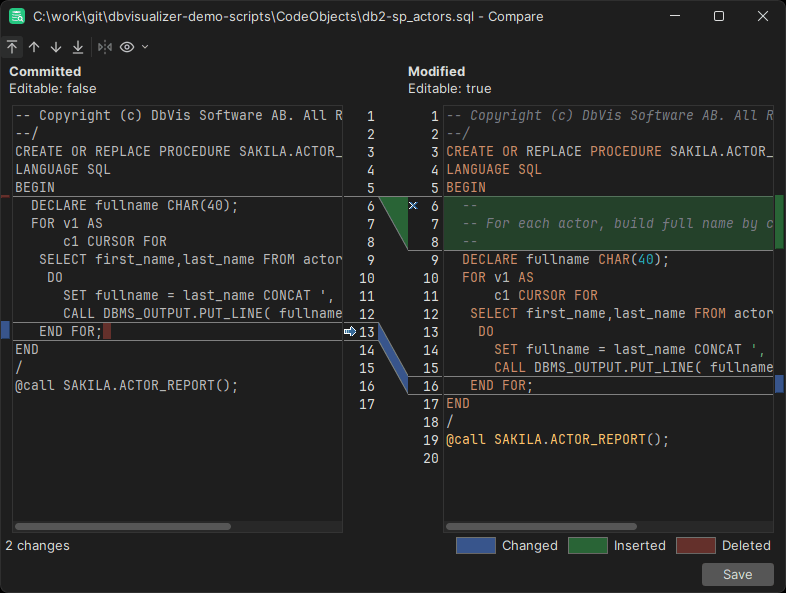
This integration hits the nail right on the head if you and/or your team are looking to incorporate a form of version control without disrupting the current DbVisualizer process. This isn’t a new system that you have to learn; you just are expanding on the things you currently do.
DataGrip
DataGrip’s Git features are inherited from the JetBrains IntelliJ Platform, which makes them very mature. The only catch is that you need to install the Git Integration plugin in DataGrip, and if you are using your GitHub account, you also need the GitHub plugin. After that, the version control system in DataGrip is very much like what you are already used to in other JetBrains IDEs.
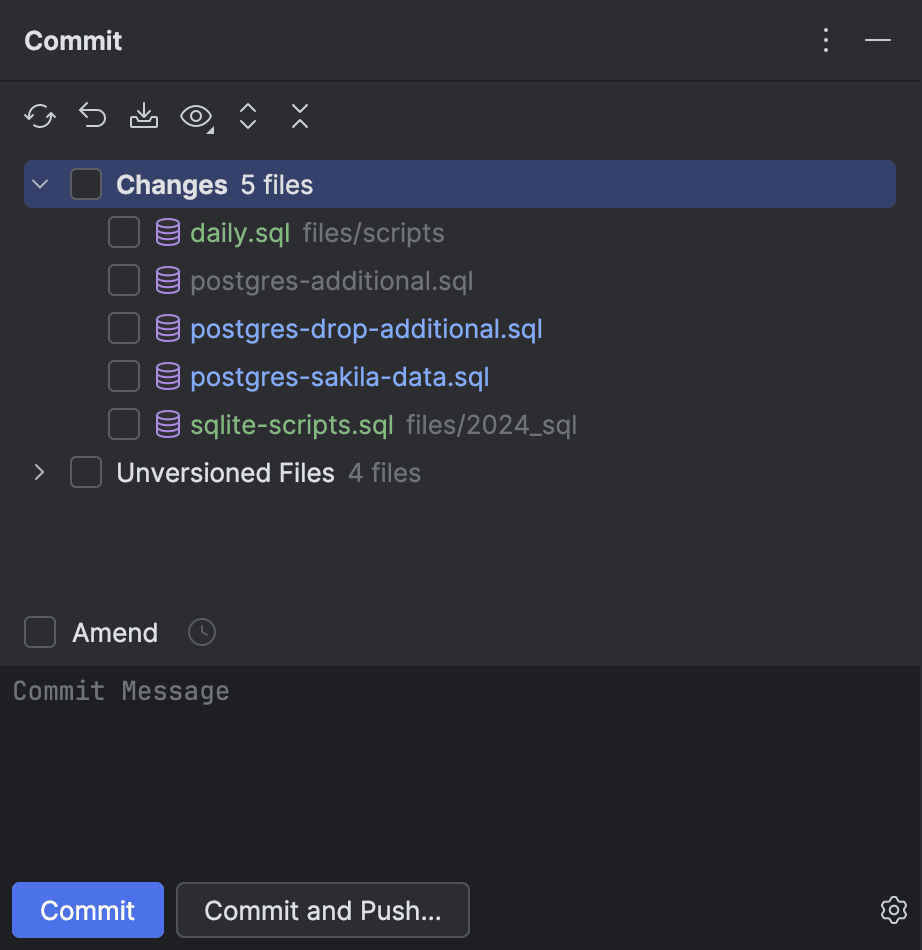
You can use it to clone repositories, work with branches, commit, and then push to remote repositories. The tool can work with local and remote repositories effortlessly.
In DataGrip, the database connections are managed in one part of the IDE, whereas your version-controlled files are shown in the “Files” tool window. You have to manually connect the directories to your project and then add them to the version control system. While this offers a great level of control over what is versioned, it is far more complicated than the integrated methods used in DbVisualizer.
You can view inline diffs as well as compare the versions side by side to see who contributed to the changes. DataGrip conflict resolution tools help you easily resolve merge conflicts by providing a visualization of the differences made.
DBeaver
DBeaver takes a unique approach in its focus on Git integration, which is only available in its Enterprise version. Although its Community version is feature-rich, it does not include version control functions.
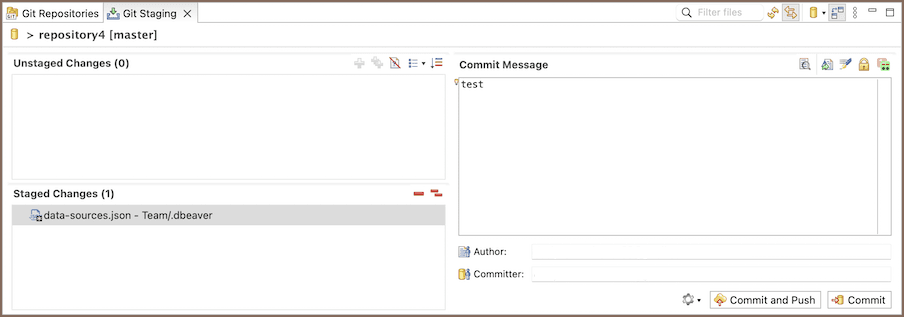
In the context of Enterprise applications, DBeaver provides schema versioning that lets teams track changes they have made to their database structures over time. The implementation focuses on collaborative schema management, helping teams see who modified objects and when. Developers would be able to modify the same schema without disrupting each other’s changes, as the Git process would be handling the collaboration process.
Of course, the Community version retains all the necessary features for free: schema editors, SQL editors, data migration tools, and ER diagrams. However, if Git is a requirement for your operational needs, you would need to look at the cost implications for the Enterprise version.
Oracle SQL Developer
Oracle SQL Developer has supported Git and Subversion for years but the implementation remains firmly file-based. You manage scripts in your version control system, not database objects directly.
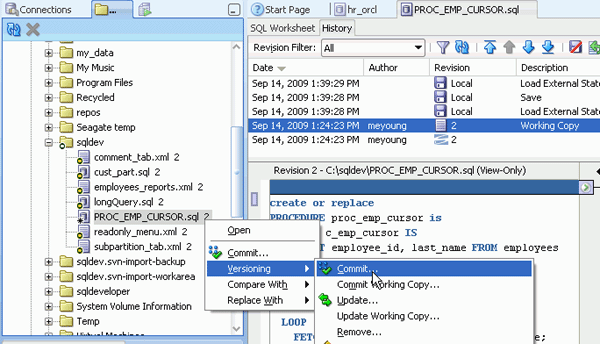
The workflow involves the “Files” navigator and “Team/Versions” panel. You connect to your repository, browse controlled files, and manage changes through SQL Developer's interface. When you open a file from version control, you get a temporary local copy that you can read and execute but not modify until you check it out.
The advantage of this approach is simplicity. You are working with scripts as files, just like application code. The downside, however, is the gap between your database objects and version control. Making a change to a stored procedure means exporting the DDL to a file, checking it into version control, then applying it to other databases. There is no automatic synchronization between your schema and your repository.
Conclusion
Git integration in SQL clients has significantly improved. DbVisualizer maintains its simplicity in Git management directly in the tool, which works ideally for teams that prioritize script version control.
DataGrip has good version control system integration for developers already using the environment, whereas DBeaver confines Git functionality to its Enterprise edition. Oracle SQL Developer has been supporting the feature for years as well.
The trick is to make your tool of choice integrate with your actual workflows. Whatever tool you use is less important than developing the habit of committing changes regularly. Know also, that simple integration with Git is better than having to think about what you changed, who made those changes, and how to revert those changes if something breaks.
Start with what you already have access to, and then develop good habits with commit messages, and eventually improve your process as you get a better idea of your needs. Download DbVisualizer for free now and it will surprise you with many things including our Git feature. Take an expo of all of our features, the Pro version of DbVisualizer is free for 21 days.
FAQ
Do I really need version control for my database scripts?
Yes, especially if you are working in a team or managing databases across multiple environments. Version control prevents the "who changed what" problem, makes it easy to roll back mistakes, and ensures everyone's working from the same baseline.
Can I use Git with any SQL database?
Git itself works with any database: it is just tracking text files. However, SQL clients vary in their Git integration quality across different databases. DbVisualizer gives consistent Git support across multiple database platforms (PostgreSQL, MySQL, Oracle, SQL Server, etc.).
What happens when two developers change the same stored procedure?
This creates a merge conflict, just like with application code. Git will flag the conflict, and you will need to manually resolve it by choosing which version to keep or combining both changes. SQL clients with three-way merge support (like DbVisualizer 25.3+) make this easier by showing you the original version, your changes, and their changes side by side.
Should I commit database passwords to Git?
No, never commit credentials to version control repositories. That is especially true if they are shared or public. Use environment variables, configuration files excluded from Git (via .gitignore), or secrets management tools. Some SQL clients like DbVisualizer let you version control connection definitions without including passwords.