
intro
Let’s see what the SQL DROP TABLE statement is, how to use it, why it is important, and how it differs from DELETE and TRUNCATE.

Deleting data from a table is one of the most common operations that database users, developers, and administrators perform regularly. Sometimes, it is just a matter of removing a few rows or emptying a table, while other times, you need to remove an entire table. This is where the SQL DROP TABLE statement comes in.
In this article, you will learn what DROP TABLE is, how it works under the hood, how to use it in SQL, and why and how you might execute it safely using a visual database client!
What Is the DROP TABLE SQL Statement?
In standard SQL, the DROP TABLE statement is a DDL (Data Definition Language) command used to permanently remove a given table from a database.
That statement is generally auto-committed, meaning it is an irreversible operation. In other words, even if executed within a transaction, it cannot be rolled back. That is common for all SQL DDL commands, which typically cause an implicit commit.
When an SQL DROP TABLE statement is executed, the DBMS performs the following high-level tasks:
When to Use the Statement
DROP TABLE in SQL comes in handy in many scenarios, such as:
How the SQL DROP TABLE Statement Works
Each database engine may implement the SQL DROP TABLE command in a different way at a low level. At the same time, there are common patterns that help you understand how this statement is actually carried out.
So, we can assume that when you run a DROP TABLE SQL query, the database engine executes two main low-level operations:
Time to take a closer look at each of these steps!
First, the DBMS usually locks the table to prevent concurrent access and immediately removes its entry from the system database catalog, where definitions of tables, columns, indexes, constraints, and triggers are stored. Once this metadata record is gone, the table effectively ceases to exist within the database’s logical structure. Second, the engine deallocates the table’s physical storage by marking its data and index pages as free, releasing the space for future use.
In the end, those two steps guarantee that both the data and metadata are permanently deleted.
Note: DELETE queries logs each row removal, and can be rolled back. Instead, DROP TABLE is carried out with minimal logging. In most cases, there is only a single record to keep track that an entire table has been removed. Learn more in our guide on how to delete data in SQL.
How to Drop a Table in SQL: Syntax
DROP TABLE is part of the ANSI/ISO SQL standard, meaning that most relational databases support it (and with a similar syntax). Still, each database system might introduce its own peculiarities, extensions, or implementation details that affect how the command behaves at a low level.
Thus, for specific syntax rules and advanced options, it is recommended to consult the official documentation of your database system:
Here, we will assume we are dealing with a standardized SQL DROP TABLE statement, which has the following basic syntax:
                    1
                    DROP TABLE table_name;
Where table_name is the name of the table you want to drop.
For example, drop the students table like this:
                    1
                    DROP TABLE students;
Execute it in a database client like DbVisualizer, targeting a database that has the students table. You will get a result like this:
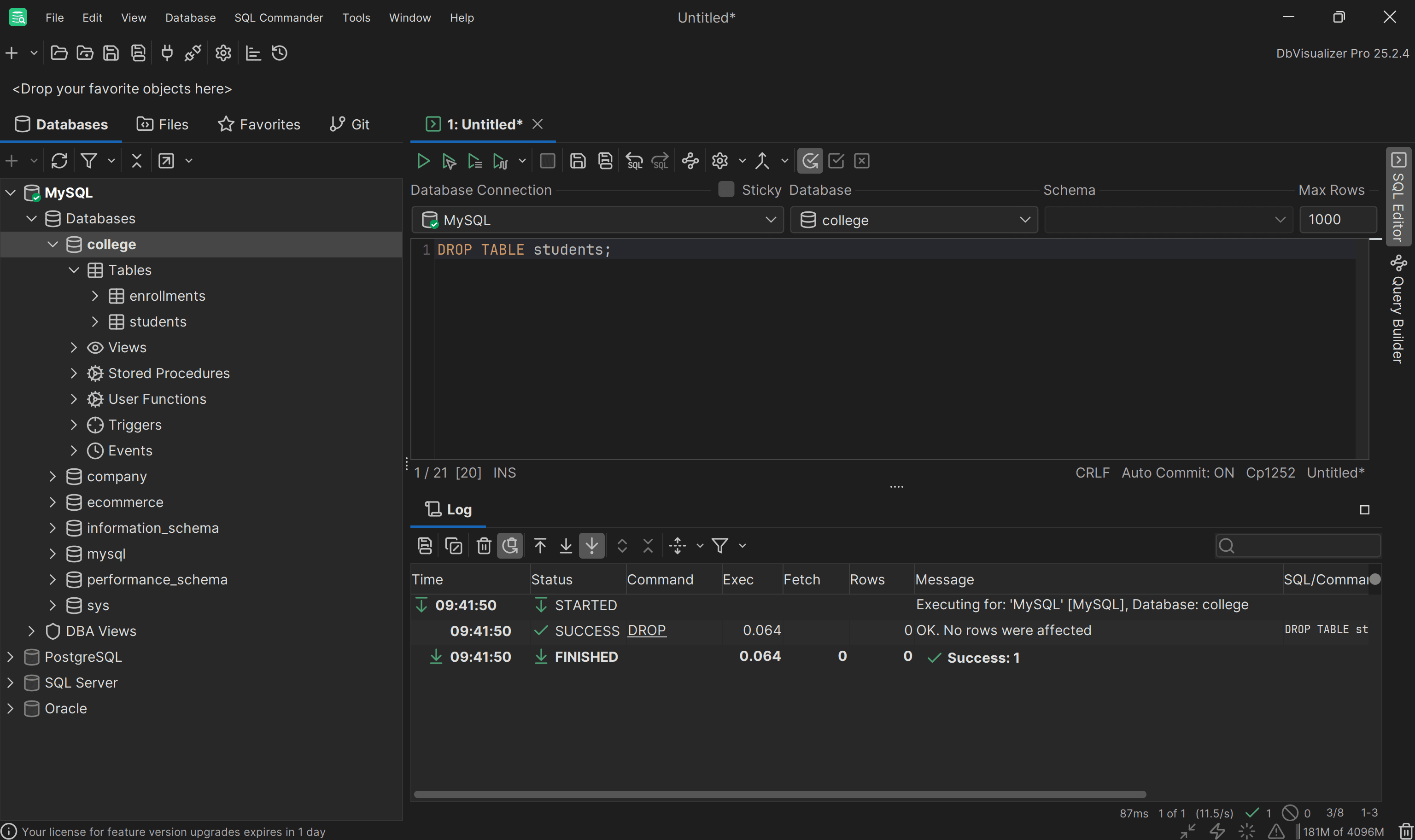
Notice that the log may mention “No rows were affected” because the DROP TABLE SQL statement does not log individual row deletions. That is because it directly removes the entire table as a single operation, without tracking the rows that were deleted.
Notes:
SQL DROP TABLE IF EXISTS
If you try to execute the SQL DROP TABLE statement on a table that does not exist, the operation will fail, and no changes are made. You would see an error like:
                    1
                    Unknown table 'table_name'
This can be problematic because such an error may break a transaction. To prevent this, most databases (including MySQL, PostgreSQL, SQL Server, and Oracle) have introduced the non-standard IF EXISTS clause. This transforms the statement into:
                    1
                    DROP TABLE IF EXISTS table_name;
With IF EXISTS, if table_name does not exist, the statement completes successfully, often issuing only a warning or equivalent notification in the database.
Note that IF EXISTS is optional, so in most databases the DROP TABLE syntax can be expressed as:
                    1
                    DROP TABLE [IF EXISTS] table_name;
For example, if the users table does not exist, running
                    1
                    DROP TABLE IF EXISTS users;
will succeed without any error, and no table is dropped.
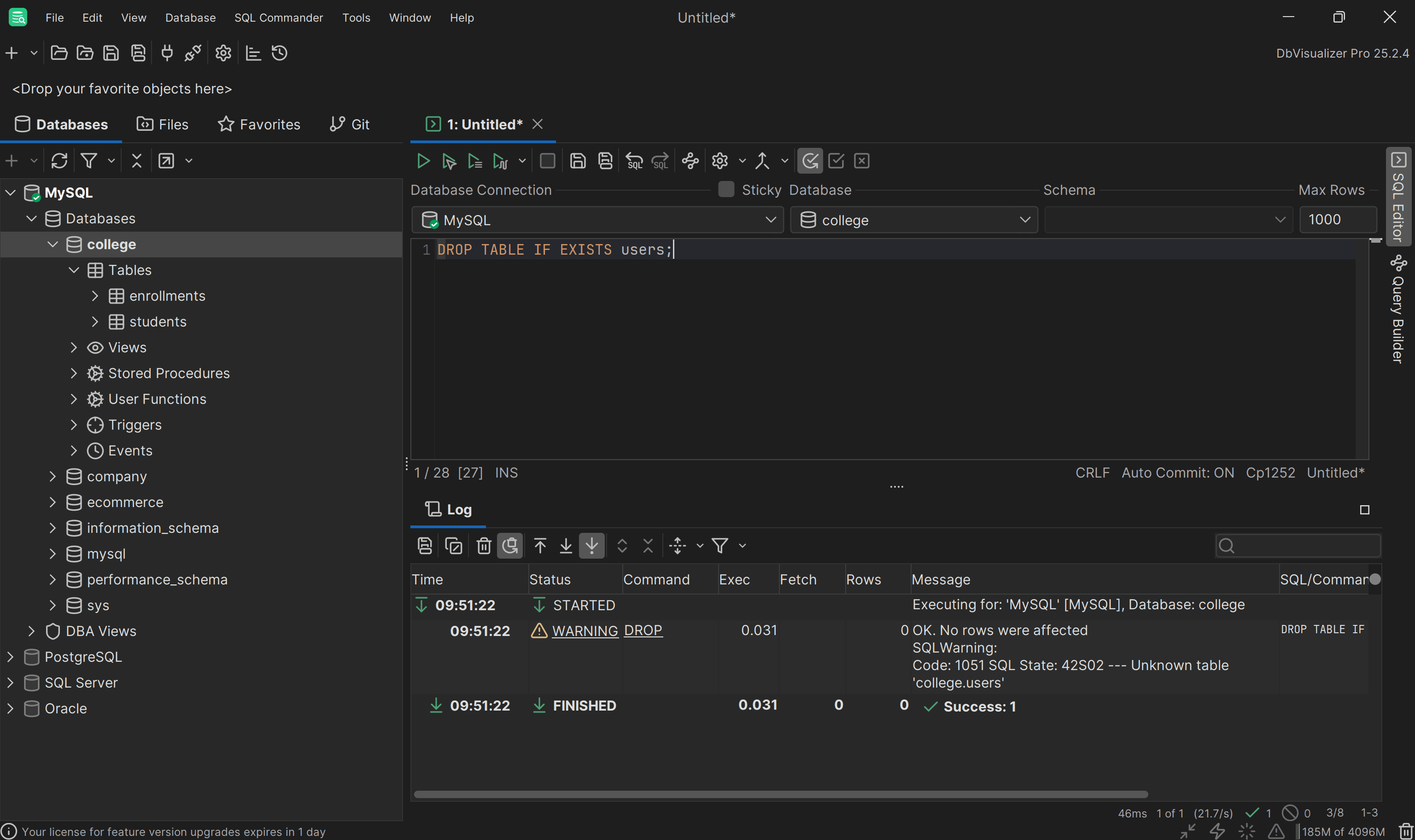
The operation was successful, but note the “Unknown table 'college.users’” SQL warning.
Dropping a Table in SQL: Visual Approach
Since the DROP TABLE operation is irreversible, it is generally best to execute it carefully from a database client you use to manage your databases.
For example, DbVisualizer allows you to connect to and manage over 50 different databases and provides visual tools to make dropping tables easier.
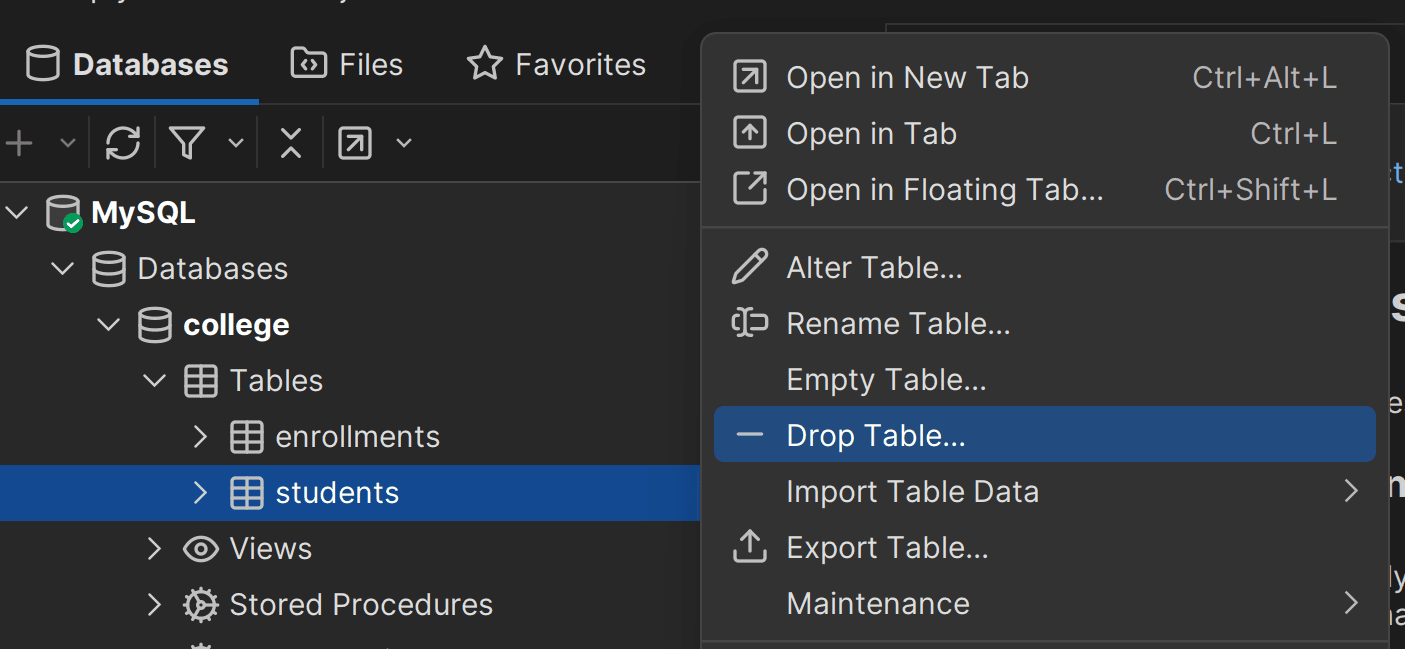
Download DbVisualizer and set up a database connection. Then, locate the table you want to remove (for instance, the students table) by exploring your database structures and schemas in the Databases section. Right-click the identified table and select the “Drop Table…” option:
This will open a “Drop Table” modal like this:
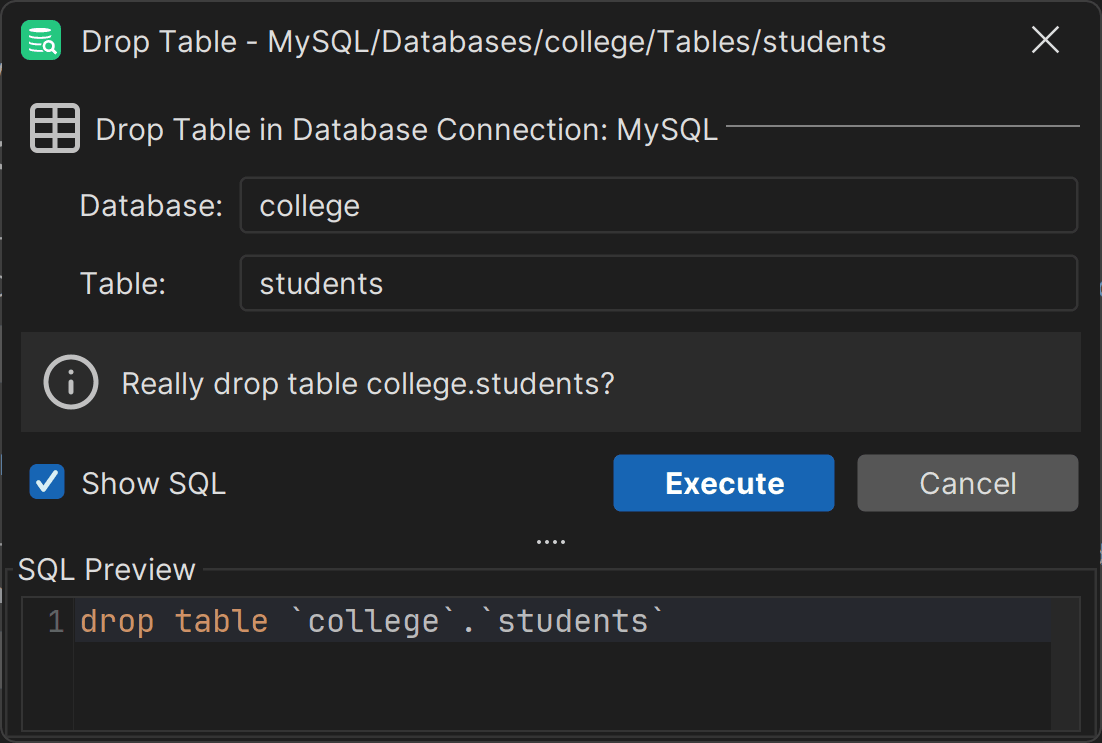
Here, you can drop the table with a single click by pressing “Execute” and even preview the SQL query that will be executed behind the scenes.
Great! This is just one of the many helpful features supported by DbVisualizer.
DROP TABLE in SQL: Best Practices
These are the most important tips and advice you should keep in mind before or while running DROP TABLE queries:
Conclusion
In this blog post, you learned about one of the fundamental SQL statements: the DROP TABLE command. Given its importance and the risks associated with its execution, managing it becomes much easier with a visual database client like DbVisualizer.
That tool provides powerful features such as an auto-complete SQL editor, ERD-like schema exploration, in-context data editing, and many other capabilities that simplify database management. Download DbVisualizer for free today!
FAQ
What is the difference between the SQL DROP TABLE, TRUNCATE, and DELETE statements?
For all differences, take a look at the DROP TABLE vs TRUNCATE vs DELETE table below:
DROP TABLE | TRUNCATE | DELETE | |
|---|---|---|---|
| Purpose | Removes the entire table and all data | Removes all rows from a table | Removes specific rows from a table |
| Type | DDL | DDL | DML |
| Table structure | Deleted | Retained | Retained |
| Logging | Minimal logging | Minimal logging | Logs each row deletion |
| Rollback | Usually cannot be rolled back | Usually cannot be rolled back | Can be rolled back if within a transaction |
| Triggers fired | No triggers | No triggers | Triggers are fired |
| Speed | Fast | Very fast | Speed depends on the number of rows |
How to drop all tables in SQL?
To drop all tables in SQL, there is no single standard command. In most cases, you need to select a list of tables from the system catalog and then execute DROP TABLE for each one using a custom SQL script.
How to drop a column from a table in SQL?
To drop a column from a table in SQL, use the ALTER TABLE statement with the DROP COLUMN clause with this syntax:
                    1
                    ALTER TABLE table_name


                    2
                    DROP COLUMN column_name;
The above query permanently removes the column_name column and all its data from the table_name table. Find out more about this operation in our ALTER TABLE DROP COLUMN guide.
How to drop a temporary table in SQL?
In MySQL, you can drop temporary tables with:
                    1
                    DROP TEMPORARY TABLE [IF EXISTS] temp_table_name;
In SQL Server, for dropping temporary tables, use # (local) or ## (global) prefixes:
                    1
                    DROP TABLE [IF EXISTS] #temp_table_name;
In most other databases, you can simply use a regular SQL DROP TABLE statement with the name of the temporary table.
How to drop multiple tables at the same time?
To drop multiple tables at the same time, you can list them in a single DROP TABLE SQL statement, separated by commas. For example:
                    1
                    DROP TABLE table_name_1, table_name_2, ..., table_name_n;
This syntax is supported by MySQL, PostgreSQL, and SQL Server. At the same time, some databases, like Oracle, only allow dropping one table per statement, so you must execute multiple DROP TABLE commands.
To build such queries, consider crafting custom scripts that generate DROP TABLE queries for all of the tables you need to remove (drop.)
Why use a visual database client?
A visual database client like DbVisualizer greatly simplifies database management. It offers an intuitive interface to explore, visualize, and query data, making it easy to navigate schema relationships and write SQL using a powerful built-in editor. In particular, it allows you to drop tables more safely and securely, with better control. You can also assign permissions to restrict operations, ensuring that only authorized users can perform potentially destructive actions. Grab a 21-day free trial for DbVisualizer Pro!


