SQL

Proprietary vs. Open Source Database Tools: A Comparison

intro

Not all database tools are created equal. While some boast open-source capabilities, others are proprietary. Here is the proprietary vs. open-source database tools showdown.

Tools used in the tutorial
Tool Description Link
Dbvisualizer DBVISUALIZER
TOP RATED DATABASE MANAGEMENT TOOL AND SQL CLIENT
mariadb MARIADB
THE MARIADB DATABASE
MySQL logo MySQL
THE MYSQL DATABASE

Are you searching for a reliable database tool? If yes, you have probably tested at least a couple of them from various points of view. But have you ever considered looking deeper than just the features they offer? Not all tools are made the same, as some are open-source and some are proprietary.

Let’s discover more about proprietary vs open-source database tools!

Proprietary Database Tools

Proprietary database tools refer to a set of commercial database offerings that are mostly developed and sold by known database vendors. Such tools usually come in the form of SQL clients or other tools that solve database issues. Some popular proprietary database tools include:

  1. DbVisualizer: DbVisualizer is an SQL client and well-known proprietary database tool. With its support for over 50 data sources, you’re sure to find the database you peruse in the list. ClickHouse, Redis, Postgres, MySQL, they’re all supported, and with an impressive set of features within the tool, you’re sure to forget your database issues soon after you start using it.
  2. Navicat: Navicat is a versatile and well-known proprietary database tool supporting MySQL, SQL Server, Oracle, PostgreSQL, and SQLite. Navicat does come with a perpetual license, but its feature set as well as the amount of supported databases is rather limited compared to advanced database tooling like DbVisualizer.

Open Source Database Tools

When it comes to open-source database tooling, such tools, unlike proprietary database tooling, are free to use and often very extendable and customizable. A prime example of this would be MariaDB coming with a foundation (MariaDB Foundation) as well as a MariaDB plc (basically an LLC to allow developers to work there.) Open source database tools are free to use making them an attractive option for small-to-medium sized companies and individuals, as well as customizable, and supported by a community.

Open source database tools include:

  1. HeidiSQL: HeidiSQL is a free software appliance crafted with Pascal. HeidiSQL lets you connect to a wide variety of database management systems like MySQL, MariaDB, MSSQL, Postgres, SQLite, Interbase, and Firebird, and allows you to edit the data within your database tables once you do so. HeidiSQL is still actively maintained and as a free tool, comes with an impressive set of functions that help you feel at ease when completing database operations.
  2. DBeaver: DBeaver is a well-known choice for many database architects worldwide. While the core of the product isn’t sold or provided on a freemium basis due to its extensive features and extensive support for many data sources including TiDB, Dameng, Altibase, as well as all of the “popular” ones like MySQL, PostgreSQL, and SQLite, a part of the tool (the community version to be more exact) is free to use and open-source.

In general, open-source database tools often come with a couple of key aspects you need to consider: the tool will be free but likely very limited (as is the case with DBeaver when we compare the community version to its premium version) or come with support for most widely used data sources forgetting the others. The features within open-source database tools aren’t likely to be as extensive as in tools like DbVisualizer either.

If you’re searching for a tool that helps you manage either proprietary or open source databases, DbVisualizer is a great option. DbVisualizer comes with a wide array of features enabling you to secure access to data using SSH, edit your data as if it was a spreadsheet, and perform a wide array of other actions.
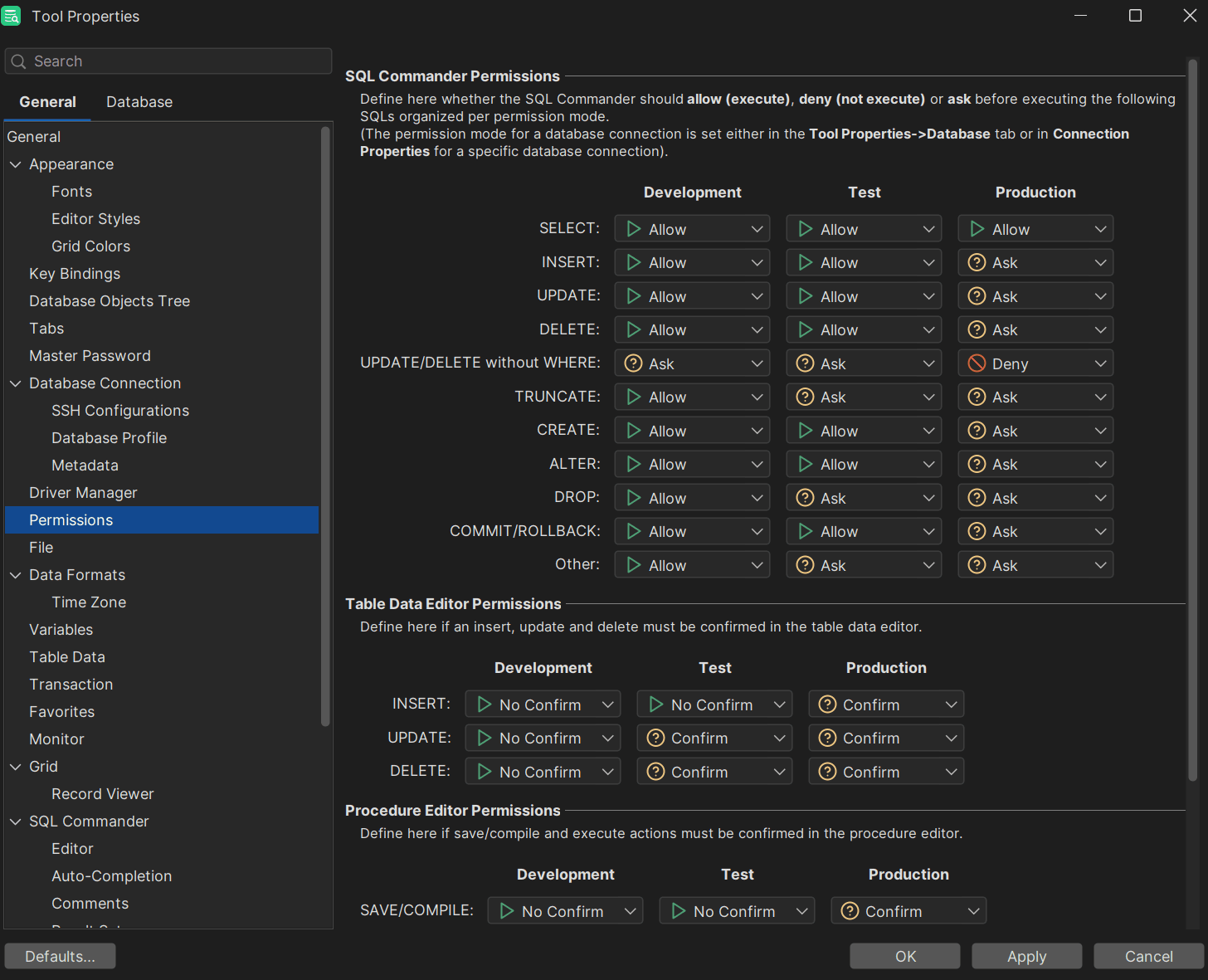
Permissions within DbVisualizer

Summary

In this day and age, database tools come in one of two forms: they’re either open source or proprietary. Both types of databases and tooling within offer powerful features and capabilities, but cater to different needs, audiences, and constraints. To choose the proper database tool for your specific use case, evaluate your requirements. and choose a secure database tool to protect your most crucial assets from breaches.

FAQ

What’s Better: Open Source or Proprietary Database Tools?

There is no specific answer to this question. A tool that is “better” or “worse” directly depends on your use case and the things necessitated by your application. Some of you use SQL Server, some of you may employ Redis or MySQL, so choose a database tool based on the database management system in use, weigh its upsides and downsides, and you should be good to go. In general, though, DbVisualizer is a good fit for most use cases.

What Database Tool Do I Choose?

The SQL client you need to choose directly depends on your use case. However, DbVisualizer will likely be a very good option regardless of what you necessitate.

What Database Tool is the Most Secure?

All database tooling is built with security in mind. At the same time, to make an informed decision, please read the docs, read books on security and related topics, and make good use of other security tooling to choose the best option.

Dbvis download link img
About the author
LukasVileikisPhoto
Lukas Vileikis
Lukas Vileikis is an ethical hacker and a frequent conference speaker. He runs one of the biggest & fastest data breach search engines in the world - BreachDirectory.com, frequently speaks at conferences and blogs in multiple places including his blog over at lukasvileikis.com.
The Table Icon
Sign up to receive The Table's roundup
More from the table
Title Author Tags Length Published
title

SQL Interview Questions and Answers: Part 3: Tackling Advanced Scenarios

author Lukas Vileikis tags SQL 8 min 2026-10-05
title

How to Delete Duplicate Rows in SQL?

author Lukas Vileikis tags SQL 6 min 2026-09-21
title

SQL vs NoSQL Databases: A Practical Guide to Choosing the Right Database for Your Use Case

author Leslie S. Gyamfi tags Database system NOSQL SQL 13 min 2026-09-14
title

SQL for Data Analytics: 5 Advanced Techniques You Should Know

author Lukas Vileikis tags MySQL SQL 5 min 2026-09-07
title

Understanding and Using the MOD Function in SQL

author Antonello Zanini tags MySQL ORACLE POSTGRESQL SQL SQL SERVER 8 min 2026-08-31
title

Ensuring HIPAA Compliance in a Changing Data Landscape

author Lukas Vileikis tags SQL 5 min 2026-08-24
title

What Is a Composite Key in SQL and When to Use It

author Antonello Zanini tags MySQL ORACLE POSTGRESQL SQL SQL SERVER 8 min 2026-08-17
title

Best Practices for Using Git with Your Database

author Lukas Vileikis tags SQL 6 min 2026-07-27
title

Understanding SQL Index Maintenance in Open Source Databases

author Lukas Vileikis tags SQL 6 min 2026-06-22
title

INSERT INTO … SELECT Statement: What You Need to Know

author Antonello Zanini tags MySQL ORACLE POSTGRESQL SQL SQL SERVER 6 min 2026-06-15

The content provided on dbvis.com/thetable, including but not limited to code and examples, is intended for educational and informational purposes only. We do not make any warranties or representations of any kind. Read more here.
