Using Variables in Connection Fields
Instead of creating many similar connections, you can use variables in some fields in the Connection tab, and enter their values when you connect. You can use variables in these fields:
- Name, Database Userid and Database Password.
- Database URL, when Settings Format is Database URL. The server fields of the Server Info format don't support variables.
- The SSH user name, password and passphrase, also for a jump server.
A field can contain several variables, each with a default value. For the variable syntax, see Using DbVisualizer Variables. This example uses variables in the name and the database URL:
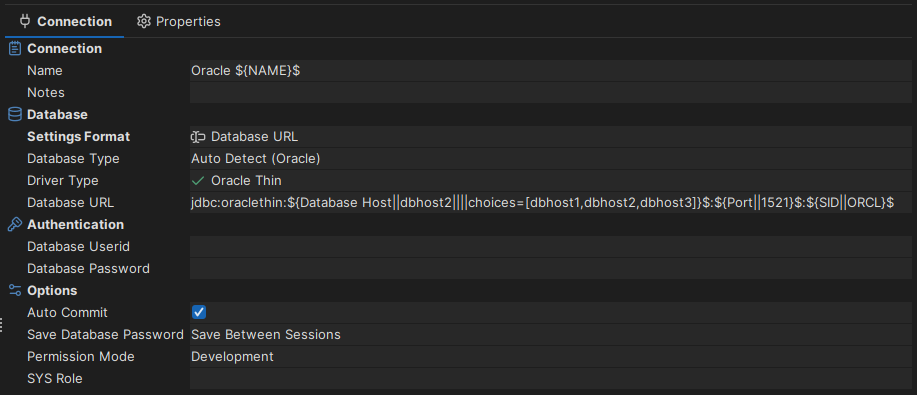
The following variables appear in the figure:
${Name}$${Database Host||dbhost2||||choices=[dbhost1,dbhost2,dbhost3]}$${Port||1521}$${SID||ORCL}$
All variables except ${Name}$ have a default value after ||, which is shown when you connect. The ${Database Host}$ variable also has a list of choices, shown in a drop-down list. You can still enter another value.
When you connect, you enter the values in this dialog:
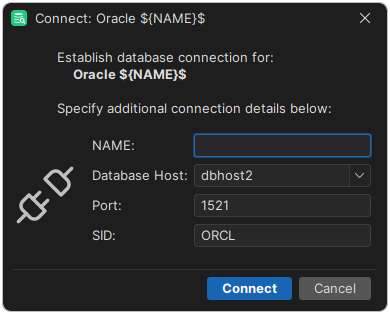
Enter the values and click Connect. While you are connected, the Connection tab shows the values instead of the variables. When you disconnect, the variables are shown again.