Exporting to SQL
When you export a table or a schema to SQL, you get a script that creates the objects and inserts the data. When SQL is the format, the Options area of the export dialog has the options below.
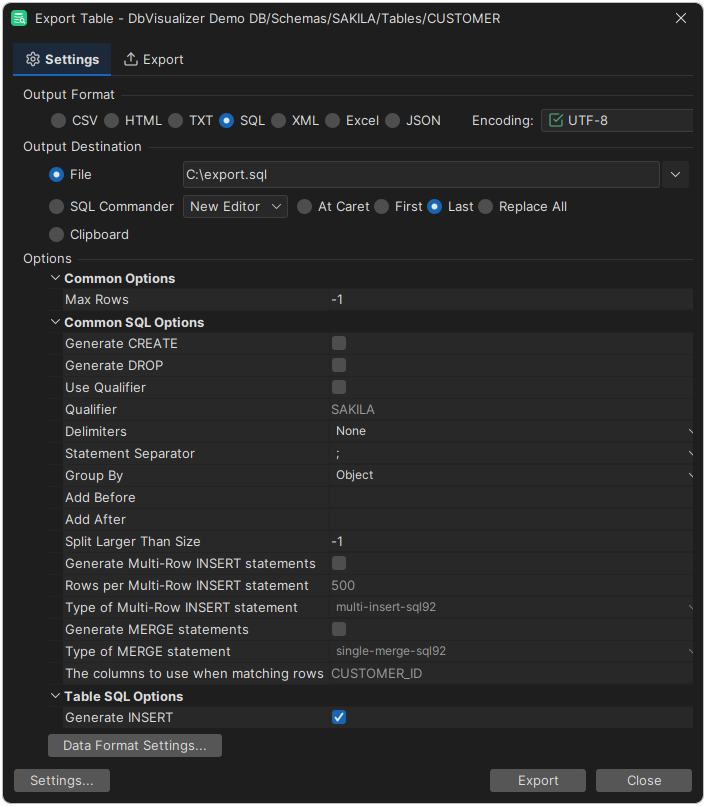
Options for all objects
| Option | Description |
|---|---|
| Max Rows | How many rows to export. -1 exports all rows. |
| Generate CREATE | Add CREATE statements. Don't use it if the objects already exist where you will run the script. |
| Generate DROP | With Generate CREATE, add DROP statements before them. |
| Use Qualifier and Qualifier | Put the qualifier before the object names in all statements. For example, SAKILA gives INSERT INTO SAKILA.<object>. |
| Delimiters | The characters to put around object names. For example, [] gives [<object>]. |
| Statement Separator | The text to add at the end of each statement. |
| Group By | How to order the statements when you export several objects. Statement puts all statements of one kind together (DROP, DROP, CREATE and so on), and Object puts the statements of each object together (DROP, CREATE, INSERT, DROP and so on). |
| Add Before and Add After | SQL to add before and after the generated SQL. |
| Split Larger Than Size | Split the script into several files when it gets bigger than this size, such as 4k (4096 bytes), using k, m or g. -1 doesn't split it. |
| Generate Multi-Row INSERT statements | Insert many rows in each INSERT statement, instead of one row per statement. |
| Type of Multi-Row INSERT statement | The syntax of the multi-row INSERT statement. Databases use different syntaxes, and INSERT INTO ... VALUES (),(),() doesn't work in all of them, so choose the one for the target database. |
| Generate MERGE statements (Export Table only) | Write MERGE statements instead of INSERT statements, for example when the target already has some of the data. |
| Type of MERGE statement (Export Table only) | The syntax of the MERGE statement for the target database. |
| The columns to use when matching rows (Export Table only) | For MERGE, the columns that identify a row, usually the primary key. |
By default, the qualifiers and delimiters are the ones set for delimited identifiers and qualified names in the connection properties. You can change them for one export in the dialog.
Options for tables
| Option | Description |
|---|---|
| Generate INSERT | Add INSERT or MERGE statements with the data. |
| Include Auto-Generated values | Include values that the database generates, such as AUTO_INCREMENT and GENERATED ALWAYS or GENERATED BY DEFAULT columns, in the INSERT statements. |
| Generate CREATE INDEX | Add CREATE INDEX statements for the indexes of the tables. |
Options for views, procedures and functions
When you export a schema, there are more options for views, procedures and functions:
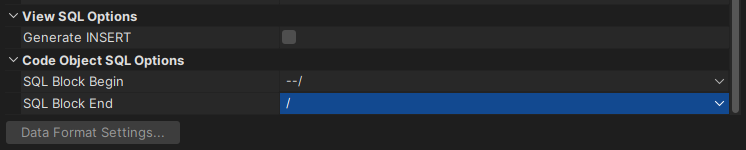
| Option | Description |
|---|---|
| Generate INSERT (views) | Add INSERT statements with the rows of the views. |
| SQL Block Begin and SQL Block End (procedures, functions and triggers) | The identifiers to put before and after each procedure, function or trigger, such as a CREATE PROCEDURE statement, so that it is executed as one statement. See Executing Complex Statements. |