intro
Compare the best SQL auto-complete experiences from tools like DbVisualizer, DataGrip, and DBeaver. Discover features, pricing, and which tool fits your workflow.

A database professional’s SQL editor is more than a text field: it is where data is asked for, investigated, and transformed. This environment requires speed and accuracy above every other consideration. This explains the importance of SQL auto-complete, otherwise referred to as code completion.
Those days are long behind us when we had to type out SELECT * FROM table_name by hand or try to remember a plethora of column names. Modern SQL environments use metadata caching, awareness, and more and more, the power of AI, to predict your next keystroke.
In this blog, we will compare the auto-completion experiences offered by the top SQL tools on the market, namely DbVisualizer, DataGrip, and DBeaver!
What Is SQL Auto-Complete and Why Does it Matter?
SQL auto-complete is a feature in database management and development tools that provides intelligent, context-aware suggestions for SQL keywords, object names (like tables, columns, views), functions, and even entire code phrases as a user types.
It functions much like auto-complete in email or word processing, but is specifically tailored to the structure and syntax of a database's schema and the SQL language.
SQL auto-complete is an great tool for both novice and experienced data professionals because it provides:
Traditional SQL Auto-Complete Solutions
Below we compare major SQL tools and their SQL auto-completion features.
DbVisualizer
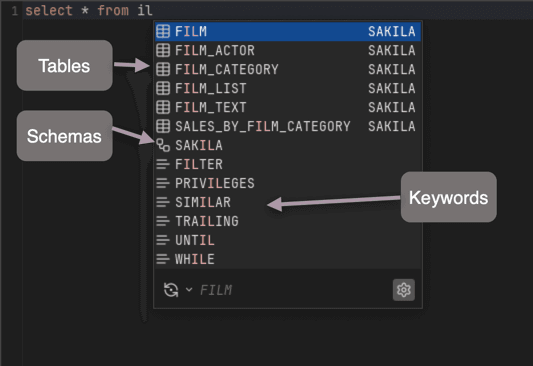
DbVisualizer offers comprehensive auto-complete as part of its database management platform, supporting over 60 database types including MySQL, PostgreSQL, Oracle, SQL Server, and many others.
DbVisualizer provides context-aware auto-completion triggered by Ctrl/Command+Space (default), though you can also configure it to activate automatically as you type. The auto-complete engine delivers database-specific keyword suggestions that adapt based on your connection type, along with table and view name completion for connected databases.
As outlined in the official DbVisualizer documentation, the features supports comprehensive DML commands (SELECT, INSERT, UPDATE, DELETE) and DDL commands (ALTER, DROP), making it versatile for both data manipulation and schema management tasks.
DbVisualizer’s auto-complete engine intelligently analyzes your SQL statement structure to provide contextually relevant suggestions at every stage of query writing. When you position your cursor where a table name is expected, it displays tables and views from your currently selected database connection, and can also show catalogs or schemas when relevant for navigating complex database structures.
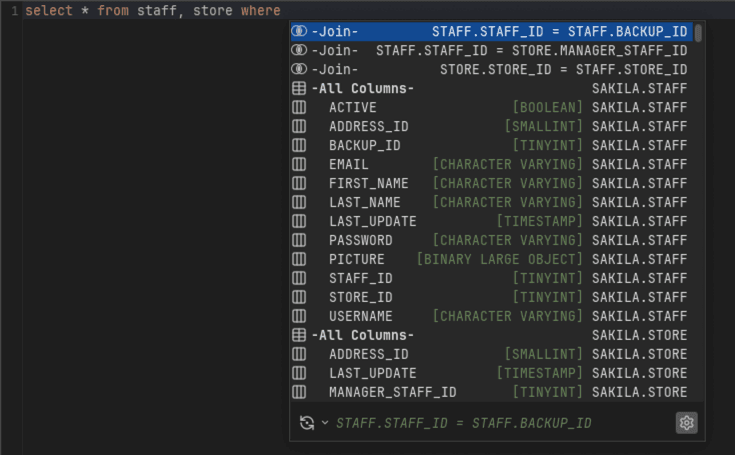
For column completion, DbVisualizer examines which tables are referenced in your statement and suggests appropriate columns. When selecting from multiple tables, the tool goes beyond basic suggestions by proposing joinable columns as conditions. That is a particularly powerful feature for writing complex JOINs quickly and accurately.
This features includes intelligent metadata caching that ensures subsequent displays of the auto-complete popup are performed quickly without repeatedly querying the database. If you modify your schema, you can easily refresh the cache directly from the bottom of the auto-complete popup.
Note: Beyond standard SQL, DbVisualizer also provides auto-completion for its own command system, with dynamic parameter adaptation. For instance, the @export set command adjusts its parameter list based on your specified output format like CSV.
DataGrip (JetBrains)
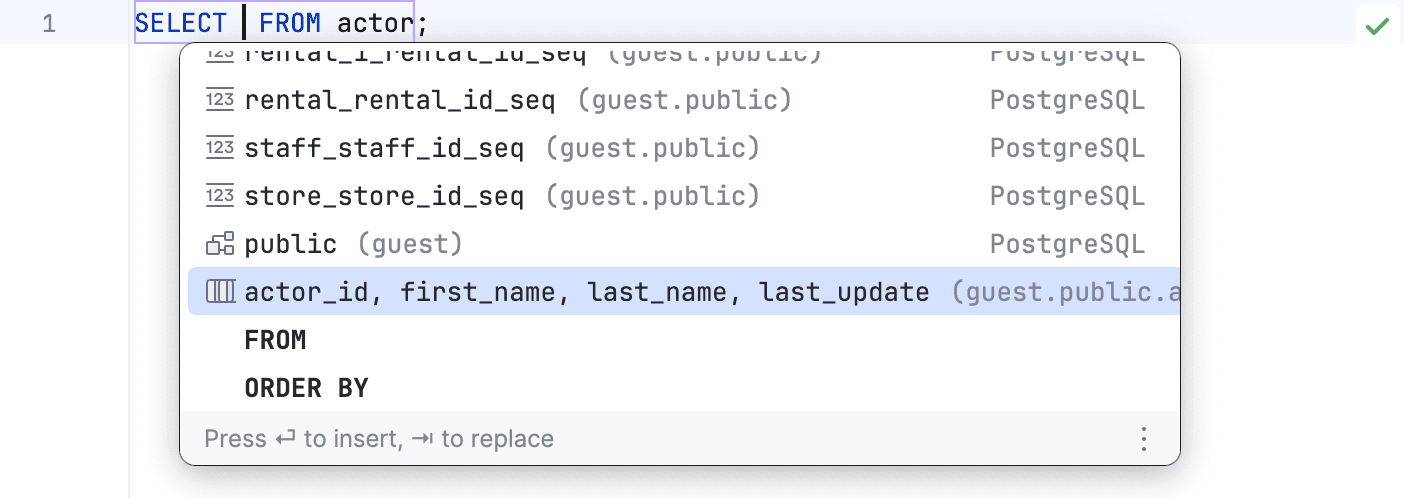
DataGrip offers context-sensitive code completion that analyzes query structure, automatic JOIN completion for foreign key relationships, field list generation for INSERT and GROUP BY statements, CamelCase and hyphenated-name recognition, postfix completion for flexible coding order, and live templates for repetitive SQL patterns.
According to DataGrip's documentation, the tool provides three completion engines: Semantic (recommended), Legacy, and Combined. The Semantic engine provides the most accurate suggestions by analyzing the entire SQL structure and lexical scopes, though users can switch engines based on their specific needs.
DBeaver
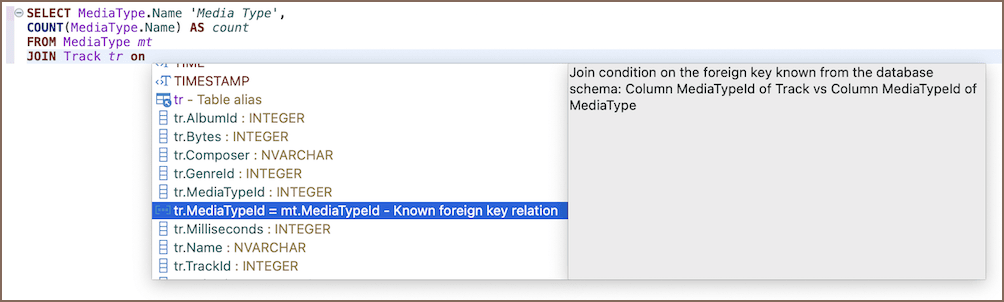
SQL-Assist in DBeaver.
Source: DBeaver documentation.
DBeaver is a database client with an open-source nature. It has gained the interest of many developers in recent years and is now one of the most used database management platforms, supporting virtually any database with a JDBC driver.
DBeaver provides advanced SQL Assist with three different completion engines that can be toggled:
Note that the Semantic configuration provides the most accurate results but may not work correctly with certain database-specific syntax, while Legacy can be more stable in edge cases.
Performance Considerations
The SQL auto-complete feature can impact editor performance, particularly in large databases with complex schemas. This is because the editor must continuously analyze database metadata (e.g., tables, columns, relationships, and indexes) in real time to generate relevant suggestions. As the size and complexity of the schema grow, this process becomes more resource-intensive, potentially leading to slower response times, increased memory usage, and a less fluid development experience.
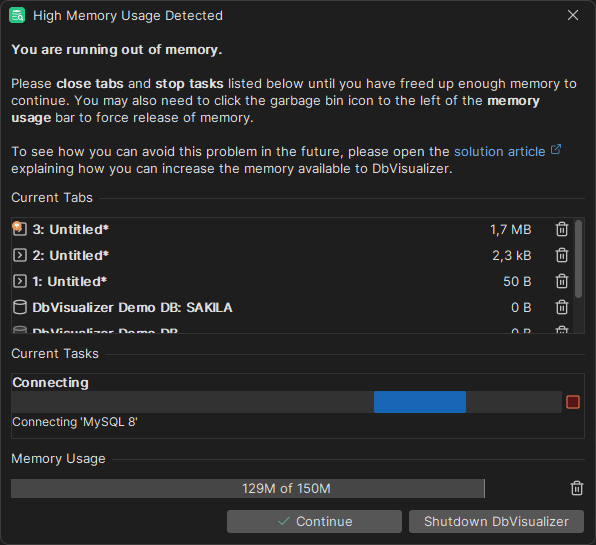
DbVisualizer uses intelligent caching to minimize performance impact through several ways including allowing users to manage memory constraints by closing high-consumption tabs or increasing global memory allocation as shown below.
Other tools like DataGrip offer configuration options to balance suggestion accuracy against resource consumption. When working with databases containing hundreds or thousands of tables, consider limiting the scope of auto-complete to specific schemas or databases to maintain responsiveness.
What Is the Future of SQL Auto-Complete?
SQL Auto-complete is a field that is constantly experiencing revolutionary changes, especially with more advanced integration of AI solutions. This approach has advanced beyond just completing codes and now include predicting developers’ intentions and anticipating the performance outcome of different solutions.
What could potentially enable future tools to learn and offer code conforming to in-house standards is the integration with machine learning models trained on organizational code patterns.
And that is a wrap!
Closing Remarks
SQL auto-completion is more than convenient; it's a productivity multiplier, especially in environments with complex schemas or frequent cross-database work. Thus, choosing a solution that marries intelligent suggestions with database awareness and ease of use will save hours and improve code quality.
Auto-complete is very context-aware in DbVisualizer, and its broad database support, together with consistency across operating systems, provides the best fit for a given developer's toolkit.
Download DbVisualizer for free now and it will surprise you with many things including the code auto-complete feature. Take an expo of all of our features, the Pro version of DbVisualizer is free for 21 days.
See you in the next one!