Transforming Text Using Morph Selection
Only in DbVisualizer Pro
This feature is only available in the DbVisualizer Pro edition.
Using Morph Selection, you turn selected text in the editor into a delimited list. For example, you can paste a column from a grid or a spreadsheet into the editor, and turn it into a list of quoted values for an IN clause.
Transforming text
- Select the text in the editor.
- Select Edit → Morph Selection, select it in the right-click menu of the editor, or press
Ctrl+Shift+M(Cmd+Shift+Mon macOS). - Choose how to read the selected text under Input Format, and how to write the result under Output Format. Output Preview shows the result.
- Click Morph to Editor to replace the selected text with the result, or Morph to Clipboard to copy the result.
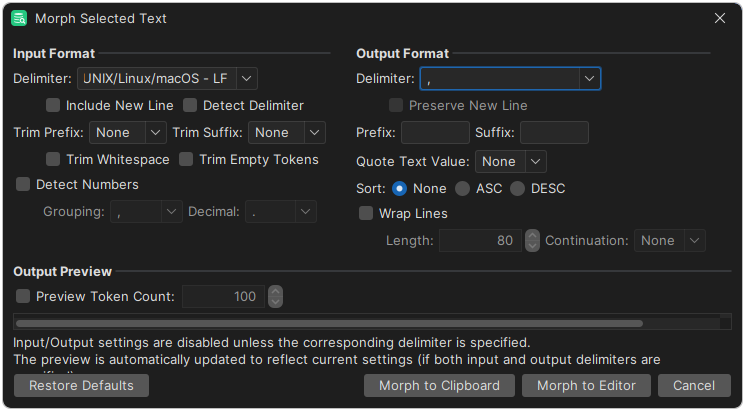
How the settings work
Each example below shows the effect of one setting, with all the settings of the dialog, the selected text and the result.
Detect input delimiter
Detect the input delimiter by counting occurrences of the default delimiters (the predefined delimiters shown in dropdown). In this case, comma (,) is the most frequent of the predefined separators (single quote (') is not a predefined delimiter).
Settings
| input setting | value | output setting | value |
|---|---|---|---|
| Delimiter | : | Delimiter | ; |
| Include New Line | OFF | Preserve New Line | OFF |
| Detect Delimiter | ON | Prefix | None |
| Trim Prefix | None | Suffix | None |
| Trim Suffix | None | Quote Text Value | None |
| Trim Whitespace | OFF | Sort | None |
| Trim Empty Tokens | OFF | Wrap Lines | OFF |
| Detect Numbers | OFF | Continuation | (N/A) |
| Grouping | (N/A) | preview setting | value |
| Decimal | (N/A) | Preview Token Count | OFF |
Input
'A','B':'C','D'
Result
'A';'B':'C';'D'
Detect numbers
Detect numbers and quote text tokens; recognized numbers (strings that match the specified number format) are not quoted.
Settings
| input setting | value | output setting | value |
|---|---|---|---|
| Delimiter | : | Delimiter | ; |
| Include New Line | OFF | Preserve New Line | OFF |
| Detect Delimiter | OFF | Prefix | None |
| Trim Prefix | None | Suffix | None |
| Trim Suffix | None | Quote Text Value | " |
| Trim Whitespace | OFF | Sort | None |
| Trim Empty Tokens | OFF | Wrap Lines | OFF |
| Detect Numbers | ON | Continuation | (N/A) |
| Grouping | , | preview setting | value |
| Decimal | . | Preview Token Count | OFF |
Input
1,000.00:two thousand:3000,00:4000
Result
1000.0;"two thousand";"3000,00";4000
Input prefix and suffix
Trim prefix and suffix in input tokens. Text inside prefix/suffix are treated as one token.
Settings
| input setting | value | output setting | value |
|---|---|---|---|
| Delimiter | : | Delimiter | ; |
| Include New Line | OFF | Preserve New Line | OFF |
| Detect Delimiter | OFF | Prefix | None |
| Trim Prefix | ( | Suffix | None |
| Trim Suffix | ) | Quote Text Value | None |
| Trim Whitespace | OFF | Sort | None |
| Trim Empty Tokens | OFF | Wrap Lines | OFF |
| Detect Numbers | OFF | Continuation | (N/A) |
| Grouping | (N/A) | preview setting | value |
| Decimal | (N/A) | Preview Token Count | OFF |
Input
A:(B:C)
Result
A;B:C
Limit preview
If the input is large, it may be useful to limit preview to speed up things while sorting out options. The limit is applied to number of input tokens as determined by the current settings.
Settings
| input setting | value | output setting | value |
|---|---|---|---|
| Delimiter | : | Delimiter | ; |
| Include New Line | OFF | Preserve New Line | OFF |
| Detect Delimiter | OFF | Prefix | None |
| Trim Prefix | None | Suffix | None |
| Trim Suffix | None | Quote Text Value | None |
| Trim Whitespace | OFF | Sort | None |
| Trim Empty Tokens | OFF | Wrap Lines | OFF |
| Detect Numbers | OFF | Continuation | (N/A) |
| Grouping | (N/A) | preview setting | value |
| Decimal | (N/A) | Preview Token Count | 2 |
Input
Token1:Token2:Token3
Result
Token1;Token2
Missing input prefix
Ignore trimming of input prefix and suffix unless both are defined (here we only defined the prefix).
Settings
| input setting | value | output setting | value |
|---|---|---|---|
| Delimiter | : | Delimiter | ; |
| Include New Line | OFF | Preserve New Line | OFF |
| Detect Delimiter | OFF | Prefix | None |
| Trim Prefix | ' | Suffix | None |
| Trim Suffix | None | Quote Text Value | None |
| Trim Whitespace | OFF | Sort | None |
| Trim Empty Tokens | OFF | Wrap Lines | OFF |
| Detect Numbers | OFF | Continuation | (N/A) |
| Grouping | (N/A) | preview setting | value |
| Decimal | (N/A) | Preview Token Count | OFF |
Input
A:'B:C
Result
A;'B;C
Missing input suffix
Ignore trimming of input prefix and suffix unless both are define (here we only defined the suffix).
Settings
| input setting | value | output setting | value |
|---|---|---|---|
| Delimiter | : | Delimiter | ; |
| Include New Line | OFF | Preserve New Line | OFF |
| Detect Delimiter | OFF | Prefix | None |
| Trim Prefix | None | Suffix | None |
| Trim Suffix | ' | Quote Text Value | None |
| Trim Whitespace | OFF | Sort | None |
| Trim Empty Tokens | OFF | Wrap Lines | OFF |
| Detect Numbers | OFF | Continuation | (N/A) |
| Grouping | (N/A) | preview setting | value |
| Decimal | (N/A) | Preview Token Count | OFF |
Input
A:'B:C
Result
A;'B;C
New line as input delimiter
Transform delimiter and quote text spanning multiple lines. Since we recognize New Line as a delimiter, Token2 and Token3 are interpreted as separate tokens.
Settings
| input setting | value | output setting | value |
|---|---|---|---|
| Delimiter | : | Delimiter | ; |
| Include New Line | ON | Preserve New Line | OFF |
| Detect Delimiter | OFF | Prefix | None |
| Trim Prefix | None | Suffix | None |
| Trim Suffix | None | Quote Text Value | " |
| Trim Whitespace | OFF | Sort | None |
| Trim Empty Tokens | OFF | Wrap Lines | OFF |
| Detect Numbers | OFF | Continuation | (N/A) |
| Grouping | (N/A) | preview setting | value |
| Decimal | (N/A) | Preview Token Count | OFF |
Input
Token1:Token2
Token3:Token4
Result
"Token1";"Token2";"Token3";"Token4"
No delimiters
No transformation occurs unless both input and output delimiters are defined.
Settings
| input setting | value | output setting | value |
|---|---|---|---|
| Delimiter | None | Delimiter | None |
| Include New Line | OFF | Preserve New Line | OFF |
| Detect Delimiter | OFF | Prefix | None |
| Trim Prefix | None | Suffix | None |
| Trim Suffix | None | Quote Text Value | None |
| Trim Whitespace | OFF | Sort | None |
| Trim Empty Tokens | OFF | Wrap Lines | OFF |
| Detect Numbers | OFF | Continuation | (N/A) |
| Grouping | (N/A) | preview setting | value |
| Decimal | (N/A) | Preview Token Count | OFF |
Input
1,000.00::' one thousand '
Result
1,000.00::' one thousand '
Output prefix
We can add a single prefix or suffix to output tokens (we can define one without the other).
Settings
| input setting | value | output setting | value |
|---|---|---|---|
| Delimiter | : | Delimiter | ; |
| Include New Line | OFF | Preserve New Line | OFF |
| Detect Delimiter | OFF | Prefix | + |
| Trim Prefix | None | Suffix | None |
| Trim Suffix | None | Quote Text Value | None |
| Trim Whitespace | OFF | Sort | None |
| Trim Empty Tokens | OFF | Wrap Lines | OFF |
| Detect Numbers | OFF | Continuation | (N/A) |
| Grouping | (N/A) | preview setting | value |
| Decimal | (N/A) | Preview Token Count | OFF |
Input
A:B:C
Result
+A;+B;+C
Output prefix and suffix
We can add prefix and/or suffix to output tokens.
Settings
| input setting | value | output setting | value |
|---|---|---|---|
| Delimiter | : | Delimiter | ; |
| Include New Line | OFF | Preserve New Line | OFF |
| Detect Delimiter | OFF | Prefix | [ |
| Trim Prefix | None | Suffix | ] |
| Trim Suffix | None | Quote Text Value | None |
| Trim Whitespace | OFF | Sort | None |
| Trim Empty Tokens | OFF | Wrap Lines | OFF |
| Detect Numbers | OFF | Continuation | (N/A) |
| Grouping | (N/A) | preview setting | value |
| Decimal | (N/A) | Preview Token Count | OFF |
Input
1,000.00::' one thousand '
Result
[1,000.00];[];[' one thousand ']
Output prefix and suffix with text quoting
We can both quote text and add a prefix and/or suffix to output tokens. Prefix/suffix are added to all tokens outside the quoting symbols. Since we detect numbers, the recognized number token is unformatted and not quoted.
Settings
| input setting | value | output setting | value |
|---|---|---|---|
| Delimiter | : | Delimiter | ; |
| Include New Line | OFF | Preserve New Line | OFF |
| Detect Delimiter | OFF | Prefix | [ |
| Trim Prefix | None | Suffix | ] |
| Trim Suffix | None | Quote Text Value | " |
| Trim Whitespace | OFF | Sort | None |
| Trim Empty Tokens | OFF | Wrap Lines | OFF |
| Detect Numbers | ON | Continuation | (N/A) |
| Grouping | , | preview setting | value |
| Decimal | . | Preview Token Count | OFF |
Input
1,000.00:one thousand:1 000,00
Result
[1000.0];["one thousand"];["1 000,00"]
Preserve output new line
Transform delimiter and quote multiline text. Since we recognize and preserve New Line, we maintain a multiline output with quoted tokens.
Settings
| input setting | value | output setting | value |
|---|---|---|---|
| Delimiter | : | Delimiter | ; |
| Include New Line | ON | Preserve New Line | ON |
| Detect Delimiter | OFF | Prefix | None |
| Trim Prefix | None | Suffix | None |
| Trim Suffix | None | Quote Text Value | " |
| Trim Whitespace | OFF | Sort | None |
| Trim Empty Tokens | OFF | Wrap Lines | OFF |
| Detect Numbers | OFF | Continuation | (N/A) |
| Grouping | (N/A) | preview setting | value |
| Decimal | (N/A) | Preview Token Count | OFF |
Input
Token1:Token2
Token3:Token4
Result
"Token1";"Token2"
"Token3";"Token4"
Quote output text tokens
Quote text tokens. Since we do not detect numbers, or strip input prefix/suffix, all tokens are quoted and prefix/suffix preserved.
Settings
| input setting | value | output setting | value |
|---|---|---|---|
| Delimiter | : | Delimiter | ; |
| Include New Line | OFF | Preserve New Line | OFF |
| Detect Delimiter | OFF | Prefix | None |
| Trim Prefix | None | Suffix | None |
| Trim Suffix | None | Quote Text Value | " |
| Trim Whitespace | OFF | Sort | None |
| Trim Empty Tokens | OFF | Wrap Lines | OFF |
| Detect Numbers | OFF | Continuation | (N/A) |
| Grouping | (N/A) | preview setting | value |
| Decimal | (N/A) | Preview Token Count | OFF |
Input
1,000.00::' one thousand '
Result
"1,000.00";"";"' one thousand '"
Repeated delimiters
We use Space (" ") asa delimiter on an input with several repeated spaces and trim single quote (') suffix but do NOT trim whitespace. Spaces outside the prefix/suffix ar treated as a single delimiter, speces inside the prefix/suffix remain.
Settings
| input setting | value | output setting | value |
|---|---|---|---|
| Delimiter | Space | Delimiter | : |
| Include New Line | OFF | Preserve New Line | OFF |
| Detect Delimiter | OFF | Prefix | None |
| Trim Prefix | ' | Suffix | None |
| Trim Suffix | ' | Quote Text Value | None |
| Trim Whitespace | OFF | Sort | None |
| Trim Empty Tokens | OFF | Wrap Lines | OFF |
| Detect Numbers | OFF | Continuation | (N/A) |
| Grouping | (N/A) | preview setting | value |
| Decimal | (N/A) | Preview Token Count | OFF |
Input
1,000.00 ' one thousand ' 1k
Result
1,000.00: one thousand :1k
Sort ascending
Sort tokens in ascending order on a single line.
Settings
| input setting | value | output setting | value |
|---|---|---|---|
| Delimiter | : | Delimiter | ; |
| Include New Line | OFF | Preserve New Line | OFF |
| Detect Delimiter | OFF | Prefix | None |
| Trim Prefix | None | Suffix | None |
| Trim Suffix | None | Quote Text Value | None |
| Trim Whitespace | OFF | Sort | ASC |
| Trim Empty Tokens | OFF | Wrap Lines | OFF |
| Detect Numbers | OFF | Continuation | (N/A) |
| Grouping | (N/A) | preview setting | value |
| Decimal | (N/A) | Preview Token Count | OFF |
Input
A:C:B
Result
A;B;C
Sort descending
Sort tokens in descending order on a single line.
Settings
| input setting | value | output setting | value |
|---|---|---|---|
| Delimiter | : | Delimiter | ; |
| Include New Line | OFF | Preserve New Line | OFF |
| Detect Delimiter | OFF | Prefix | None |
| Trim Prefix | None | Suffix | None |
| Trim Suffix | None | Quote Text Value | None |
| Trim Whitespace | OFF | Sort | DESC |
| Trim Empty Tokens | OFF | Wrap Lines | OFF |
| Detect Numbers | OFF | Continuation | (N/A) |
| Grouping | (N/A) | preview setting | value |
| Decimal | (N/A) | Preview Token Count | OFF |
Input
A:C:B
Result
C;B;A
Sort multiline output
This is an unsupported setup: sorting is done on tokens, not lines. Sorting tokens in a multiline text would be very confusing.
Settings
| input setting | value | output setting | value |
|---|---|---|---|
| Delimiter | : | Delimiter | ; |
| Include New Line | ON | Preserve New Line | ON |
| Detect Delimiter | OFF | Prefix | None |
| Trim Prefix | None | Suffix | None |
| Trim Suffix | None | Quote Text Value | " |
| Trim Whitespace | OFF | Sort | DESC |
| Trim Empty Tokens | OFF | Wrap Lines | 8 |
| Detect Numbers | OFF | Continuation | \ |
| Grouping | (N/A) | preview setting | value |
| Decimal | (N/A) | Preview Token Count | OFF |
Input
Token1:Token2
Token3:Token4
Result
"Token1"\
;"Token2\
"
"Token3"\
;"Token4\
"
Transform delimiter
Basic transformation of delimiters using default settings. The defined input delimiters are replaced with the defined output delimiters.
Settings
| input setting | value | output setting | value |
|---|---|---|---|
| Delimiter | : | Delimiter | ; |
| Include New Line | OFF | Preserve New Line | OFF |
| Detect Delimiter | OFF | Prefix | None |
| Trim Prefix | None | Suffix | None |
| Trim Suffix | None | Quote Text Value | None |
| Trim Whitespace | OFF | Sort | None |
| Trim Empty Tokens | OFF | Wrap Lines | OFF |
| Detect Numbers | OFF | Continuation | (N/A) |
| Grouping | (N/A) | preview setting | value |
| Decimal | (N/A) | Preview Token Count | OFF |
Input
1,000.00::' one thousand '
Result
1,000.00;;' one thousand '
Transform delimiters on multi line tokens
Transform delimiters and quote text spanning multiple lines. Since we ignore New Line, the Token2 and Token3 are interpreted as one token with two embedded New Line. The resulting output is three tokens on three lines, where the middle token includes two consecutive New Line (producing an empty line).
Settings
| input setting | value | output setting | value |
|---|---|---|---|
| Delimiter | : | Delimiter | ; |
| Include New Line | OFF | Preserve New Line | OFF |
| Detect Delimiter | OFF | Prefix | None |
| Trim Prefix | None | Suffix | None |
| Trim Suffix | None | Quote Text Value | " |
| Trim Whitespace | OFF | Sort | None |
| Trim Empty Tokens | OFF | Wrap Lines | OFF |
| Detect Numbers | OFF | Continuation | (N/A) |
| Grouping | (N/A) | preview setting | value |
| Decimal | (N/A) | Preview Token Count | OFF |
Input
Token1:Token2

Token3:Token4
Result
"Token1";"Token2

Token3";"Token4"
Trim input empty tokens
Since the input starts with a delimiter, we get an initial empty token that is trimmed. Since don't trim whitespace or consider New Line as a delimiter, the middle and trailing tokens are not trimmed.
Settings
| input setting | value | output setting | value |
|---|---|---|---|
| Delimiter | : | Delimiter | ; |
| Include New Line | OFF | Preserve New Line | OFF |
| Detect Delimiter | OFF | Prefix | None |
| Trim Prefix | None | Suffix | None |
| Trim Suffix | None | Quote Text Value | None |
| Trim Whitespace | OFF | Sort | None |
| Trim Empty Tokens | ON | Wrap Lines | OFF |
| Detect Numbers | OFF | Continuation | (N/A) |
| Grouping | (N/A) | preview setting | value |
| Decimal | (N/A) | Preview Token Count | OFF |
Input
: A : B :
: C : D :
Result
A ; B ;
; C ; D ;
Trim input empty tokens with include input new line as delimiter
Trim empty tokens while treating New Line as a delimiter. Sine the input starts with a delimiter, we get an initial empty token that is trimmed. Since New Line is considered a delimiter, we get an empty middle token that is trimmed. Since the input ends with a delimiter and a New Line, we get a trailing empty token that is trimmed.
Settings
| input setting | value | output setting | value |
|---|---|---|---|
| Delimiter | : | Delimiter | ; |
| Include New Line | ON | Preserve New Line | OFF |
| Detect Delimiter | OFF | Prefix | None |
| Trim Prefix | None | Suffix | None |
| Trim Suffix | None | Quote Text Value | None |
| Trim Whitespace | OFF | Sort | None |
| Trim Empty Tokens | ON | Wrap Lines | OFF |
| Detect Numbers | OFF | Continuation | (N/A) |
| Grouping | (N/A) | preview setting | value |
| Decimal | (N/A) | Preview Token Count | OFF |
Input
: A : B :
: C : D :
Result
A ; B ; C ; D
Trim input whitespace
Trim whitespace outside any prefix/suffix (whitespace inside prefix/suffix is preserved). Since New Line is considered as whitespace, we get an empty middle token.
Settings
| input setting | value | output setting | value |
|---|---|---|---|
| Delimiter | : | Delimiter | ; |
| Include New Line | OFF | Preserve New Line | OFF |
| Detect Delimiter | OFF | Prefix | None |
| Trim Prefix | None | Suffix | None |
| Trim Suffix | None | Quote Text Value | None |
| Trim Whitespace | ON | Sort | None |
| Trim Empty Tokens | OFF | Wrap Lines | OFF |
| Detect Numbers | OFF | Continuation | (N/A) |
| Grouping | (N/A) | preview setting | value |
| Decimal | (N/A) | Preview Token Count | OFF |
Input
: A : B :
: C : D :
Result
;A;B;;C;D;
Trim input whitespace and empty tokens
Trim whitespace outside any prefix/suffix (whitespace inside prefix/suffix is preserved). Since the input starts with a delimiter, we get an initial empty token that is trimmed. Since New Line is considered as whitespace, we get an empty middle token that is trimmed. Since the input ends with a delimiter and a New Line, we get a trailing empty token that is trimmed.
Settings
| input setting | value | output setting | value |
|---|---|---|---|
| Delimiter | : | Delimiter | ; |
| Include New Line | OFF | Preserve New Line | OFF |
| Detect Delimiter | OFF | Prefix | None |
| Trim Prefix | None | Suffix | None |
| Trim Suffix | None | Quote Text Value | None |
| Trim Whitespace | ON | Sort | None |
| Trim Empty Tokens | ON | Wrap Lines | OFF |
| Detect Numbers | OFF | Continuation | (N/A) |
| Grouping | (N/A) | preview setting | value |
| Decimal | (N/A) | Preview Token Count | OFF |
Input
: A : B :
: C : D :
Result
A;B;C;D
Trim input whitespace and empty tokens with input new line as delimiter
Trim whitespace and Empty Tokens while recognizing New Line as an input delimiter. Since the input starts with a delimiter, we get an initial empty token that is trimmed. Since New Line is considered as whitespace, we get an empty middle token that is trimmed. Since the input ends with a delimiter and a New Line, we get a trailing empty token that is trimmed.
Settings
| input setting | value | output setting | value |
|---|---|---|---|
| Delimiter | : | Delimiter | ; |
| Include New Line | ON | Preserve New Line | OFF |
| Detect Delimiter | OFF | Prefix | None |
| Trim Prefix | None | Suffix | None |
| Trim Suffix | None | Quote Text Value | None |
| Trim Whitespace | ON | Sort | None |
| Trim Empty Tokens | ON | Wrap Lines | OFF |
| Detect Numbers | OFF | Continuation | (N/A) |
| Grouping | (N/A) | preview setting | value |
| Decimal | (N/A) | Preview Token Count | OFF |
Input
: A : B

C : D :
Result
A;B;C;D
Trim input whitespace and empty tokens with input new line as delimiter preserved in output
Trim whitespace and Empty Tokens while recognizing New Line as a delimiter and preserving it in the Output. Since the input starts with whitespace and a delimiter, we get an initial empty token that is trimmed. Since New Line is considered as whitespace, we get an empty middle token that is trimmed. Since the input ends with a delimiter and a New Line that is trimmed, we get a trailing empty token that is trimmed. Since we preserve New Line in Output, we get the first two tokens (A and B) on the first line and the last two tokens (C and D) on the second line.
Settings
| input setting | value | output setting | value |
|---|---|---|---|
| Delimiter | : | Delimiter | ; |
| Include New Line | ON | Preserve New Line | ON |
| Detect Delimiter | OFF | Prefix | None |
| Trim Prefix | None | Suffix | None |
| Trim Suffix | None | Quote Text Value | None |
| Trim Whitespace | ON | Sort | None |
| Trim Empty Tokens | ON | Wrap Lines | OFF |
| Detect Numbers | OFF | Continuation | (N/A) |
| Grouping | (N/A) | preview setting | value |
| Decimal | (N/A) | Preview Token Count | OFF |
Input
: A : B

C : D :
Result
A;B
C;D
Trim input whitespace with prefix and suffix
Whitespace is trimmed before trimming prefix/suffix - whitespace inside prefix/suffix is preserved.
Settings
| input setting | value | output setting | value |
|---|---|---|---|
| Delimiter | : | Delimiter | ; |
| Include New Line | OFF | Preserve New Line | OFF |
| Detect Delimiter | OFF | Prefix | None |
| Trim Prefix | ( | Suffix | None |
| Trim Suffix | ) | Quote Text Value | None |
| Trim Whitespace | ON | Sort | None |
| Trim Empty Tokens | OFF | Wrap Lines | OFF |
| Detect Numbers | OFF | Continuation | (N/A) |
| Grouping | (N/A) | preview setting | value |
| Decimal | (N/A) | Preview Token Count | OFF |
Input
1,000.00: ( 1k ) : one thousand
Result
1,000.00; 1k ;one thousand
Wrap output lines
Wrap lines at specified length, including any prefix, suffix or quoting symbols. Wrapping does not observe any tokens or words, it breaks here at specified length.
Settings
| input setting | value | output setting | value |
|---|---|---|---|
| Delimiter | : | Delimiter | ; |
| Include New Line | OFF | Preserve New Line | OFF |
| Detect Delimiter | OFF | Prefix | None |
| Trim Prefix | None | Suffix | None |
| Trim Suffix | None | Quote Text Value | " |
| Trim Whitespace | OFF | Sort | None |
| Trim Empty Tokens | OFF | Wrap Lines | 8 |
| Detect Numbers | OFF | Continuation | None |
| Grouping | (N/A) | preview setting | value |
| Decimal | (N/A) | Preview Token Count | OFF |
Input
Token1:Token2:Token3
Result
"Token1"
;"Token2
";"Token
3"
Wrap output lines with continuation symbol
Wrap a multiline output text with a symbol terminating each line that continues on the next line. Regular line breaks (not resulting from wrapping) are not terminated with the wrapping symbol.
Settings
| input setting | value | output setting | value |
|---|---|---|---|
| Delimiter | : | Delimiter | ; |
| Include New Line | ON | Preserve New Line | ON |
| Detect Delimiter | OFF | Prefix | None |
| Trim Prefix | None | Suffix | None |
| Trim Suffix | None | Quote Text Value | " |
| Trim Whitespace | OFF | Sort | None |
| Trim Empty Tokens | OFF | Wrap Lines | 8 |
| Detect Numbers | OFF | Continuation | \ |
| Grouping | (N/A) | preview setting | value |
| Decimal | (N/A) | Preview Token Count | OFF |
Input
Token1:Token2
Token3:Token4
Result
"Token1"\
;"Token2\
"
"Token3"\
;"Token4\
"
Examples
Turning an IN list into CSV
You have an IN list of quoted names, and you want the names without quotes, separated by semicolons, for a CSV file. Trim the whitespace and the quotes, and change the delimiter.
Settings
| input setting | value | output setting | value |
|---|---|---|---|
| Delimiter | , | Delimiter | ; |
| Include New Line | OFF | Preserve New Line | OFF |
| Detect Delimiter | OFF | Prefix | None |
| Trim Prefix | ' | Suffix | None |
| Trim Suffix | ' | Quote Text Value | None |
| Trim Whitespace | ON | Sort | None |
| Trim Empty Tokens | OFF | Wrap Lines | OFF |
| Detect Numbers | OFF | Continuation | (N/A) |
| Grouping | (N/A) | preview setting | value |
| Decimal | (N/A) | Preview Token Count | OFF |
Input
'BETTE', 'CHRISTIAN', 'GRACE', 'JENNIFER', 'JOE', 'JOHNNY', 'KARL', 'MATTHEW', 'UMA', 'ZERO'
Result
BETTE;CHRISTIAN;GRACE;JENNIFER;JOE;JOHNNY;KARL;MATTHEW;UMA;ZERO
Turning a table into CSV
You have copied a table from a web page into the editor, and you want to save it as a CSV file for import. The columns are separated by spaces, and the values aren't quoted. In the result, the values are separated by semicolons, and the text values are quoted. Empty lines are left out.
The lines keep their order. Morph Selection works on the values, not the lines, so it can't sort lines.
Settings
| input setting | value | output setting | value |
|---|---|---|---|
| Delimiter | Space | Delimiter | ; |
| Include New Line | ON | Preserve New Line | ON |
| Detect Delimiter | OFF | Prefix | None |
| Trim Prefix | None | Suffix | None |
| Trim Suffix | None | Quote Text Value | " |
| Trim Whitespace | ON | Sort | None |
| Trim Empty Tokens | OFF | Wrap Lines | OFF |
| Detect Numbers | ON | Continuation | (N/A) |
| Grouping | , | preview setting | value |
| Decimal | . | Preview Token Count | OFF |
Input
1  PENELOPE GUINESS
6  BETTE NICHOLSON
3  ED CHASE
7  GRACE MOSTEL
2  NICK  WAHLBERG
4  JENNIFER DAVIS
5  JOHNNY   LOLLOBRIGIDA
8  MATTHEW  JOHANSSON
12 KARL  BERRY
9  JOE   SWANK
11 ZERO  CAGE
10 CHRISTIAN   GABLE
13 UMA   WOOD
Result
1;"PENELOPE";"GUINESS"
6;"BETTE";"NICHOLSON"
3;"ED";"CHASE"
7;"GRACE";"MOSTEL"
2;"NICK";"WAHLBERG"
4;"JENNIFER";"DAVIS"
5;"JOHNNY";"LOLLOBRIGIDA"
8;"MATTHEW";"JOHANSSON"
12;"KARL";"BERRY"
9;"JOE";"SWANK"
11;"ZERO";"CAGE"
10;"CHRISTIAN";"GABLE"
13;"UMA";"WOOD"
Turning a column into an IN list
You have copied a column from a spreadsheet into the editor, and you want the values as a sorted, quoted list for an IN clause, separated by a comma and a space. None of the listed delimiters has a space after the comma, so type the delimiter in the Delimiter field. The space isn't visible in the settings below. The whitespace around the values is trimmed, and empty lines are left out.
Settings
| input setting | value | output setting | value |
|---|---|---|---|
| Delimiter | UNIX/Linux/macOS - LF | Delimiter | , |
| Include New Line | ON | Preserve New Line | OFF |
| Detect Delimiter | OFF | Prefix | None |
| Trim Prefix | None | Suffix | None |
| Trim Suffix | None | Quote Text Value | ' |
| Trim Whitespace | ON | Sort | ASC |
| Trim Empty Tokens | OFF | Wrap Lines | OFF |
| Detect Numbers | OFF | Continuation | (N/A) |
| Grouping | (N/A) | preview setting | value |
| Decimal | (N/A) | Preview Token Count | OFF |
Input
JENNIFER

  JOHNNY
BETTE
   GRACE
MATTHEW
      JOE
CHRISTIAN
ZERO
KARL
UMA
Result
'BETTE', 'CHRISTIAN', 'GRACE', 'JENNIFER', 'JOE', 'JOHNNY', 'KARL', 'MATTHEW', 'UMA', 'ZERO'