Executing a Script File
Only in DbVisualizer Pro
This feature is only available in the DbVisualizer Pro edition.
A very large script may need more memory than DbVisualizer has to open it in the editor. Instead, you can execute the file using the @run client-side command, which reads one statement at a time. When you open a very large file, DbVisualizer suggests this:
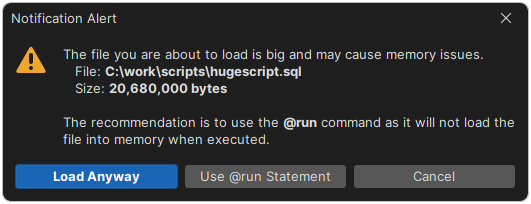
For the fastest way to execute large scripts, use the command-line interface instead.
Using @run and @cd
| Command | Description |
|---|---|
@run <file> [<variables>] | Execute the script in the file, optionally with values for its variables. |
@cd <directory> | Change the directory for the next @run commands. |
A relative path is resolved against the current directory. For a script that is opened from a file, this is the folder of the file. Otherwise, it is the working directory of DbVisualizer, usually the installation folder. The directory set by @cd only applies until the script ends, so use @cd and @run in the same execution.
@run createDB.sql;
@cd /tmp/scripts;
@cd monthly;
@run loadBackup.sql;
Here, createDB.sql is read from the current directory, and loadBackup.sql from /tmp/scripts/monthly.
To give values to variables in the script, add them after the file name:
@run monthlyReport ${month||2021-01-14||Date||noshow}$ ${dept||HR||String||noshow}$
Turning off preprocessing
Even with @run, the whole script is read before it runs: DbVisualizer looks for variables, parameter markers and commands that need permission, and counts the statements to show the progress. For a large script, this can use a lot of memory and take time, so DbVisualizer asks whether to skip it:
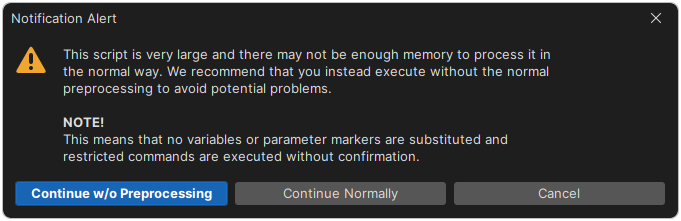
- Continue w/o Preprocessing executes each statement as it is read. Variables, parameter markers and permissions aren't handled. This is the safe choice for scripts of any size.
- Continue Normally reads the whole script first. Choose it only if DbVisualizer has enough memory, see Handling Memory Constraints.
Skipping the preprocessing is always faster. If your script doesn't use variables, parameter markers or permissions, you can turn it off for all scripts: clear Preprocess Script in SQL Commander → SQL Commander Options.