Using Parameter Markers
A parameter marker, also called a bind variable or placeholder, stands for a value in an SQL statement. When the statement is executed, the values are bound to the markers. Applications use them a lot, and DbVisualizer supports the common syntaxes, so that you can run the SQL from an application as it is. For more flexible variables that only DbVisualizer understands, see Using DbVisualizer Variables.
Use parameter markers only where the database allows them, usually for column values. Unlike DbVisualizer variables, they can't be used for table or column names.
Use only one kind of variable or marker in a script. If you mix DbVisualizer variables and parameter markers, or named and unnamed markers, you are only asked for the values of one kind, and the execution fails.
Named parameter markers
A named parameter marker has a name, which DbVisualizer shows when it asks for the value. It can't have a default value or a data type. Which syntaxes work depends on the database:
| Syntax | Spaces in the name |
|---|---|
:name | No |
&name | No |
:{name} | Yes |
:'name' | Yes |
INSERT INTO EMPLOYEES
  (EMPLOYEE_ID, FIRST_NAME, LAST_NAME, EMAIL, PHONE_NUMBER, HIRE_DATE,
   JOB_ID, SALARY, COMMISSION_PCT, MANAGER_ID, DEPARTMENT_ID)
VALUES
  (:EMPLOYEE_ID, :FIRST_NAME, :LAST_NAME, :EMAIL, :PHONE_NUMBER,
   :HIRE_DATE, :JOB_ID, :SALARY, :COMMISSION_PCT, :MANAGER_ID, :DEPARTMENT_ID);
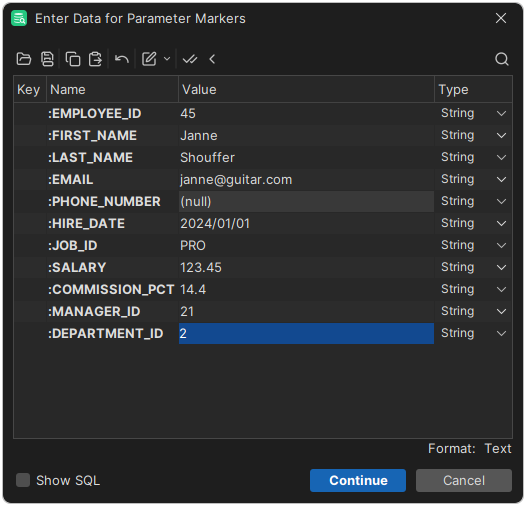
When you execute this, the markers are listed by name:
Unnamed parameter markers
An unnamed parameter marker is a question mark (?). Most databases support it, but you must count the question marks to know which value goes where. DbVisualizer lists them as Parameter1, Parameter2 and so on.
INSERT INTO EMPLOYEES
  (EMPLOYEE_ID, FIRST_NAME, LAST_NAME, EMAIL, PHONE_NUMBER, HIRE_DATE,
   JOB_ID, SALARY, COMMISSION_PCT, MANAGER_ID, DEPARTMENT_ID)
VALUES
  (?, ?, ?, ?, ?, ?, ?, ?, ?, ?, ?);
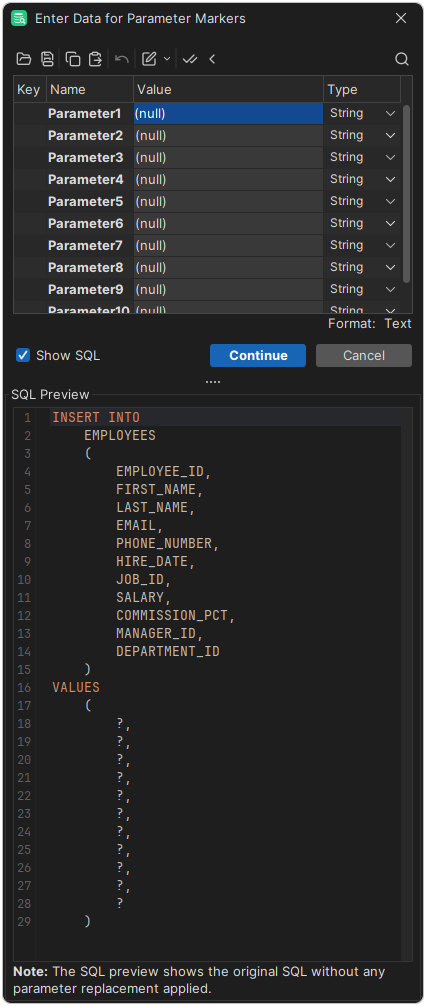
The SQL Preview shows the statement with the markers, not the values. Named and unnamed markers work the same way otherwise, so prefer named markers when the database supports them.
Entering the values
Parameter markers are only handled when SQL Commander → SQL Commander Options → Parameterized SQL is selected.
When you execute the SQL, a window asks for the values. Enter them, and press Ctrl+Enter (Cmd+Enter on macOS) to execute.
Each value has a Type. By default, it is String, and it changes when you enter a value, based on the value. To choose another type, click the type. Literal puts the value in the statement as text, instead of binding it.
Getting the types from the driver
Some drivers can tell which data types the markers have. To show those types in the window, select SQL Commander → SQL Commander Options → Get Parameter Types via JDBC.
This can make the execution much slower, since each statement in the script is first sent to the database to get the types.
Database support
Check the documentation of your database for the syntaxes it supports. If the database doesn't accept the way DbVisualizer uses named markers, for example when the same name is used twice in a statement, DbVisualizer uses the driver's view and lists the markers as Parameter1, Parameter2 and so on.